Court Filing Fax Service — For Courts That Accept Fax Filings
Fax motions, pleadings, and other court documents to courts that still permit fax filing. No fax machine, no account, no subscription—just upload, enter the court's fax number, and pay only if delivery succeeds.
Important: Always verify that your court accepts fax filings for your specific document, and check all deadlines, local rules, and formatting requirements before using any fax service.
When Courts Still Accept Fax Filings
Many courts have moved to e-filing systems, but some still accept or require fax filings in specific situations.
Common fax filing scenarios (where rules allow):
- Emergency motions or urgent applications when time is critical
- Courts without e-filing systems, especially smaller or rural courts
- Small claims, municipal, or traffic courts that accept faxed filings
- After-hours filings when the clerk's office is closed (if local rules permit)
- Backup submissions when an e-filing system is temporarily unavailable
Every court is different:
Always review your court's local rules and website—or contact the clerk's office—to confirm whether fax filings are allowed, and under what conditions.
Before You Fax a Court Filing
Faxing the document is only one part of proper filing. To avoid rejected filings, go through this checklist:
Confirm fax filing is allowed
- • Check the court's local rules and official website
- • Some courts accept fax only for specific document types or emergencies
- • Many courts prohibit fax filings entirely
Check deadlines and time zones
- • Confirm the exact filing deadline (date and time)
- • Account for the court's time zone and any delay in clerk processing
Confirm the correct fax number
- • Make sure you have the official court fax number for filings, not just a general office or chamber number
- • If in doubt, call the clerk's office to verify
Prepare a proper cover page
- • Court name
- • Case number
- • Party names
- • Document title (e.g., "Motion to Continue," "Complaint")
- • Your contact information
- • Total number of pages (including cover)
Some courts have specific cover sheet requirements—follow those rules.
Check if original documents are required
- • Many courts require you to mail or deliver originals after fax filing within a certain timeframe
- • Make a note of any follow-up requirements
Important: OneFaxNow is a fax delivery tool, not a law firm. This page is not legal advice. You are responsible for complying with all court rules, deadlines, and filing requirements.
How to Fax Court Documents with OneFaxNow
Prepare your filing
- • Draft your document (motion, complaint, notice, etc.) in your word processor
- • Export or scan to a legible PDF, or use DOCX, TXT, JPG/JPEG, PNG, or TIF/TIFF
- • Confirm formatting, signatures, and page numbering comply with the court's rules
Add or prepare your cover page
Create a cover page with court name, case number, party names, document title, your contact information, and total pages. OneFaxNow can generate one for you, or upload your own.
Upload your documents
- • Go to Pay-Per-Fax and upload your cover sheet and filing
- • Upload multiple files; we merge them in your chosen order
- • Limits: 20 MB per file, 50 pages total
Enter the court's fax number
Enter the official court fax number you verified. We support U.S. & Canada only. We auto-format the number for you.
Pay only if delivery succeeds
Pricing starts at $3.50 for 1–10 pages and $5.00 for 11–50 pages.
We authorize at checkout and capture only if delivery succeeds. If all retries fail, you pay $0.
Track transmission and save confirmation
Watch real-time progress on your Fax Status page. If the court's line is busy, we retry up to 3 times. Save your email confirmation and status page as part of your filing record.
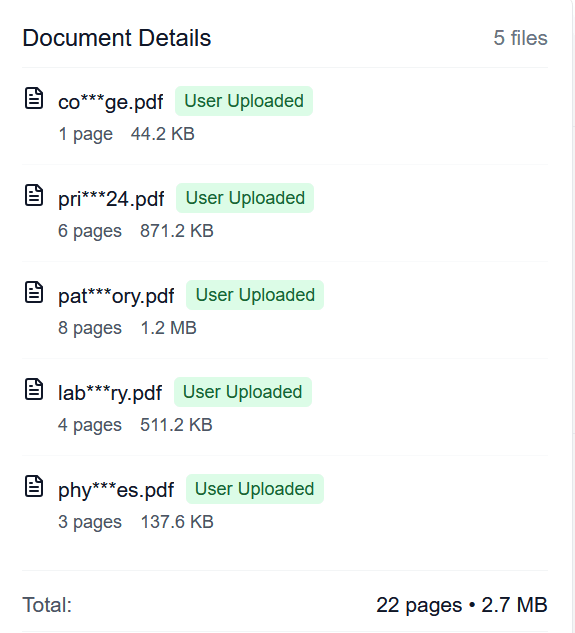
Verify your files before sending
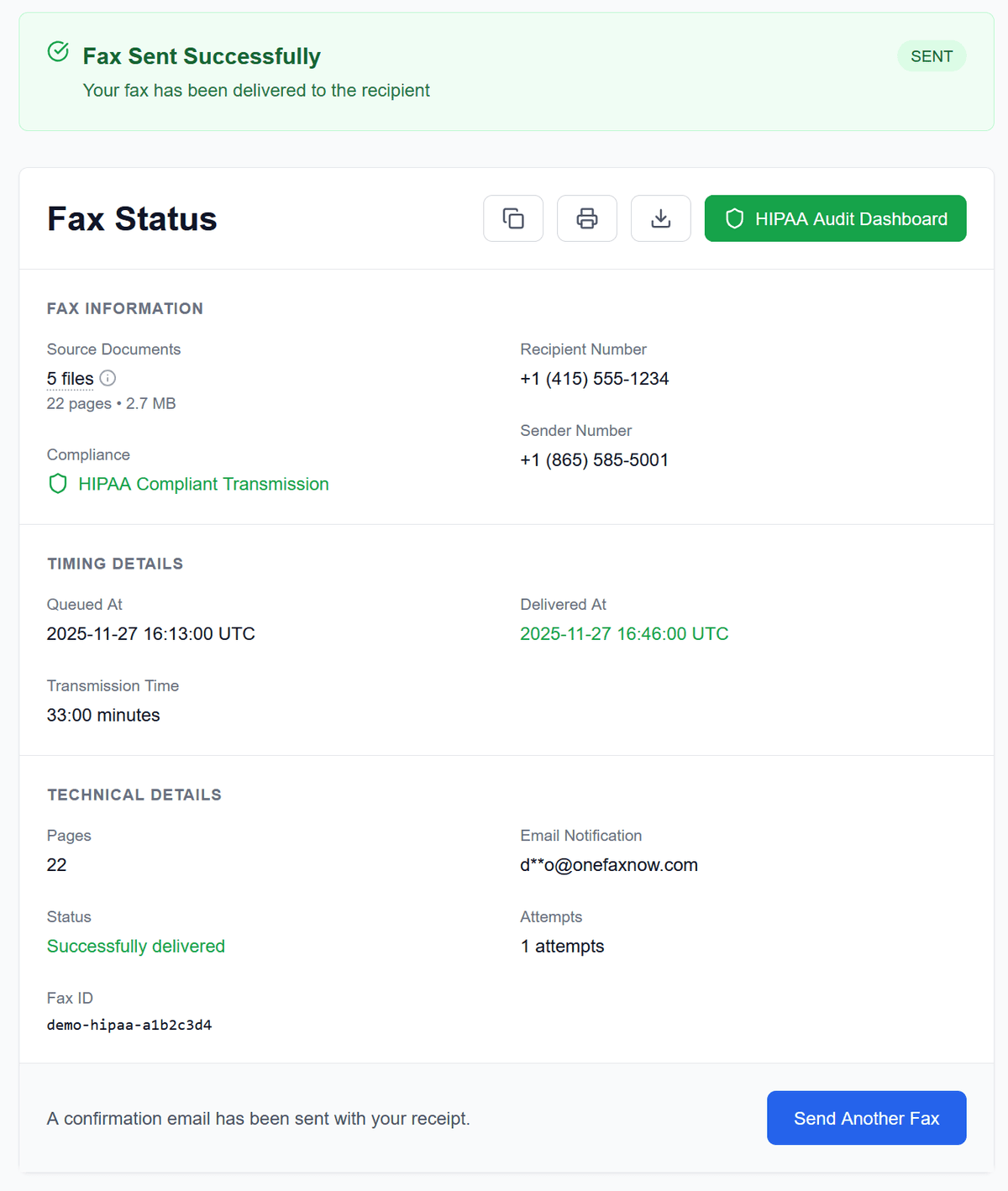
Confirmation of successful delivery
Why Use OneFaxNow for Court Faxing (Where Allowed)
No account or subscription
Perfect for occasional court filings or emergency motions. No need for a monthly fax plan just to meet a single deadline.
Pay only on successful delivery
Your card (or Apple Pay/Google Pay) is authorized at checkout. If all attempts to deliver the fax fail, you're never charged.
Real-time tracking & confirmation
See exactly when your fax is dialing, sending, and completing. Receive an email confirmation after successful delivery to use in your records.
Automatic retries when lines are busy
If the court's fax line is busy or temporarily unavailable, OneFaxNow automatically retries up to three times. You can watch each attempt on the status page.
Secure document handling
Documents are transmitted over encrypted channels. Files are kept only as long as needed to complete delivery and are then deleted according to our retention policies.
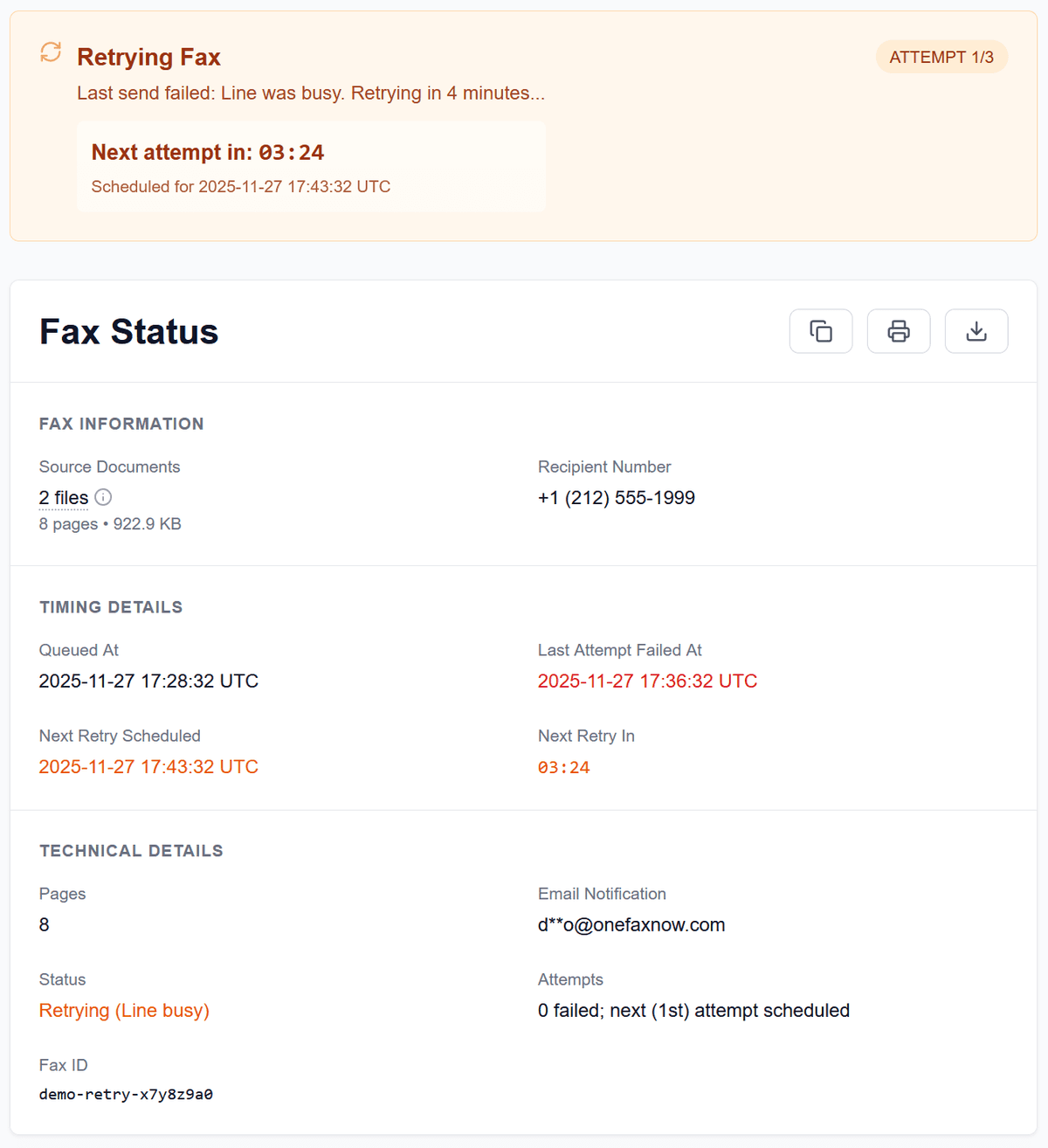
If the court's line is busy, we automatically retry with countdown timers.
Again, OneFaxNow confirms fax delivery—it cannot guarantee the court will accept a filing as "filed" under their rules. Always follow local requirements.
Court Filing Fax Pricing
Most court filings fit within our standard pricing tiers.
Lite Court Fax
1–10 pages
Ideal for short motions, notices, or letters to the court
Standard Court Fax
11–50 pages
For longer briefs, exhibits, or combined filings
- U.S. & Canada fax numbers only
- Cover page counts toward total page count
- Pay only on successful delivery
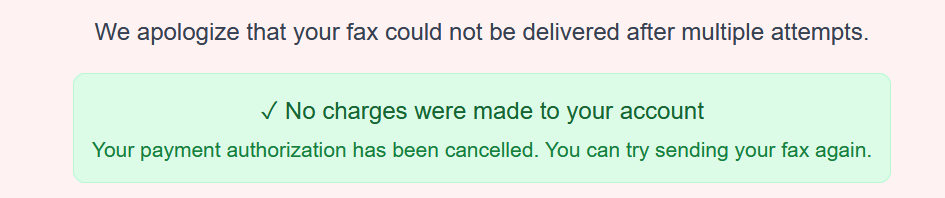
If delivery fails after all retries, you pay nothing.
Filing Court Documents That Include Medical Records or PHI?
Some court filings—especially in injury, disability, or certain family law cases—may include medical records or other PHI as exhibits.
If your filing includes PHI:
- You may choose to enable HIPAA Mode for stricter handling and additional compliance documentation
HIPAA Mode provides:
- Encrypted transmission and storage while processed
- Automatic PHI file deletion after completion with audit logs
- A Business Associate Agreement (BAA) and a HIPAA Audit Dashboard for your records
For most routine court filings that don't contain medical information, Standard Pay-Per-Fax is sufficient. If you're not sure, talk with your attorney and consider whether HIPAA-grade handling is appropriate.
Court Filing Fax Questions
How do I know if a court accepts fax filings?
Check the court's local rules, official website, or call the clerk's office. Some courts accept fax filings only for specific document types or emergencies; others prohibit fax filings entirely. You must confirm acceptability with the court before using any fax service.
What should I include in my cover page?
A typical court fax cover page includes:
- • Court name and division
- • Case number and party names
- • Document title (e.g., "Motion to Continue")
- • Your name, firm (if any), and contact information
- • Total number of pages (including the cover page)
Some courts have their own cover sheet requirements—if they do, always use those.
What if my filing deadline is today?
OneFaxNow starts transmission immediately and automatically retries if the line is busy. However, we cannot guarantee that your fax will be delivered or accepted as "filed" by the deadline. Always leave extra time, follow your court's rules, and consider backup options (in-person filing, e-filing, or other methods allowed by the court).
Do I need to follow up with original documents?
Many courts require you to mail or deliver originals or certified copies within a certain timeframe after fax filing, even if fax is permitted. Check your local court rules; OneFaxNow does not handle mailing of originals.
Will the court treat my fax as officially filed?
That depends entirely on the court's rules and whether you followed them. OneFaxNow's role is limited to transmitting your fax to the number you provide and giving you delivery status. Only the court can determine whether a fax is accepted as a proper filing.
Do I need an account or subscription for court faxing?
No. OneFaxNow is designed for one-time, pay-per-fax usage. There are no accounts or subscriptions required—just upload, send, and track.
Ready to Fax Court Documents (Where Permitted)?
If your court allows fax filings, OneFaxNow makes it simple to send documents online with real-time tracking and pay-per-fax pricing.