Insurance Claims & Medical Document Fax Service
Fax insurance claims, supporting medical records, and healthcare documents to insurers and administrators in minutes. No fax machine, no account, no subscription. Enable HIPAA Mode for PHI to get a HIPAA-compliant pipeline with instant BAA and audit logs.
When Faxing Insurance Claims & Medical Documents Still Makes Sense
Even with portals and uploads, many insurers and administrators still accept or expect faxed documents:
Common situations:
- Health insurance claims and supplemental documentation
- Workers' compensation claims and medical reports
- Short- and long-term disability claims
- Auto insurance claims involving medical treatment
- Appeals and grievances, especially with supporting records
- Benefits verification forms with PHI
- Provider credentialing packets that include sensitive information
Faxing is often used when:
- The insurer's portal is limited, unreliable, or doesn't accept certain document types
- A dedicated fax number is listed on the claim form or provider manual
- You want a fax transmission record alongside portal submissions or mail
Always check your carrier's instructions. Some insurers require portal uploads or specific forms; others publish fax numbers for claims and supporting documentation.
Standard vs HIPAA Mode — Which Should I Use?
Many insurance-related documents contain protected health information (PHI). When they do, you should use HIPAA Mode.
Use HIPAA Mode when your documents include PHI
Examples:
- Claim forms that list diagnoses, treatments, or medications
- Medical records supporting a claim (clinic notes, labs, imaging)
- Disability or workers' compensation documentation with clinical details
- Prior authorization forms and appeal packets
- Any document that includes identifiable medical information
With HIPAA Mode ON, you get:
- HIPAA-compliant transmission
- Instant BAA at checkout for covered entities/business associates
- Access to a HIPAA Audit Dashboard with detailed, exportable logs
- Automatic PHI file deletion after completion with audit logging
When Standard Pay-Per-Fax is usually enough
Standard mode can be fine when:
- The fax includes no medical details or PHI, like:
- •A generic claim correspondence letter without diagnosis/treatment info
- •Simple administrative forms with only contact details
- The recipient does not require HIPAA-level handling
If you're unsure whether a document is PHI, it's safer to treat it as PHI and use HIPAA Mode.
How to Fax Insurance Claims & Medical Documents with OneFaxNow
Prepare your claim packet
- • Fill out the insurer's claim or appeal form
- • Gather all required documentation: medical records, treatment summaries, operative reports, labs, imaging reports
- • Include disability forms, employer statements, or police reports (for auto)
- • Ensure everything is signed and legible
Upload your documents
- • Supported: PDF, DOCX, TXT, JPG/JPEG, PNG, TIF/TIFF
- • Up to 20 MB per file and 50 pages total
- • Upload multiple files (claim form + records + letters); we merge them in your order
Enable HIPAA Mode for PHI
If your packet includes medical information or other PHI, toggle HIPAA Mode ON. This provides stricter PHI handling, instant BAA, and access to the HIPAA Audit Dashboard.
Enter the insurer's fax number
Enter the exact fax number provided on the claim form, provider portal, or manual. We support U.S. & Canada only. The number is automatically formatted as you type.
Pay only if delivery succeeds
Standard pricing from $3.50 (1–10 pages) or $5.00 (11–50 pages). HIPAA Mode adds $3 (Lite) or $5 (Standard).
We authorize at checkout and only capture if delivery succeeds.
Track status and keep proof
Watch your fax send in real time on your Fax Status page. If busy, we retry up to 3 times. Keep your email confirmation and, in HIPAA Mode, your audit logs as proof of submission.
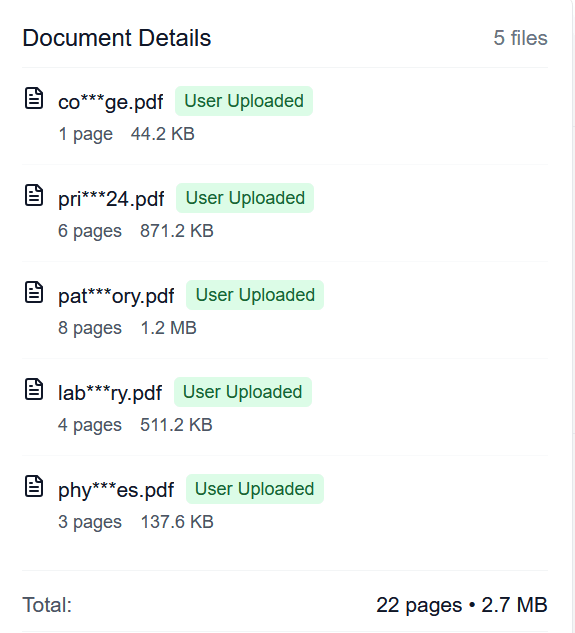
Verify your claim documents before sending
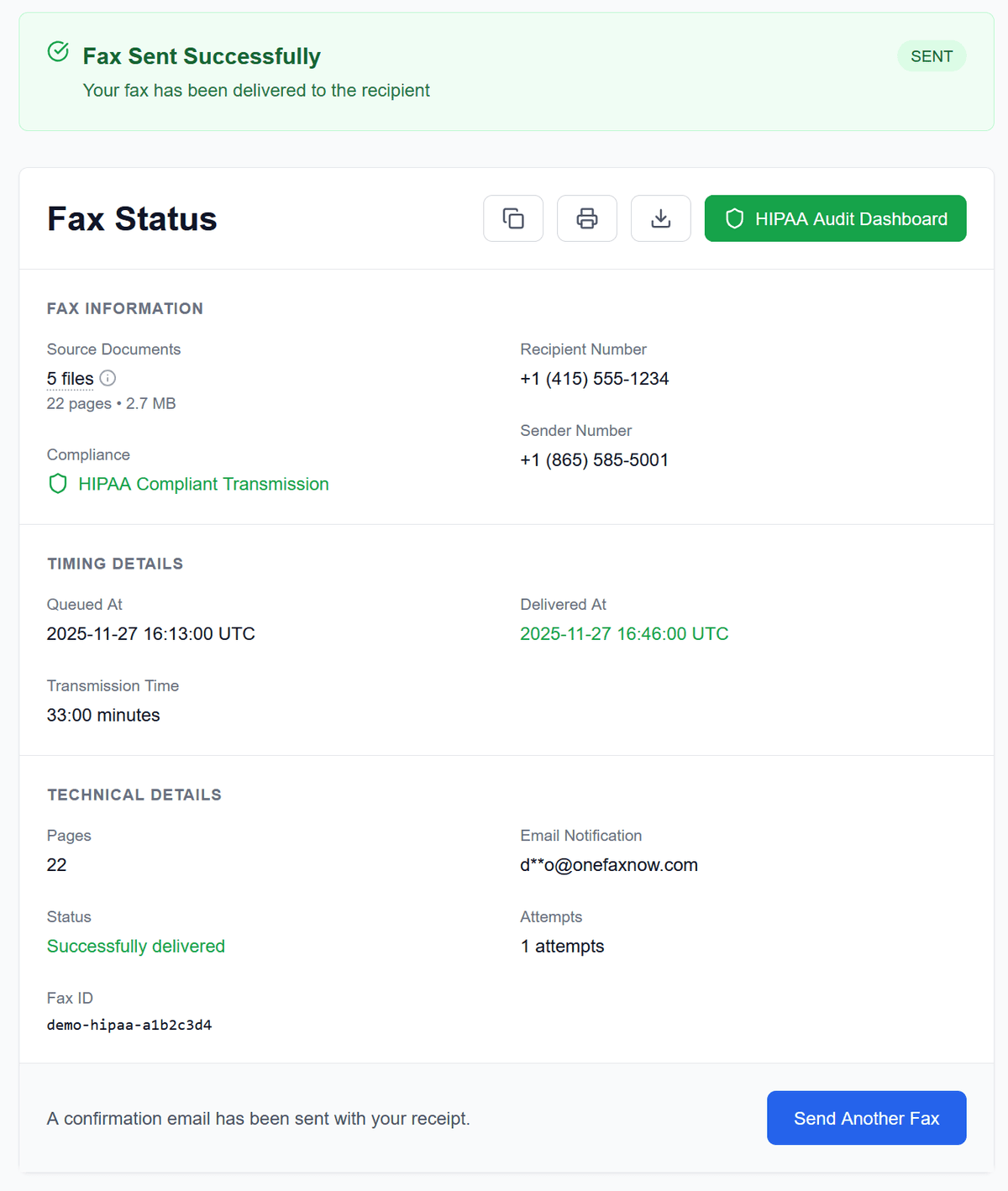
Confirmation of successful delivery
For Patients, Clinics, and Billing Teams
Patients & caregivers
- Fax claim forms and medical records directly to your insurance carrier.
- Use HIPAA Mode for any documentation that includes diagnoses or treatment details.
- Keep your confirmation email and status page for your own records or appeals.
Clinics & allied health
- Send claims, encounter documentation, and supporting medical records to payers.
- Fax prior auth packets, appeals, and benefit verification forms.
- Use HIPAA Mode for instant BAA, HIPAA Audit Dashboard, and exportable logs.
Billing & revenue cycle
- Use OneFaxNow as a pay-per-fax option for edge cases and low-volume workflows.
- Avoid provisioning separate fax lines or subscriptions for occasional claim packets.
- Attach proof of fax delivery and logs to your claim notes.
Pricing for Insurance Claims & Medical Documents
Most claim and medical document packets fall within our standard tiers.
Standard Pay-Per-Fax (non-HIPAA)
Lite: 1–10 pages
Standard: 11–50 pages
- Pay only on successful delivery
- Best for admin-only documents without PHI
HIPAA Mode
Recommended for PHILite HIPAA Fax: 1–10 pages
Standard HIPAA Fax: 11–50 pages
- Pay only on successful delivery
- Includes instant BAA, audit dashboard, PHI deletion
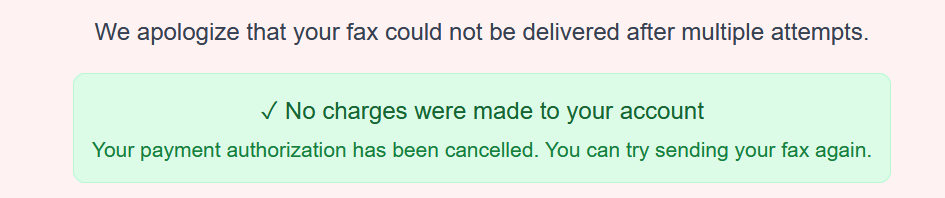
If delivery fails after all retries, you pay nothing.
Cover pages count toward your total page count. Full details on Pricing and HIPAA Fax.
Security & Compliance for Insurance & Medical Faxing
When insurance documents include PHI, you need both secure handling and proof.
With HIPAA Mode enabled:
Instant BAA
A fully executed Business Associate Agreement is generated at checkout. Download it with your receipt for your compliance files.
HIPAA Audit Dashboard
See a complete event history: created, sent, retried, completed. Export logs as CSV or PDF for audits, payers, or internal records.
Encrypted transmission & secure deletion
Encrypted in transit and at rest while processed. PHI files are automatically deleted after completion with immutable logs.
No account required
Access your HIPAA dashboard through secure, time-limited email links—no usernames or passwords to manage.
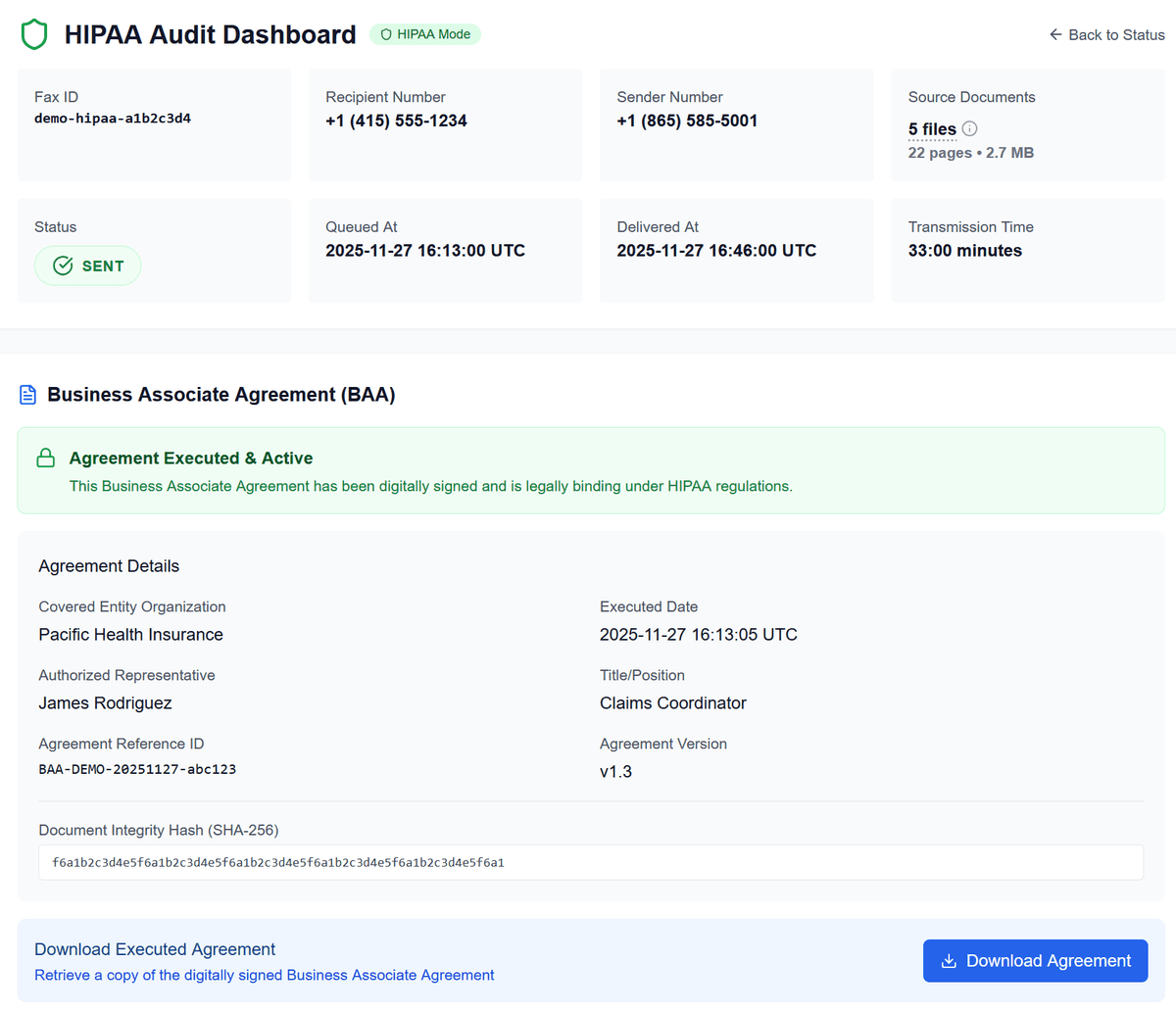
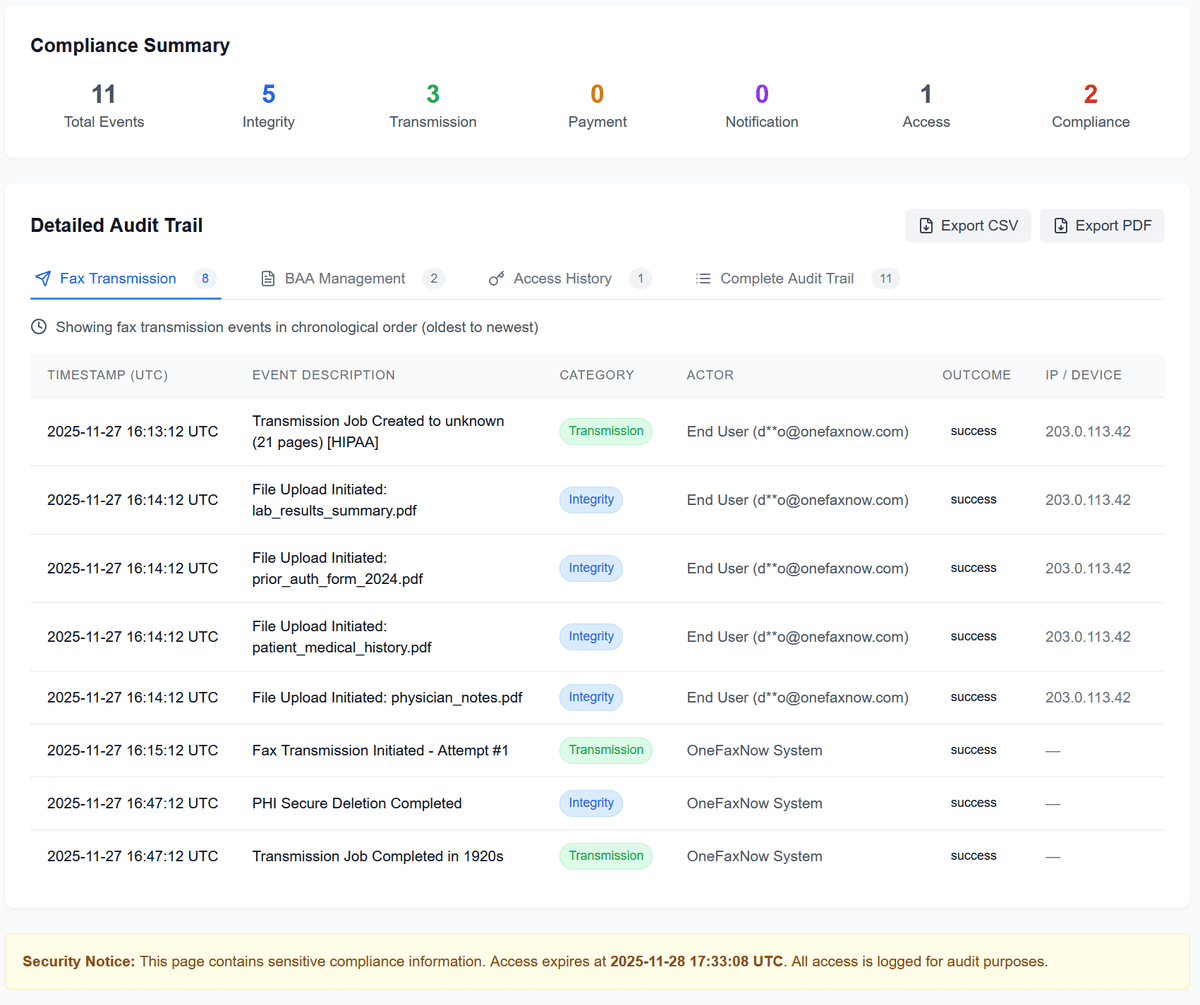
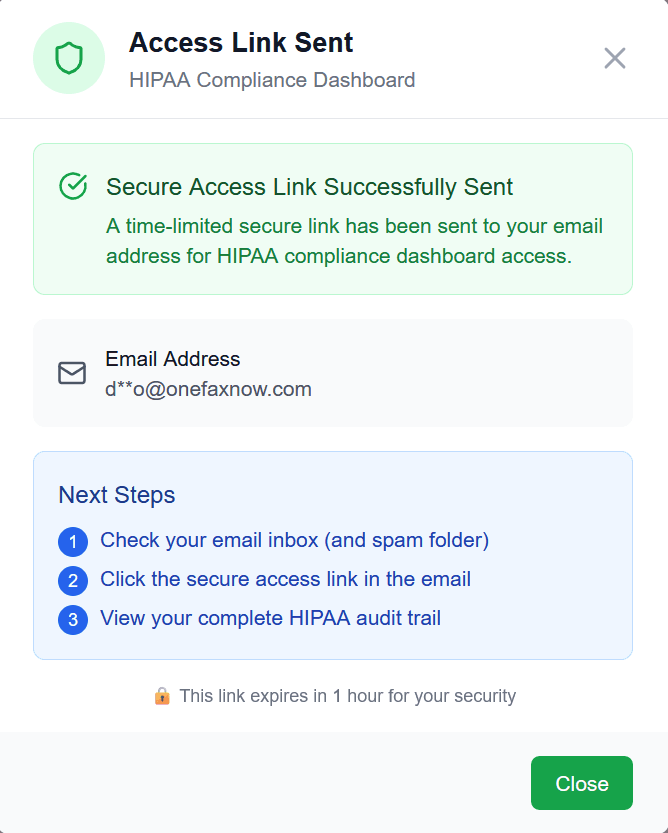
Secure, time-limited email links to your HIPAA dashboard
For non-PHI insurance documents, Standard Pay-Per-Fax still uses encrypted transmission and automatic deletion after delivery, just without the HIPAA-specific BAA and audit dashboard.
Insurance & Medical Fax Questions
Do all insurance faxes have to be HIPAA faxes?
Not necessarily. If your fax includes PHI (medical details, diagnoses, treatment information, etc.), you should use HIPAA Mode. For purely administrative documents without PHI, Standard Pay-Per-Fax is usually sufficient. When in doubt, treat it as PHI and use HIPAA Mode.
What is a Business Associate Agreement (BAA)?
A BAA is a HIPAA-required contract between covered entities/business associates and vendors who handle PHI on their behalf. When you use HIPAA Mode, OneFaxNow generates and executes a BAA instantly during checkout so you don't need a separate onboarding process.
How is PHI handled securely?
In HIPAA Mode, PHI documents are transmitted over encrypted channels and encrypted at rest while processed, then automatically deleted after completion with audit logging. We keep status metadata, receipts, and audit logs—not the underlying PHI files.
Can I access my HIPAA audit trail later?
Yes. Every HIPAA fax includes access to the HIPAA Audit Dashboard, where you can view detailed logs and export audit reports as CSV or PDF. These exports can be attached to your compliance records or payer documentation.
What happens if the insurer's fax line is busy?
OneFaxNow automatically retries up to three times if the fax line is busy or temporarily unavailable. You can watch each attempt on your Fax Status page. If all attempts fail, your payment authorization is released and you're not charged.
Do I need an account to use HIPAA Mode?
No. OneFaxNow is designed for one-time faxes without accounts or subscriptions. You can enable HIPAA Mode during checkout and still access your HIPAA dashboard via secure email links.
Ready to Fax Insurance Claims or Medical Documents?
Upload your claims, medical records, or healthcare documents, enable HIPAA Mode for PHI, and send them securely to any U.S. or Canada fax number—no fax machine or subscription required.