How to Fax a Document from Yahoo Mail
Yahoo Mail has no built-in fax feature — and neither does any email provider. Download your attachment, upload it to OneFaxNow, and your fax is delivered in minutes. No account, no add-on, no email-to-fax gateway.
Can Yahoo Mail send a fax? No — but the workaround takes 5 minutes
Yahoo Mail is an email service with 225 million users worldwide. Faxes travel over phone lines. Yahoo has never included a fax feature, and no amount of account upgrades will add one.
Most "fax from Yahoo Mail" guides tell you to sign up for an email-to-fax gateway like eFax or Fax.Plus, compose a specially formatted email (e.g., 12125551234@efaxsend.com), and pay a monthly subscription. That approach works, but it requires creating an account, learning a special address format, and paying $8.99 to $18.99 per month — all for a single fax.
The faster approach: download the attachment from Yahoo Mail, open OneFaxNow.com, upload the file, and send. No account, no add-on, no subscription. Done in under 5 minutes.
What you'll need
Yahoo Mail attachment
PDF, DOCX, JPG, or other file
Browser or phone
Any device with internet
Fax number
U.S. or Canada number
Payment
Card, Apple Pay, or Google Pay
Step-by-step: fax a Yahoo Mail attachment
Open Yahoo Mail and find your document
Log in to Yahoo Mail on your computer or phone. Open the email that contains the document you need to fax.
Look for the attachment at the bottom of the email. Yahoo Mail lets you preview PDFs, images, and Office documents directly before downloading.
Download the attachment
Hover over the attachment and click the download arrow icon. On the Yahoo Mail app for Android, tap the attachment at the bottom of the email, then tap download. On iPhone, touch and hold the attached file and tap "Save to File."
The file saves to your Downloads folder (or your phone's Files app). Supported types: PDF, DOCX, JPG, PNG, TIFF, and TXT.
Tip: If the document is in the body of the email (not an attachment), select the text, paste it into a document editor, and export as PDF. Then download that PDF.
Open OneFaxNow and upload the file
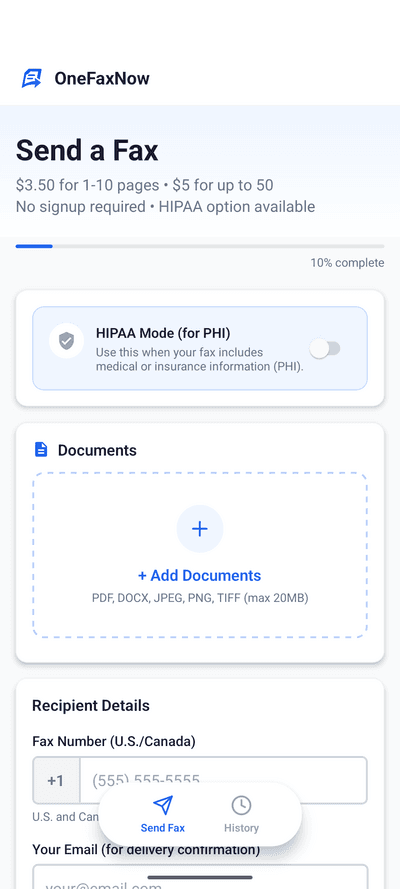
Open a new browser tab and go to OneFaxNow.com. Tap "Send a Fax" to open the fax form. No account creation, no sign-up required.
Click "Choose Files" or drag and drop the file you just downloaded from Yahoo Mail. You can upload up to 15 files and 50 pages per fax.
Enter the fax number and your email
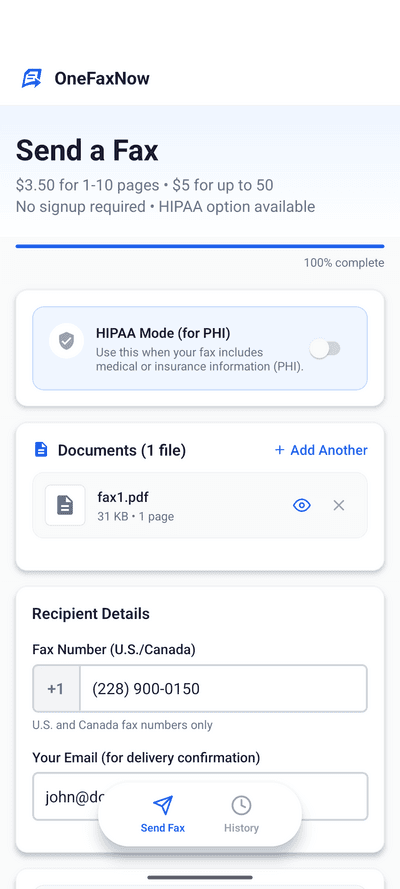
Type the recipient's U.S. or Canada fax number. The form auto-formats as you type — just enter the digits.
Enter your email address to receive a delivery confirmation when the fax goes through.
Optional: toggle "Add Cover Page" to include sender/recipient details and a message on the first page of your fax.
Pay and send
Review your fax details — number, page count, and price — then tap "Pay & Send".
Pay with Apple Pay, Google Pay, or a credit/debit card. Your payment is authorized but not charged until the fax is delivered successfully.
Pay-on-success guarantee: If the fax fails after 3 automatic retries, the authorization is released and you're never charged.
Track your delivery
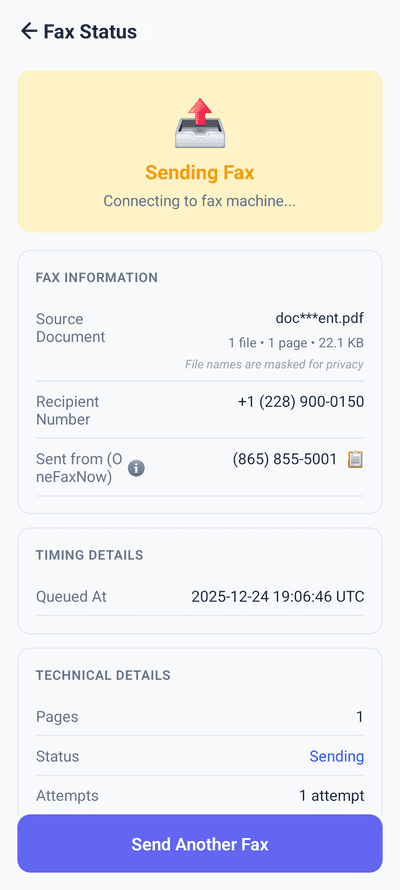
After payment, you'll see a live status page that updates in real time: Sending → Delivered.
- Watch transmission progress live
- Automatic retries if the line is busy (up to 3 attempts)
- Email confirmation when delivery is complete
Using an AT&T, AOL, or Verizon email? This works for you too
Yahoo hosts email for several legacy ISP domains, including att.net, aol.com, sbcglobal.net, bellsouth.net, and verizon.net. If your inbox is powered by Yahoo's infrastructure, the process above works exactly the same.
Download your attachment from whichever Yahoo-hosted inbox you use, upload it to OneFaxNow, and send. Your email provider does not matter — OneFaxNow works with any browser on any device.
OneFaxNow vs. email-to-fax gateways
Email-to-fax services ask you to set up an account and learn a special email format. Here is how the two approaches compare for a one-time fax.
| Feature | Email-to-Fax Gateway | OneFaxNow |
|---|---|---|
| Account required | Create account, verify email, pick plan | No account needed |
| Subscription | $8.99-$18.99/mo minimum | Pay per fax: $3.50 for 1-10 pages |
| Setup time | 5-15 min (account + email format) | Under 2 min (upload, number, pay) |
| Email format | faxnumber@efaxsend.com | Enter number in a form field |
| HIPAA option | Enterprise tier ($25+/mo) | $6.50/fax with instant BAA |
| Delivery tracking | Email confirmation (may take hours) | Real-time status page |
| Cover page | Subject line = title, body = message | Full sender/recipient fields |
| Failure handling | Varies by provider | 3 auto-retries, pay only on success |
| File types | PDF, DOCX (varies) | PDF, DOCX, JPG, PNG, TIFF, TXT |
| File limits | Varies (often 1-5 per email) | 15 files, 50 pages, 20MB each |
Need to fax medical documents from Yahoo Mail?
Yahoo Mail is not HIPAA compliant. It does not offer encryption at rest, audit logging, or Business Associate Agreements. If you route a medical document through an email-to-fax gateway, the email leg of the journey is unprotected.
OneFaxNow's direct upload bypasses email entirely. Your document goes straight from your device to the fax network — never through an email server.
Encrypted transmission
From upload to delivery
Automatic deletion
All documents deleted after faxing
Full audit trail
For compliance documentation
Instant BAA
No paperwork, no wait
$6.50 for 1-10 pages | $10.00 for 11-50 pages
Send a HIPAA FaxYahoo Mail tips for faster faxing
Preview before downloading
Yahoo Mail shows inline previews for PDFs and images. Confirm you have the right document before downloading — it saves time if the email thread has multiple attachments.
Multiple attachments? Download all
If the email has several attachments, download each one separately. Then upload all of them to OneFaxNow in a single fax — up to 15 files per fax.
Medical or legal docs?
If your Yahoo Mail attachment contains protected health information, toggle HIPAA mode before sending. You get encrypted transmission, auto-deletion, and an instant BAA.
On your phone?
Download the attachment from the Yahoo Mail app, then open OneFaxNow.com in your mobile browser. Or use the OneFaxNow app: iPhone guide | Android guide.
Why OneFaxNow instead of an email-to-fax gateway
Faster than a gateway
Email-to-fax services require account creation, plan selection, and learning a special email format. OneFaxNow: open, upload, send.
No subscription
Pay $3.50 for up to 10 pages. No monthly fee, no credit packs, no auto-renewals to cancel later.
Under 5 minutes
Download from Yahoo Mail, upload to OneFaxNow, enter the number, pay, done. Most faxes deliver within 60 seconds.
Simple pricing
Lite
1-10 pages
$3.50
$3.99 via iOS app
HIPAA add-on: +$3
Standard
11-50 pages
$5.00
$5.99 via iOS app
HIPAA add-on: +$5
Pay only on successful delivery. Authorization released on failure.
Frequently asked questions
Can Yahoo Mail send a fax directly?
No. Yahoo Mail is an email service with no built-in fax feature. Yahoo has never offered fax functionality, and no account upgrade or add-on will add it. To fax from Yahoo Mail, download your attachment and upload it to an online fax service like OneFaxNow. No account or Yahoo add-on required.
Do I need to install a Yahoo Mail add-on to fax?
Not with OneFaxNow. Some guides suggest email-to-fax gateways that require account setup and a special email format (e.g., 12125551234@efaxsend.com). OneFaxNow works differently: download the file from Yahoo Mail, upload it at OneFaxNow.com, and send. No add-ons, no extensions, no special email syntax.
Can I fax from my AT&T, AOL, or Verizon email address?
Yes. Yahoo hosts email for att.net, aol.com, sbcglobal.net, bellsouth.net, and verizon.net domains. Download the attachment from your Yahoo-powered inbox and upload it to OneFaxNow. The process is identical regardless of your email domain.
Is it HIPAA-compliant to fax from Yahoo Mail?
Yahoo Mail is not HIPAA compliant — it offers no BAA, no encryption at rest, and no audit logs. Email-to-fax gateways route documents through email servers, creating compliance gaps for PHI. OneFaxNow's direct upload bypasses email entirely. Toggle HIPAA mode for encrypted transmission, auto-deletion, full audit logs, and an instant Business Associate Agreement.
What file types from Yahoo Mail can I fax?
Any file you can download from Yahoo Mail can be faxed through OneFaxNow: PDF, DOCX, JPG, PNG, TIFF, and TXT. You can upload up to 15 files and 50 pages per fax, with a 20MB limit per file.
How much does it cost to fax from Yahoo Mail?
OneFaxNow charges $3.50 for 1-10 pages or $5.00 for 11-50 pages. HIPAA faxes are $6.50 or $10.00. There is no subscription, no per-page fee, and no charge if the fax fails to deliver.
Can I fax from the Yahoo Mail mobile app?
Yes. Open the Yahoo Mail app on iPhone or Android, download the attachment, then open OneFaxNow.com in your mobile browser. Upload the file, enter the fax number, pay, and send. You can also use the OneFaxNow app from the App Store or Google Play.
More email and device faxing guides
Fax from Gmail
Fax a document you received in Gmail
Fax from Outlook
Send a fax from Outlook by uploading your attachment
Fax a PDF
How to fax any PDF document online
Fax from iPhone
Step-by-step guide to faxing from your iPhone
Fax from Android
Send a fax from your Android phone
All How-To Guides
Guides for every device, software, and file type
Ready to fax your Yahoo Mail attachment?
No account. No subscription. No email-to-fax gateway. Upload your document and fax it in under 5 minutes.