Cover Page Templates for Legal Faxes (Court, Counsel, and Carriers)
Practical guide to legal fax cover pages for courts, opposing counsel, and insurers—what to include, templates, confidentiality notices, and best practices.
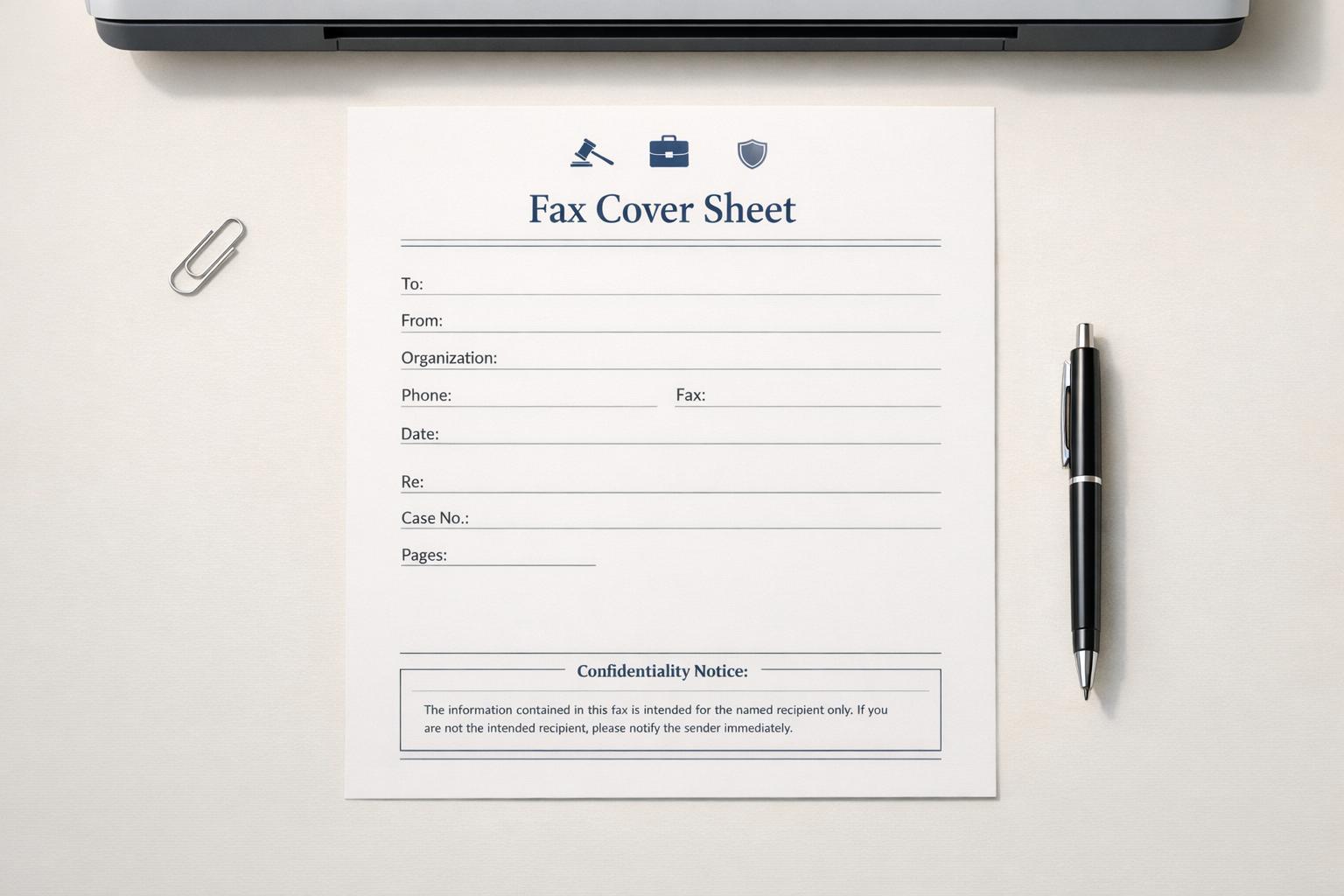
Cover Page Templates for Legal Faxes (Court, Counsel, and Carriers)
Legal fax cover pages are essential for ensuring documents are delivered accurately, securely, and on time. Whether you're filing with a court, corresponding with opposing counsel, or submitting claims to an insurance carrier, a well-crafted cover page helps prevent errors, missed deadlines, and confidentiality breaches. Here's what every legal fax cover sheet should include:
- Sender and recipient details: Full names, contact information, and, for legal filings, State Bar numbers.
- Case information: Case name, number, and relevant context (e.g., Plaintiff vs. Defendant).
- Transmission details: Total page count, date, and time of sending.
- Confidentiality notice: A disclaimer to protect sensitive information.
Each situation - court filings, attorney communications, or insurance claims - may require specific details. For example, courts often mandate standardized forms, while insurance carriers need claim numbers and policy details. Always verify recipient requirements before sending.
To simplify the process, use pre-designed templates tailored to each purpose. Tools like PDF editors or online fax services can help you customize and save templates for reuse. Double-check the recipient's fax number, confirm the total pages, and keep proof of transmission for your records.
For occasional fax needs, services like OneFaxNow offer pay-per-fax options with features like automatic retries and real-time tracking, ensuring your documents are delivered securely and efficiently.
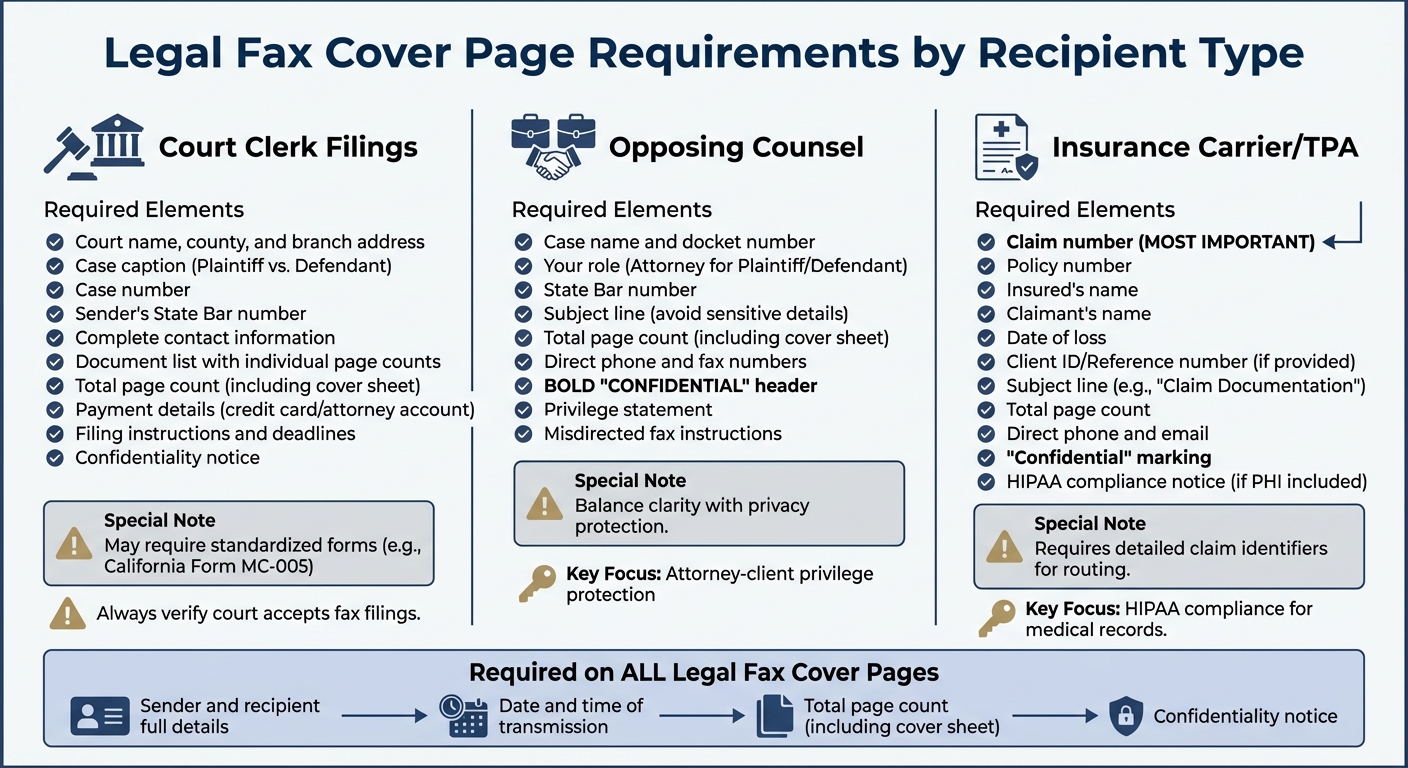
Legal Fax Cover Page Requirements: Court vs Counsel vs Insurance Carrier
What to Include on Every Legal Fax Cover Page
A legal fax cover page should include sender and recipient details, transmission information, and a confidentiality notice. These elements help ensure accurate delivery and create a clear record of the communication.
Sender and Recipient Information
Start by listing the sender's full details: name, law firm, address, phone number, fax number, and, if relevant for court filings, your State Bar number [2]. Then, include the recipient's information - name, organization (and department if applicable), and their phone and fax numbers [2]. For legal documents, also add the case name (formatted as Plaintiff/Petitioner vs. Defendant/Respondent) and the case number [2].
This section ensures the fax reaches the correct person and helps identify the context of the communication.
Transmission Details
Clearly state the date, time, and total number of pages being sent (including the cover sheet). This is crucial for confirming that the entire document was transmitted [3][4]. For example, if the cover page specifies "5 pages" but the recipient only receives four, it immediately flags a problem.
If the filing involves a payment, include processing instructions, such as credit card authorization or attorney account numbers, directly on the cover page [2].
Confidentiality Notice
End with a clear confidentiality disclaimer. For example, you can include a simple "Confidential" notice, and for healthcare-related faxes, such as faxing medical records, add a HIPAA compliance statement [4][5].
Avoid putting detailed sensitive information on the cover page, as it is often visible to anyone near the receiving fax machine. While the disclaimer provides a layer of protection, it does not guarantee absolute legal security.
sbb-itb-0df24da
Template 1: Fax to Court Clerk
When sending legal documents to a court clerk via fax, it’s crucial to include all the necessary details to ensure proper handling and filing. Court-specific fax cover pages often require additional fields to meet filing requirements. For instance, in California, Form MC-005 is the standard, while Nebraska mandates a uniform cover sheet approved by the Supreme Court [2][3].
Required Fields for Court Filings
Your fax cover page should clearly display the court name, county, and branch address at the top. Follow this with the case caption, formatted as Plaintiff/Petitioner vs. Defendant/Respondent, and the case number [2]. Additionally, provide your complete contact information and your State Bar number if applicable [3].
Be sure to list each document being sent along with its respective page count [2]. Then, include the total number of pages in the entire fax [3][5]. If required, add payment details, such as a credit card number or attorney account number, to cover any filing fees [2].
Filing Instructions
Include clear instructions for the clerk, such as the filing order or any urgent deadlines (e.g., an upcoming hearing date) [2]. This step helps ensure the clerk processes your submission accurately and without unnecessary delays.
By adhering to these guidelines, you can streamline the filing process and avoid potential issues with your court documents.
Check Court Fax Policies First
Before using this template, double-check your court’s fax policies. Some courts now require e-filing or have specific rules about fax submissions [7]. Confirm that the court still accepts fax filings and verify the correct fax number for the intended branch or department [7]. Sending documents to an incorrect or outdated number could result in missed deadlines.
"If you are filing documents in a court by fax, tell the court what documents you are filing and how you are paying the filing fees." - California Courts [1]
For added convenience, you might consider using OneFaxNow's court fax service. They offer real-time tracking, automatic retries for busy lines, and success-only billing, meaning you only pay if your fax is successfully delivered.
Template 2: Fax to Opposing Counsel
When sending a fax to opposing counsel, the cover page plays a key role in directing documents properly and maintaining confidentiality. Unlike court filings, communication between attorneys requires a careful balance of clarity and privacy.
Case and Party Information
Always include the case name (e.g., Plaintiff vs. Defendant) and the cause or docket number. Clearly state your role as "Attorney for Plaintiff" or "Attorney for Defendant" to ensure the fax is routed correctly within the receiving firm’s case files. Adding your State Bar number is also important to confirm your professional credentials [2].
Subject Line and Page Count
Use a subject line that is clear but avoids revealing sensitive details, such as "Settlement Offer", "Demand Letter", or "Discovery Request." This helps the recipient prioritize the fax appropriately. Additionally, specify the total page count, including the cover sheet, so the recipient can confirm that all pages were received [4][6].
"A single missing page in a legal contract could change the document's meaning." - MyFax [6]
After listing the page count, include a confidentiality notice to safeguard the document’s contents.
Confidentiality and Privilege Notice
Begin your cover page with a bold "CONFIDENTIAL" header to immediately highlight the sensitive nature of the fax [6]. For communications with opposing counsel, this ensures quick identification and provides clear instructions for handling misdirected faxes. Include a notice requesting recipients to notify you immediately and destroy the documents if received in error [6]. Add a formal privilege statement, such as:
"This fax contains confidential information intended solely for the individual or entity named above. Unauthorized disclosure, copying, or distribution is prohibited." - MyFax [6]
Keep case details minimal to avoid unnecessary exposure before the fax is delivered [4].
For added assurance, you might consider using services like OneFaxNow's legal correspondence service. Features like real-time tracking, automatic retries, and pay only on successful delivery make it a dependable choice for ensuring your fax reaches opposing counsel securely and efficiently.
Template 3: Fax to Insurance Carrier or TPA
When sending claim documentation to insurance carriers or third-party administrators (TPAs), it's essential to include specific identifiers on your fax cover page. These details help ensure your documents are routed and processed correctly within the carrier's systems. Unlike court filings or attorney correspondence, insurance faxes require more detailed claim information to avoid delays.
Claim and Policy Details
The claim number is the most important piece of information - it’s what allows the carrier to match your fax with their records. Be sure to also include the policy number, the insured’s name, and the claimant’s name. Adding the date of loss is equally critical, as it helps confirm the coverage timeline and can be necessary to meet legal requirements.
Make sure all information is clear and easy to read. If the carrier has provided a "Client ID" or "Reference Number", include it as well to speed up their internal tracking process. Mark the cover sheet as "Confidential" to highlight the presence of sensitive information, such as Protected Health Information (PHI), which is often included in insurance claims.
Providing these details ensures the carrier can process your claim without unnecessary delays.
Subject and Sender Information
After listing the core claim details, make sure the subject line and sender information are clear and concise. Use a subject line like "Claim Documentation" or "Medical Records for Claim #12345" to immediately clarify the purpose of the fax. You can also add a brief note or specific instructions, such as "Prior authorization request - response needed by 02/15/2026", to provide further context.
Include the total number of pages in the fax for verification purposes, and don’t forget to add your direct phone number and email address. This allows the carrier to contact you quickly if they need clarification or additional information.
If your fax contains PHI, such as medical records or referrals, make sure to use a HIPAA-compliant fax service. For example, OneFaxNow offers a pay-per-fax service with features like a HIPAA add-on, instant Business Associate Agreement (BAA) execution, real-time tracking, and automatic retries. These tools ensure secure and efficient delivery, giving you peace of mind that your documentation reaches its destination without issues.
How to Create and Customize Your Cover Page
Using Templates and Tools
Creating a professional cover page can be streamlined using text editors or PDF tools. For instance, if you're dealing with fillable PDF templates like California's Form MC-005 for court filings, you'll need a PDF editor such as Adobe Acrobat. This allows you to input case-specific details while maintaining the official format [10][5][2].
Many online fax services come with built-in templates. Platforms like MyFax and Onebox enable you to customize cover pages directly through their web interfaces. These services often let you save contact information for future use, making the process even more efficient [5][9]. For those who prefer mobile solutions, several apps provide template libraries and integrated scanners, making it easy to create and attach cover pages on the go.
Once you've chosen your tool, you can add branding elements for a polished, professional appearance.
Customizing Layout and Branding
Incorporating your firm's logo into the header of your cover page is a simple way to create a professional and branded look. Pair this with clean, readable fonts and a straightforward design to ensure your message is clear [10][5]. You can also include permanent details - like your firm’s name, address, phone number, and fax number - directly in the header. By saving this as a master template, you’ll only need to update recipient and case-specific details each time you send a fax [5].
"A printable fax cover template can be downloaded in Word or PDF format and printed. Just add your logo, edit the fields and fill in custom details before you send your fax." – MyFax [5]
Once your cover page design is complete, make sure to save it in a way that allows for quick and easy reuse.
Saving Templates for Reuse
To stay organized and save time, follow these tips for managing your cover page templates:
- Group templates by recipient type, such as Courts, Opposing Counsel, or Insurance carriers.
- Store files in a dedicated drive or use cloud storage for easy access [5][10].
- Configure online fax services to automatically attach a default cover page [9].
- When sending a fax via email or an online service, ensure the cover page is the first attachment so it appears as the opening page of the document [5].
Best Practices for Sending Legal Faxes
Follow these steps to ensure your legal faxes meet compliance standards and are efficiently tracked and delivered.
Cover Page Positioning and Proof of Transmission
Always place the cover page as the first page of your fax. Courts require this for proper routing and maintaining confidentiality[3]. Double-check the total page count. For instance, if you're sending a 12-page motion along with a cover sheet, the total should read "13 pages." Mismatched page counts could signal transmission issues[10]. Keep all proof of transmission - such as confirmation emails, timestamps, and delivery logs - on file for future audits[8].
Delivery Timing and Verification
After setting up the cover page, focus on timing and recipient verification to ensure your fax reaches the right destination. Confirm the recipient's fax number to avoid sending documents to the wrong party. Send during standard business hours, as most faxes are delivered within 1–3 minutes[8]. If you're close to a filing deadline, send your fax early in the day to allow for any troubleshooting. Also, check whether the court you're faxing to accepts fax filings, as many federal courts now require electronic submissions instead[7].
Using Online Fax Services
Online fax services can add an extra layer of reliability and security to your transmissions. For occasional faxing needs, platforms like OneFaxNow let you pay-per-fax vs. subscription services without needing an account and only charge if the delivery is successful[8]. Many services also include automatic retry features, attempting delivery multiple times (e.g., at 3, 6, and 12-minute intervals) if the recipient's line is busy[8]. When transmitting sensitive documents, such as those containing protected health information, enable HIPAA mode for secure encryption, detailed audit logs, and instant Business Associate Agreement (BAA) execution[7]. Features like real-time tracking links and email confirmations can also provide the documentation you need for legal filings or correspondence.
Conclusion and Next Steps
A well-prepared cover page ensures your faxes are sent to the right place, protects sensitive information, and creates an essential audit trail. As Comfax puts it, "Fax cover sheets keep your faxes accurate, professional-looking, and secure" [10]. Whether you're filing documents with a court clerk, communicating with opposing counsel, or submitting claims to an insurance carrier, the templates mentioned earlier provide a solid starting point for routing documents effectively while maintaining a polished appearance.
Take the time to tailor your cover page to meet the specific needs of your fax. Whether you're dealing with court filings, legal correspondence, or insurance claims, select a template that fits the purpose, add your firm's branding, double-check the recipient's fax number, and confirm the total page count - including the cover sheet - for accuracy.
If you only need to fax occasionally, OneFaxNow offers a pay-per-fax option with no subscription required. You simply pay upon successful delivery, with automatic retries included [8]. For transmitting medical records or documents containing protected health information, HIPAA mode ensures end-to-end encryption, audit logs, and instant Business Associate Agreement (BAA) execution for compliance [7][8].
Whether you're managing court filings (where allowed) or legal correspondence, having a structured cover page and a dependable fax service can help you meet deadlines with confidence. Use these strategies to simplify your legal faxing process.
Send a Fax Online - No Account Required
FAQs
What information should be included on a legal fax cover page?
A legal fax cover page serves as a critical tool for ensuring that your fax is properly routed, identified, and documented. It should include the following key details:
- Case Information: Include the case caption, case number, and any relevant hearing or filing dates to clearly identify the legal matter at hand.
- Document Description: Provide a brief description of the documents you're sending, such as pleadings, motions, or correspondence.
- Sender and Recipient Information: List the names, contact details, and fax numbers of both the sender and the recipient to confirm delivery.
- Page Count: Specify the total number of pages being sent, including the cover page, so the recipient can verify completeness.
- Additional Notes: Add confidentiality statements or specific instructions, like payment authorizations for filing fees, if applicable.
By including these elements, you help ensure your fax is delivered to the right place and meets the necessary legal documentation standards.
How can I make sure my legal fax is sent to the right recipient?
To make sure your legal fax lands in the right hands, always include a detailed and precise cover page. For court filings, be sure to list essential details like the case caption, case number, document type, hearing date, deadline, total page count, and your contact information. These details help ensure the court clerk or department can process and route your fax without delays.
If you're faxing to opposing counsel or an insurance carrier, include identifying information such as the case name, cause number, party names, and a clear subject line (e.g., Settlement Offer). For insurance matters, don’t forget to add the claim number, policy number, and date of loss. A well-organized cover sheet not only minimizes the risk of misrouting but also acts as proof of transmission - something you’ll want to have in legal situations.
Using a standardized or personalized cover page with all the necessary details ensures your fax reaches the right recipient and is properly acknowledged.
What are the advantages of using OneFaxNow for sending legal faxes?
OneFaxNow offers a range of advantages designed specifically for legal professionals. For starters, it streamlines the faxing process by eliminating the need to create an account or install any software. This means you can send faxes quickly and easily. The service supports multiple file formats, such as PDFs and Word documents, and allows up to 50 pages per fax, making it suitable for most legal document needs.
Another key benefit is its pay-per-fax pricing model. You’re only charged for faxes that are successfully delivered, with no subscriptions or hidden fees to worry about. The service includes features like real-time delivery updates, automatic retries for busy lines, and optional HIPAA compliance with instant BAA execution. These features ensure secure and reliable communication, which is essential when dealing with sensitive legal materials.
By combining simplicity, cost transparency, and security, OneFaxNow stands out as a practical and trustworthy solution for legal professionals, whether part of a larger team or working independently.