How Lawyers Use Fax as a Backup When E-Filing Systems Go Down
Lawyers rely on fax and online fax services as court-approved backups to meet filing deadlines, preserve proof, and handle e-filing outages securely.
How Lawyers Use Fax as a Backup When E-Filing Systems Go Down
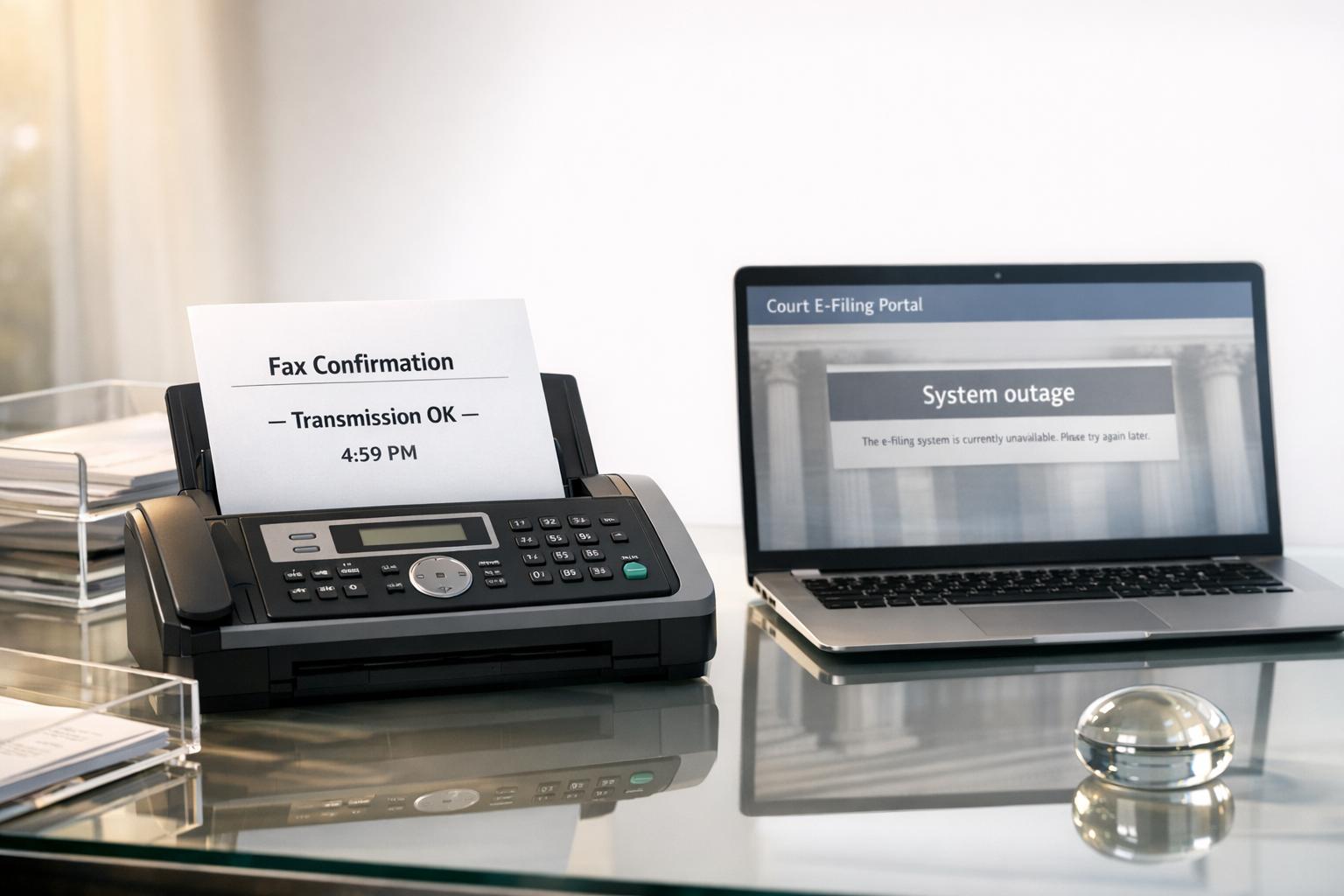
When e-filing systems fail, lawyers turn to fax as a reliable backup to meet court deadlines. Fax provides proof of filing attempts, which is critical for protecting clients' rights during outages. Courts often accept fax filings under specific rules, making it a dependable alternative when digital platforms experience disruptions.
Key Points:
- E-filing outages happen due to maintenance, cyberattacks, or technical failures.
- Fax is court-approved for emergencies, offering transmission records as evidence.
- Jurisdiction rules vary: Some courts allow direct fax filing, while others require intermediaries or manual submissions.
- Preparation is crucial: Lawyers should know local fax rules, keep a ready-to-send packet, and document all filing attempts.
- Online fax services simplify the process, offering secure, pay-per-fax options without requiring a physical machine.
Fax remains an essential tool for legal professionals, ensuring deadlines are met even during unpredictable technical issues.
When Lawyers Need Fax as a Backup
Meeting Filing Deadlines During Outages
When system failures collide with critical deadlines, fax often becomes a lifeline for meeting filing requirements. For instance, if the court's electronic filing system (CM/ECF) goes offline, lawyers may need to file essential case documents - like complaints, notices of appeal, or objections to discharge - via fax to protect their clients' legal rights [3]. Missing these deadlines can lead to irreversible consequences, such as the loss of a claim or appeal rights.
Courts distinguish between technical failures on their end versus issues on the filer’s side. If the court's system is down, lawyers can often document their filing attempt and submit the necessary documents the next business day to avoid penalties [6]. However, problems like office internet outages or equipment failures are rarely accepted as valid excuses for late filings [6]. This is why courts establish specific backup protocols for fax filings, ensuring deadlines can still be met even during digital disruptions.
Courts with Fax-If-Portal-Down Rules
Rules for fax filings vary widely depending on the jurisdiction. In Indiana, for example, some state courts allow direct fax filings if the local judge has authorized it through a posted local rule, though certain limitations apply [7]. California takes a different approach: its trial courts require attorneys to use a fax filing agency. These agencies act as intermediaries, receiving the fax and physically delivering it to the court clerk. In this process, documents must include the phrase "By fax" directly beneath the title [4].
On the other hand, New Hampshire circuit courts do not accept fax filings at all [6]. Similarly, the U.S. Bankruptcy Court for the Central District of California prefers manual filings at the court clerk's window during system outages, particularly for time-sensitive matters [3]. Since fax filing rules vary so much, it’s crucial to check the specific requirements for your jurisdiction by consulting official court websites or procedural guidelines. These rules highlight the importance of fax as a reliable backup when digital systems fail.
When Your Office Internet Goes Down
If your office internet crashes just hours before a filing deadline, quick thinking is essential. Courts typically don’t accept technical issues on the attorney’s side as a valid reason for late filings [6]. In such situations, online fax services can be a game-changer.
With online faxing, you can send documents from a mobile device using cellular data or from any location with Wi-Fi. This flexibility is particularly crucial for urgent filings, such as requesting a Temporary Restraining Order (TRO) or establishing jurisdiction for a preliminary injunction. When the e-filing portal is down, fax ensures that these critical documents are submitted on time [3]. This adaptability underscores why fax remains an indispensable tool for legal professionals navigating filing deadlines in unpredictable circumstances.
How to Prepare for E-Filing Failures
Know Your Court's Fax Filing Rules
Plan ahead by familiarizing yourself with your court's fax filing rules. These can vary widely depending on the jurisdiction, and what’s acceptable in one court might be prohibited in another. Start by confirming whether judges in your area allow fax filing. Look for posted local rules and check if a specific fax number has been designated for submissions [7]. Some courts have strict page limits - for instance, certain jurisdictions in Indiana only allow 10 pages per fax, including the cover sheet [7].
Pay close attention to required notations and fee structures. For example, California courts require the phrase "By fax" to be placed directly under the document title [4]. Meanwhile, the U.S. Bankruptcy Court for the Central District of California mandates marking documents with "NOT YET FILED DUE TO AN OUTAGE" in the upper right corner during system downtime [3]. Also, check if your court requires pre-payment or charges additional fees - Indiana counties, for instance, may charge up to $10.00 per transmission [7].
Once you’ve reviewed the rules, start putting together your fax packet.
Build a Ready-to-Send Fax Packet
Get your documents ready in advance. Convert all necessary filings into PDF or TIFF formats [8]. Create a compliant cover sheet template that includes essential details like the document title, case number, total page count, your contact information, filing instructions, and a signature line [7]. In California courts, attorneys are required to use the official Facsimile Transmission Cover Sheet (Fax Filing) (form MC-005) as the first page of their submission [2].
"Any document sent to the Clerk of the Circuit Court by electronic facsimile transmission shall be accompanied by a cover sheet which states the title of the document, case number, number of pages, identity and voice telephone number of the sending party and instructions for filing." - Indiana Administrative Rules [7]
Make sure to include payment details - credit or debit card information - on the cover sheet to handle any filing fees [2]. Keep an updated list of court fax numbers for various departments and maintain a service list with fax numbers for all parties who have agreed to accept fax service [5].
Once your packet is ready, focus on documenting every step of the process.
Keep Records of Filing Attempts
Document every filing attempt meticulously. Configure your fax service to automatically generate and save delivery receipts for each transmission [7]. If you haven't selected a provider yet, compare the best online fax services to find one with reliable tracking features. In Indiana, you’re required to keep both the original document and the transmission log for the duration of the litigation [7].
If you’re switching to fax because of an e-filing system failure, record evidence of the outage. Take screenshots of error messages or save any "Outage" notification emails from the court [3]. These records can prove your timely filing attempt if the court later questions your submission. If your fax doesn’t go through or isn’t processed, this documentation will support a nunc pro tunc (retroactive) filing order. Be sure to include the transmission record and a formal declaration when making such a motion [2].
"A party filing by fax must cause the transmitting fax machine to print a transmission record of each filing by fax." - California Rules of Court [2]
How to Send a Fax Online Without a Fax Machine
What to Look for in an Online Fax Service
If you only need to send a fax occasionally - like for emergency legal filings - a pay-per-fax service is your best bet. This way, you only pay when you actually use the service. Make sure the service can handle multi-page documents, as many court systems have a file size limit of 35 megabytes [1]. These features are crucial, especially during e-filing outages when reliability is key.
Security is another critical factor, particularly when dealing with sensitive court documents. Look for services that offer AES 256-bit encryption to protect your data. If you're sending files with private client information, ensure the service meets HIPAA fax requirements to maintain confidentiality. Delivery confirmation is also vital - you’ll want automated proof of transmission that courts will accept. Services that provide real-time tracking links and email confirmations can save you from potential headaches if technical issues arise.
Steps to Send a Fax Online
Once you’ve chosen the right service, sending a fax online is pretty straightforward.
Start by preparing your document. Use the "print to PDF" option to flatten the file. This ensures that signatures remain visible and reduces the chance of upload errors.
"A document is flattened by using a 'print to PDF' command feature. DO NOT use a 'save to PDF' command as this will not flatten a document."
– United States Bankruptcy Court, Northern District of California [1]
After that, upload and send your fax. Most services follow a similar process: log into the service’s web dashboard (or use an email-to-fax option), enter the court’s fax number (including the area code), attach your flattened PDF, and include the required cover sheet specified by your jurisdiction. Within minutes, you should receive a delivery confirmation email with a transmission record for your files.
Now, let’s dive into why OneFaxNow is a great choice for court filings.
Why OneFaxNow Works for Court Filings
When e-filing systems go down, OneFaxNow ensures your court filings stay on schedule. It offers a pay-per-fax option with no need for an account or subscription. You can upload your document (up to 50 pages) and pay via Stripe - $3.50 for 1–10 pages and $5.00 for 11–50 pages. For added security, you can enable HIPAA mode for an additional $3.00 (Lite) or $5.00 (Standard), which includes stricter handling, audit logging, and instant BAA generation through your dashboard.
OneFaxNow also addresses the need for proof of filing. Each fax generates a job ID and tracking link sent directly to your email, providing a timestamped confirmation that courts require. The service automatically retries failed transmissions up to three times, and you’re only charged once the fax is successfully delivered. Plus, the entire process can be handled from your mobile device, making it convenient even during remote work situations.
For more information, check out OneFaxNow's court fax guide or explore their pay-per-fax pricing options.
Disclaimer: This article offers general information about fax filing procedures and does not constitute legal advice. Always confirm your court’s specific rules, fax numbers, and filing requirements before submitting any documents.
sbb-itb-0df24da
Online Fax Service Comparison for Legal Use
Online Fax Services Comparison for Legal Professionals
Feature and Pricing Comparison Table
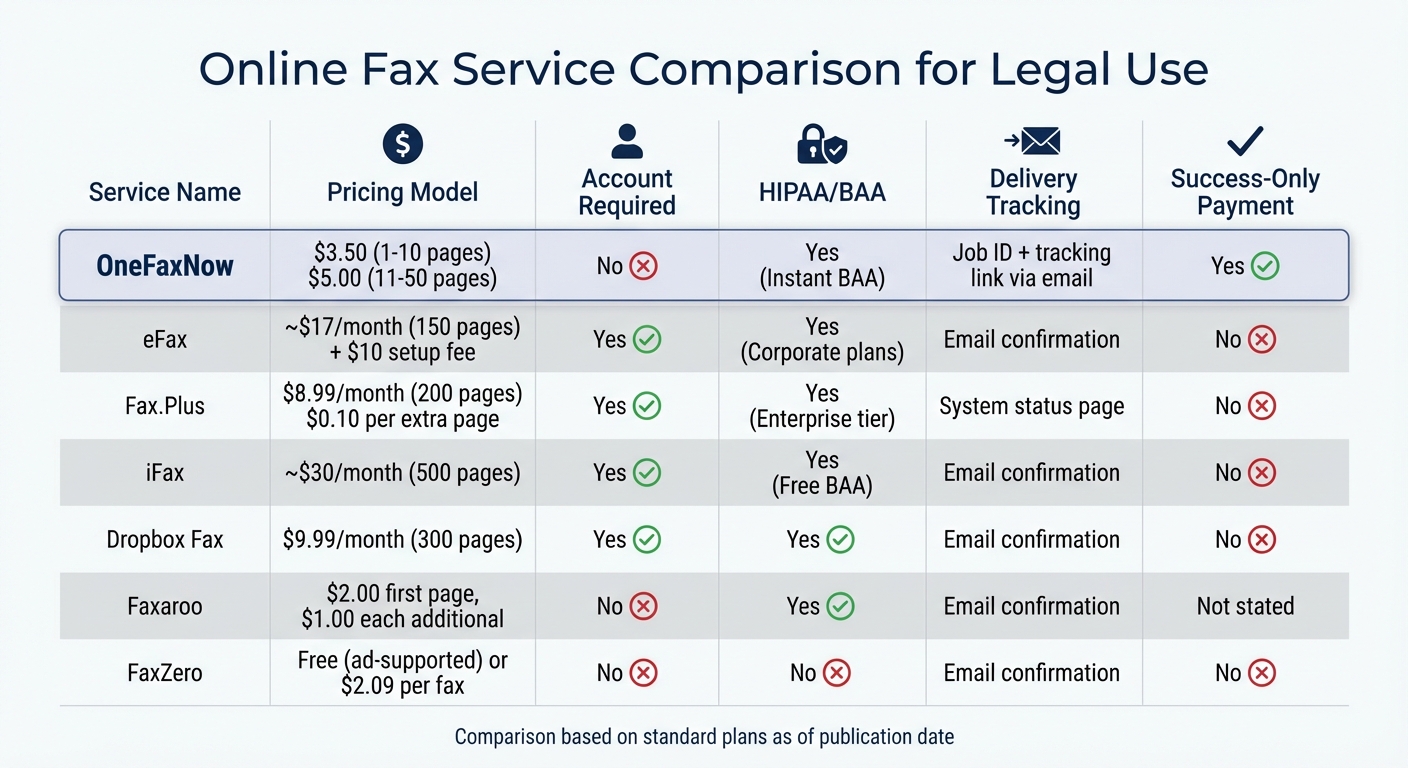
Faxing remains a critical backup for legal professionals when e-filing systems fail. Selecting the right fax service for court filings means carefully evaluating pricing structures and features. Some providers require monthly subscriptions with fixed page limits, while others offer pay-as-you-go options. For legal work, it's crucial to ensure the service is HIPAA-compliant and provides a Business Associate Agreement (BAA) if you're handling sensitive client data.
Here's a quick comparison of popular fax services for legal use:
| Service | Pricing Model | Account Required | HIPAA/BAA | Delivery Tracking (Job ID & Email) | Success-Only Payment |
|---|---|---|---|---|---|
| OneFaxNow | Pay-per-fax: $3.50 (1–10 pages), $5.00 (11–50 pages) | No | Yes (Instant BAA) | Job ID + tracking link via email | Yes |
| eFax | Subscription: ~$17/month (150 pages); $10 setup fee | Yes | Yes (Corporate plans) | Email confirmation | No |
| Fax.Plus | Subscription: $8.99/month (200 pages); $0.10 per extra page | Yes | Yes (Enterprise tier) | System status page | No |
| iFax | Subscription: ~$30/month (500 pages) | Yes | Yes (Free BAA) | Email confirmation | No |
| Dropbox Fax | Subscription: $9.99/month (300 pages) | Yes | Yes | Email confirmation | No |
| Faxaroo | Pay-per-fax: $2.00 first page, $1.00 each additional | No | Yes | Email confirmation | Not publicly stated |
| FaxZero | Free (ad-supported) or $2.09 per fax | No | No | Email confirmation | No |
For instance, eFax charges a $10 activation fee on top of its monthly subscription [9]. Meanwhile, pay-per-fax services like OneFaxNow and Faxaroo only charge when you send a document, making them more flexible for occasional use.
Why OneFaxNow Is Better for Lawyers
OneFaxNow stands out for legal professionals due to its success-only payment model and instant HIPAA compliance. This service is designed to minimize risks, especially during emergency filings. With its success-only payment model, you're only charged if your fax successfully reaches its destination. The system retries up to three times automatically and provides proof of delivery with a job ID and tracking link via email - critical evidence for timely court filings when e-filing systems are down.
Another advantage is instant BAA generation. Unlike subscription services that require enterprise plans for HIPAA compliance, OneFaxNow lets you generate a BAA directly from your dashboard for an additional $3.00 (Lite) or $5.00 (Standard). This process is quick, with no waiting periods or sales calls. You can enable HIPAA mode, execute the BAA, and send your fax within minutes.
For more details, check out OneFaxNow's court fax guide and pay-per-fax pricing. It’s clear why OneFaxNow is a go-to option for legal faxing during e-filing outages.
Conclusion
Key Points to Remember
As outlined earlier, being prepared with a solid backup plan is essential when digital filing systems fail. E-filing platforms can experience outages, and if your internet connection goes down, you’ll need a reliable alternative to meet crucial deadlines. Courts often enforce strict filing deadlines regardless of technical issues, and judges may lack the authority to waive these deadlines due to system failures [3]. This makes having a backup method not just helpful, but essential for safeguarding your clients' interests [3][10].
Preparation is critical. Familiarize yourself with your court's fax filing rules before an emergency arises. For example, California trial courts have specific provisions (like Rule 2.303) that permit fax filings through agencies acting as intermediaries to physically deliver documents to the court [4]. Keep a list of court fax numbers, emergency filing procedures, and a pre-prepared fax packet ready to go. Additionally, always retain transmission logs as evidence of timely filing [2][7].
Data security is equally important. Using tools with AES-256 encryption and multi-factor authentication (MFA) can help protect sensitive information during emergency filings [11]. With data breaches affecting around 26% of law firms in 2023, and human error accounting for roughly 90% of these incidents, prioritizing secure filing methods is non-negotiable [11].
Try OneFaxNow for Your Next Court Filing
If you're looking for a dependable backup solution, OneFaxNow offers a fast and efficient way to handle court filings. There's no need for an account, subscription, or even a fax machine. Simply upload your document, enter the court's fax number, and send - it takes about 60 seconds. You'll receive a job ID and tracking link via email, giving you the proof you need for timely filing.
With a success-only payment model, you're only charged if your fax is successfully delivered. For sensitive client data, you can enable HIPAA mode and instantly generate a Business Associate Agreement (BAA) from your dashboard - no delays or sales calls required. Pricing is straightforward: $3.50 for 1–10 pages or $5.00 for 11–50 pages. This fast, secure, and audit-friendly option ensures you're prepared when you need it most. Visit OneFaxNow's court fax guide and pay-per-fax pricing for more details.
Send a Fax Online - No Account Required
Learn About HIPAA-Compliant Faxing
Disclaimer: This article is for informational purposes only and does not constitute legal advice. Always confirm your local court's rules and emergency filing procedures before relying on fax as a backup method.
FAQs
What are the rules for fax filing in different courts across the U.S.?
Fax filing rules can differ widely depending on the jurisdiction, as they're shaped by each court's local procedures. Take California, for instance - courts there may allow fax filings, but only if local rules explicitly permit it. Typically, these filings require a specific fax number, a cover sheet, and the inclusion of the phrase "By fax" on the document. Another option is to use a fax filing agency, but this requires making prior arrangements.
In Indiana, certain counties allow fax filings under their local rules, though they often come with restrictions. For example, some counties limit transmissions to a maximum of ten pages. Additionally, filers must keep the original document and the transmission log for the entire duration of the case. Meanwhile, jurisdictions like the Western District of Washington provide alternative filing procedures during system outages, though fax-specific guidelines are usually determined by local agreements.
To ensure compliance and avoid complications, legal professionals should carefully review the specific filing requirements for each court. This includes understanding formatting rules, page limits, and any necessary documentation, such as transmission logs or cover sheets.
What steps should lawyers take to ensure their fax filings are accepted by the court?
To make sure fax filings are accepted, lawyers need to first verify that the court permits fax submissions and carefully follow any specific procedures required by that jurisdiction. Many courts ask for a cover sheet that indicates the filing was sent via fax, along with a clear label on the document itself, such as "By fax."
Keeping a transmission log or receipt is crucial as proof of timely filing. Courts often advise retaining both the original document and the fax confirmation for the entire duration of the case. If the court’s e-filing system goes down, understanding the backup fax procedures ahead of time can help avoid missing critical deadlines. Being prepared with emergency fax numbers and knowing the proper steps can make it easier to comply with court rules.
Additionally, documenting the filing attempt - complete with timestamps and records of successful transmission - is vital to prove the submission was made on time, especially during technical issues or system outages. This careful preparation reduces the risk of disputes and ensures that filings are accepted as valid and submitted within the required timeframe.
Why are online fax services a valuable backup for legal filings?
Online fax services offer a dependable and versatile way to handle legal filings, especially when e-filing systems experience downtime. With these services, legal professionals can send and receive documents from virtually anywhere - whether they’re in the office, at court, or working remotely - eliminating the need for a bulky physical fax machine. This flexibility ensures that important documents are submitted on time, helping to steer clear of costly missed deadlines.
Security is another key advantage. Many online fax platforms include features like encryption and two-factor authentication, providing a secure way to transmit sensitive legal information. By combining convenience, reliability, and adherence to confidentiality standards, online fax services have become an indispensable resource for law firms managing time-critical filings.