Faxing Demand Letters: Practical Tips for Sending to Insurers and Opposing Counsel
Steps to reliably fax demand letters: verify recipient numbers, use detailed cover sheets, ensure HIPAA compliance, and pair fax with email or certified mail.
Faxing Demand Letters: Practical Tips for Sending to Insurers and Opposing Counsel
Faxing demand letters is still widely used in legal and insurance industries due to its reliability, security, and legal recognition. Here's what you need to know:
- Why Faxing? It provides a secure method for sending sensitive documents, offers proof of delivery, and complies with privacy laws like HIPAA.
- Key Steps for Success:
- Verify the fax number using official sources.
- Include a detailed cover sheet with sender/recipient info, case/claim numbers, and total page count.
- Use multi-channel delivery (fax, email, certified mail) for a stronger audit trail.
- Online Fax Services vs. Machines: Online services are cost-effective, offer encryption, automatic retries, and detailed logs, making them ideal for occasional users.
- Compliance: When dealing with Protected Health Information (PHI), ensure HIPAA-compliant faxing with encryption and Business Associate Agreements (BAAs).
Faxing remains essential for time-sensitive communications, but pairing it with other methods ensures better reliability and documentation.
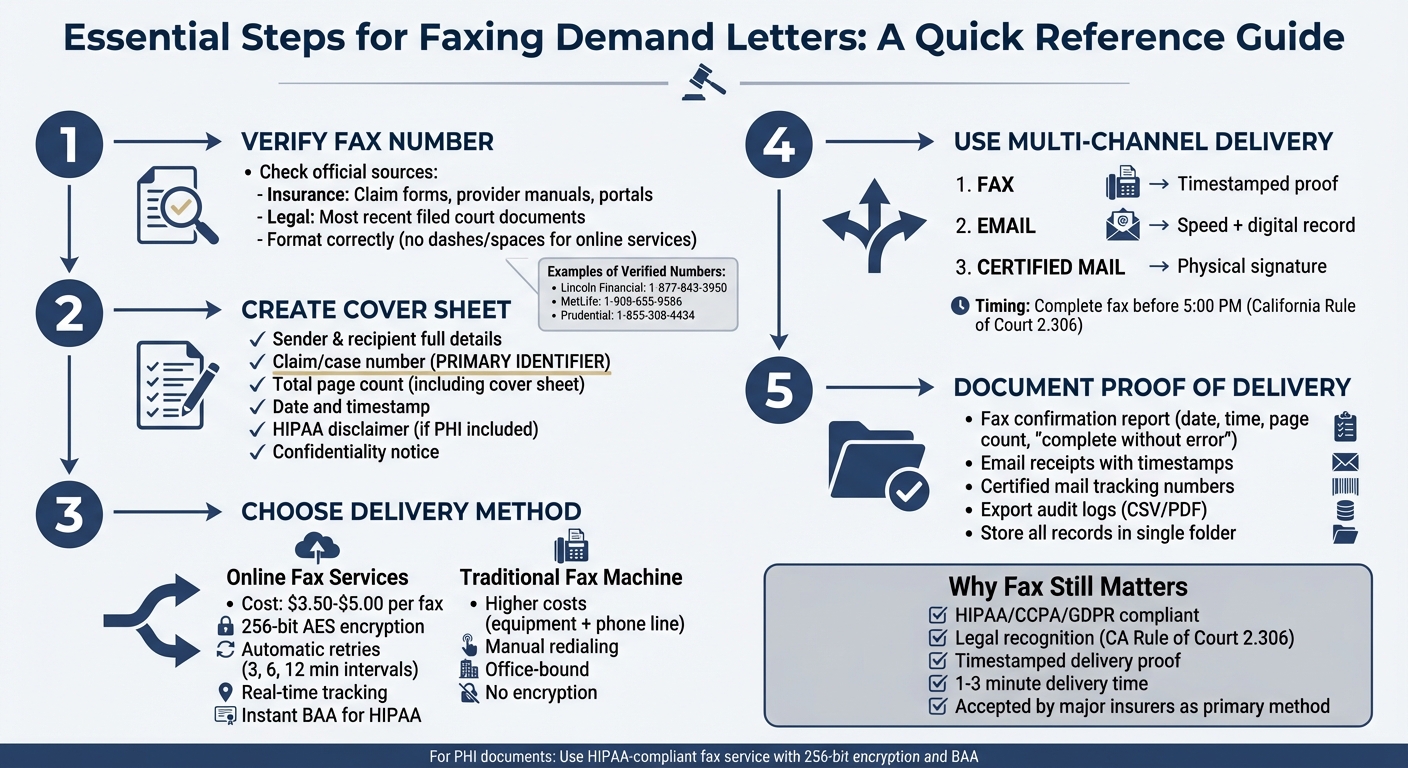
Essential Steps for Faxing Demand Letters to Insurers and Attorneys
Why Fax Is Still Used for Legal and Insurance Communications
Why Insurance Carriers and Law Firms Still Use Fax
Insurance carriers and law firms continue to rely on fax because of their established systems and intake processes. Major insurers like Lincoln Financial (1-877-843-3950), MetLife (1-908-655-9586), and Prudential (1-855-308-4434) prominently list fax numbers on claim forms and provider manuals as their primary method for receiving documents [2]. Fax remains a dependable option when online portals impose file size limits, restrict certain document types, or experience technical issues.
Regulations also play a key role in keeping fax relevant. Fax transmissions comply with stringent data privacy laws such as HIPAA, CCPA, and GDPR. This is largely because online fax services use advanced encryption methods like 256-bit AES and TLS to safeguard sensitive information [2].
Legal systems further cement fax's place as a formal communication tool. For instance, California's Rule of Court 2.306 allows documents to be served via fax, provided the entire transmission is completed and properly documented. Under this rule, service is considered complete once the fax is fully transmitted, though faxes sent after 5:00 p.m. are legally recorded as being sent the next court day [5].
These factors make fax a go-to solution for handling urgent and legally critical documents.
Benefits of Fax for Time-Sensitive Documents
Faxing also stands out for its speed and ability to provide proof of delivery. It generates a timestamped delivery record and detailed logs, offering a level of accountability that email or regular mail often can't match [3]. For legal purposes, such as under California Rule of Court 2.306, this delivery report must confirm the document was sent in full without errors and should be attached to the proof of service.
Automatic retries add another layer of reliability for urgent documents. When lines are busy, online fax services will attempt delivery at regular intervals, ensuring most faxes are sent within 1–3 minutes. This consistency is critical in situations where meeting statutory deadlines or responding to insurance carriers within tight timeframes is non-negotiable, as even minor delays can lead to significant consequences.
How to Create a Demand Letter Cover Sheet
Required Information to Include
A properly crafted cover sheet ensures your demand letter reaches the right department. Whether you're addressing an insurance adjuster or opposing counsel, the cover sheet should clearly indicate the document's purpose at a glance, without requiring anyone to sift through multiple pages.
Start with sender and recipient details: Include your full name, your firm or company name, and your contact information at the top. Directly below, list the recipient’s name, their company or firm, and their fax number. This setup simplifies follow-ups if there are any questions about the transmission [2][7].
The claim or case number is essential. This number acts as the primary identifier for insurance carriers and law firms, helping them route the document through their systems. If it’s missing or not prominently displayed, your demand letter could end up sitting in a general inbox for days while staff figure out where it belongs [2].
Don’t forget to include the total page count, including the cover sheet. For example, if your letter and attachments total five pages, note "Total Pages: 6" on the cover sheet. This detail allows the recipient to immediately confirm they’ve received everything. In states like California, proof of service by fax requires confirmation that the transmission was complete and error-free, which is verified against your stated page count [5].
| Cover Sheet Element | What to Include |
|---|---|
| Sender Information | Your name, firm/company name, phone number, and return fax number [2] |
| Recipient Information | Adjuster or attorney name, company/firm name, and their fax number [7][2] |
| Case Identifiers | Claim number, case number, or policy number [2] |
| Date and Time | Exact timestamp of transmission for legal records [2] |
| Page Count | Total pages being sent, including the cover sheet (e.g., "6 pages total") [4][2] |
Finally, include confidentiality notices to safeguard sensitive data.
HIPAA Disclaimers and Confidentiality Notices
If your document contains Protected Health Information (PHI), include a HIPAA disclaimer. This disclaimer informs the recipient that the information must be handled securely and is intended solely for the named addressee [1][2].
Even if PHI isn’t involved, a confidentiality notice is still important. A statement like "This transmission contains confidential information intended only for the addressee" can help reduce the risk of sensitive data being misused if it’s received by the wrong party [2].
When using online fax services for sending documents with PHI, activate HIPAA mode and execute a Business Associate Agreement (BAA) before transmission. This ensures encrypted delivery and provides an audit trail with details like the date, time, and delivery status - critical for HIPAA compliance. Platforms like OneFaxNow allow instant BAA execution through their dashboard, helping you stay compliant without unnecessary delays [1][4].
How to Avoid Misrouting Your Fax
How to Verify the Correct Fax Number
Double-check that the fax number you’re using is tied to the correct department. Many insurance companies and law firms have separate fax lines for claims, appeals, legal matters, and general inquiries. Sending a fax to a general number increases the chances of it being misrouted or delayed.
Start by consulting official sources. For insurance claims, look at the specific claim form, provider manual, or secure provider portal to confirm the correct fax number. Major insurers often list department-specific numbers on these documents. For instance, as of November 2025, verified fax numbers for prominent U.S. insurance companies included Lincoln Financial at 1‑877‑843‑3950, Mass Mutual at 1‑413‑226‑4054, and MetLife at 1‑908‑655‑9586 [2].
In legal cases, use the most recent fax number provided by the opposing party in any filed and served document. According to California Rules of Court, documents must be served to the fax number "as last given by that person on any document that the party has filed in the case" [5]. In cases involving multiple parties, the lead plaintiff typically maintains an up-to-date service list with all relevant fax numbers.
| Source of Fax Number | How to Verify It |
|---|---|
| Insurance Carrier | Refer to the claim form, provider manual, or member portal |
| Opposing Counsel | Use the latest filed and served document from the case |
| Medical Provider | Check the provider’s official website or a HIPAA-compliant directory |
| International Recipient | Include the "011" or "+" prefix with the country and area code |
Make sure the number is formatted correctly for your fax service. Some online fax platforms require numbers to be entered without dashes or spaces (e.g., 12025551234 instead of 1‑202‑555‑1234) to avoid delivery issues [6]. For international faxes, confirm whether the service requires "011" or "+" before the country code [7].
Documenting how you verified these numbers is another important step to ensure a reliable transmission record.
How to Document Where You Got the Fax Number
Keep a record of where you sourced each fax number. If a recipient later claims they didn’t receive the fax, having documentation - such as screenshots from provider portals, copies of claim forms, or relevant emails - can show that the number was verified. For legal cases, save a copy of the most recent court filing that lists the opposing party’s fax number. Additionally, maintain an updated service list for ongoing claims or cases, as fax numbers can change over time.
By pairing verified numbers with clear documentation, you’ll create a solid foundation for ensuring successful transmissions.
Why You Should Include the Total Page Count
After verifying the fax number, it’s equally important to confirm the total page count to ensure complete delivery. Listing the total page count on your cover sheet allows the recipient to immediately check if all pages have been received. If the stated page count doesn’t match the received pages, it signals a possible transmission issue.
This isn’t just a best practice - it’s a legal requirement in some cases. For example, under California Rules of Court, service by fax is only considered complete when the "entire document" has been transmitted: "Service by fax is complete on transmission of the entire document to the receiving party's fax machine" [5]. Including an accurate page count helps confirm that the full document was delivered.
Don’t forget to count the cover sheet as part of the total page count. Restate this number clearly on the cover sheet itself. Many online fax services, like OneFaxNow, offer tracking links and status updates that show exactly how many pages were sent and received. These features create a reliable record of delivery, which can be crucial for legal or insurance communications.
Using Multiple Delivery Methods Alongside Fax
Sending by Email and Certified Mail Alongside Fax
Relying only on fax can sometimes leave gaps in your delivery record. Insurer portals might fail, reject certain file formats, or go offline, and opposing counsel could claim they never received your fax due to a busy line or system issues. To close these gaps, sending the same demand letter via multiple channels - fax, email, and certified mail - creates a stronger proof of delivery. Each method has its strengths: fax provides an immediate, timestamped record, email delivers speed (provided encryption is used for sensitive data), and certified mail offers a physical signature. Together, they form a solid audit trail.
When dealing with demand letters that include Protected Health Information (PHI) - like medical records or treatment summaries - HIPAA-compliant faxing should be your go-to method. Standard email lacks the security necessary for transmitting sensitive data unless encrypted end-to-end. Faxing, on the other hand, uses phone lines, which reduces the risk of interception [2]. Services such as OneFaxNow provide a HIPAA mode with features like instant Business Associate Agreement (BAA) execution and detailed audit logs [2].
By combining these delivery methods with your fax strategy, you enhance the reliability and evidentiary value of your demand letter. The next step is to synchronize these channels for a consistent delivery timeline.
How to Time Multi-Channel Delivery
Proper coordination of these delivery methods ensures that your records are consistent and legally defensible. To achieve this, send the fax, email, and certified mail versions of your document on the same business day. This approach ensures all delivery records align, making it harder for recipients to claim they received conflicting versions or missed deadlines.
If you’re faxing, aim to complete the transmission before 5:00 PM to meet same-day service requirements under the California Rules of Court. Any fax sent after 5:00 PM will be recorded as sent on the next business day [5]. Additionally, in some jurisdictions, serving documents by fax may extend the response or notice period by up to two court days [5].
Include a note on your fax cover sheet to inform the recipient that the document is also being sent via email and certified mail. This reduces confusion and prompts them to check all channels. Be sure to include the total page count on both the fax and email versions so the recipient can confirm they’ve received the full document [2]. If the fax line is busy, services like OneFaxNow will automatically retry at 3-, 6-, and 12-minute intervals [3]. Allow these retries to finish before assuming the fax has failed and switching solely to alternative delivery methods.
sbb-itb-0df24da
How to Document Proof of Delivery
Ensuring solid proof of delivery is a critical step after successfully sending a fax, especially when managing a multi-channel documentation strategy.
Fax Confirmation Reports
A fax confirmation report serves as your primary evidence that a demand letter was successfully transmitted to the recipient's machine. To be legally valid, this report should include key details such as the date and time of transmission, the sending fax number, the recipient's fax number, and a clear statement indicating the transmission was "reported as complete and without error" [5]. For example, in California, attaching this report to your formal proof of service declaration is a legal requirement [5].
Many online fax services simplify this process by sending automated email confirmations once delivery is successful, adding an extra layer of proof [3]. If you’re using platforms like OneFaxNow, you can also access a real-time status page that tracks your fax’s progress, including automatic retry attempts [1]. It’s a good idea to save a screenshot of this status page, as it provides detailed retry timestamps.
For demand letters containing Protected Health Information (PHI), activating HIPAA mode is essential. This feature creates an unalterable audit trail. For instance, OneFaxNow offers a HIPAA add-on ($3.00 for 1–10 pages, $5.00 for 11–50 pages) that includes an audit dashboard. Logs from this dashboard can be exported as CSV or PDF files for permanent records [4]. To further strengthen your proof, verify receipt using alternate channels.
Email and Mail Receipts
Supplement your fax confirmation with email and mail receipts for a more comprehensive delivery record. Email receipts provide a digital timestamp and a direct record of communication with the recipient, such as an insurance adjuster [9]. When sending emails, include important details like the claim number, policy number, and date of the incident in the subject line. Many insurance companies also digitize physical correspondence, so emailing a copy directly can speed up internal processing.
For certified mail, keep the tracking number and delivery confirmation in the same digital folder as your fax and email records. While faxing efficiently meets legal deadlines, certain actions - like demanding arbitration under a contract or insurance policy - may specifically require registered or certified mail to meet legal standards. Certified mail offers physical, third-party verification of receipt at a specific address, complementing the technical proof provided by fax [9].
Organizing All Delivery Records in One Place
Centralize all your delivery records - fax reports, email receipts, and certified mail tracking - into a single, well-organized folder. Export transmission logs as PDFs and store them alongside the original demand letter and email confirmations [4]. If you’re managing multiple cases, establish a standardized file naming system to make retrieval easier [6].
For ongoing legal cases, maintain an updated log of all parties and their verified fax numbers to ensure proper document routing [5]. Download transmission reports immediately and attach them to the relevant claim or case notes. This ensures the audit trail is directly linked to the corresponding file, making it easier to produce proof of delivery during negotiations, discovery, or compliance audits [1].
Fax Machines vs. Online Fax Services for Demand Letters
This section breaks down the differences between traditional fax machines and online fax services, focusing on how they compare in cost, compliance, and functionality when sending demand letters.
Cost and Convenience Differences
Traditional fax machines come with hefty upfront and ongoing expenses, including equipment, dedicated phone lines, and supplies [2]. By contrast, online fax services eliminate these costs entirely [2].
The convenience factor is another game-changer. With online faxing, you can send documents from anywhere using a web browser, email, or app. Traditional machines, on the other hand, keep you tethered to the office [2][10]. This flexibility is particularly helpful when you're in court, meeting clients, or working remotely and need to send critical documents under tight deadlines.
Reliability is another area where online faxing shines. Many platforms automatically retry failed transmissions and provide real-time updates and email confirmations [4][3]. In contrast, traditional fax machines require manual redialing and rely on printed confirmation slips, which can be misplaced. Online services also allow you to combine multiple file types - like PDFs, DOCX, and JPGs - into a single transmission and offer digital audit trails, which are hard to replicate with paper-based systems [3][1].
For sporadic faxing, pay-per-use options like OneFaxNow are budget-friendly, with Lite Fax priced at $3.50 for 1–10 pages and Standard Fax at $5.00 for 11–50 pages. For higher volumes, subscription plans like RingCentral's 3,000-page monthly pool at $22.99 per month might be a better fit. However, most attorneys who only send occasional demand letters prefer avoiding recurring fees [4][10].
HIPAA Compliance and Audit Trails
When demand letters involve sensitive medical information, HIPAA compliance is non-negotiable. Online fax services use Advanced Encryption Standard (AES) 256-bit and Transport Layer Security (TLS) to secure documents during transmission and storage [2]. Traditional fax machines, however, rely on unencrypted analog phone lines, leaving them more vulnerable to breaches.
OneFaxNow simplifies compliance by offering instant Business Associate Agreements (BAAs) at checkout [1][4]. For an additional cost - $3.00 for Lite and $5.00 for Standard per fax - you gain access to audit dashboards that track every step of the process, from document creation to successful delivery [1]. These logs can be exported as CSV or PDF files and attached to case records as proof of delivery. This level of detail complements the multi-channel delivery options discussed earlier.
In contrast, traditional fax machines provide only basic printed confirmation slips, which lack detailed tracking. They also pose physical security risks; documents left in output trays are vulnerable to unauthorized access. Machines connected to the internet are also at risk of hacking due to weak security protocols [2].
File Types and Page Limits
Online fax services support a wide variety of file formats, including PDFs, Word documents (DOCX), plain text (TXT), and image files like JPG, PNG, and TIFF [3][1]. You can upload and merge up to 10 separate files into a single fax, a feature especially useful for demand letters that include photographic evidence. Printed photos or detailed medical images often lose clarity when sent via traditional fax machines [3][6].
With traditional machines, all digital evidence must first be printed, adding time and cost while risking quality degradation [2][10]. Online platforms, on the other hand, handle large files more efficiently. Most services have a file size limit of 20MB per file and a total page limit of 50 pages per transmission [3][1][6]. Keep in mind that the cover page counts toward this total, so aim for 49 pages or fewer when using a standard 50-page tier [4]. To manage file sizes for extensive medical records, scanning in black and white at 200–300 DPI can help maintain legibility [6]. Also, using filenames under 21 characters and avoiding special symbols ensures compatibility with online fax servers [6].
Traditional fax machines, constrained by physical paper tray capacity, often struggle with long documents. Line interruptions can cause transmission failures, especially for multi-page faxes [2]. Online services sidestep these issues with features like automatic page counting and file validation, ensuring smoother delivery [3][4]. These technical advantages make online faxing, such as that offered by OneFaxNow, a smart choice for legal and insurance-related communications.
Conclusion
Faxing demand letters remains a key practice for insurers and law firms, but success hinges on careful preparation, thorough verification, and proper documentation.
Start by confirming the recipient's fax number using official sources [1][2]. Always include essential details on your cover page, such as the claim or case number, involved parties, date of loss, and total page count [2]. If your documents contain Protected Health Information (PHI), opt for a HIPAA-compliant fax service that provides 256-bit AES encryption and a Business Associate Agreement (BAA) [1][2].
While faxing is crucial, don't rely on it alone. Pair it with certified mail or email to establish a more complete paper trail. This multi-channel approach strengthens your documentation. For instance, in California, service by fax is considered complete once the entire document is transmitted, but only if both parties have agreed in writing to use this method [5]. Keep all confirmation reports, transmission logs, and audit trails in one organized location. These records are vital if an insurer disputes receipt or if you need to provide evidence of service in court [5][8].
Modern online fax services address these logistical challenges while offering additional advantages. Services like OneFaxNow reduce costs, provide real-time tracking, and include automatic retries. They even allow instant BAA execution during checkout [1][3][4]. For occasional users, pay-per-fax pricing - $3.50 for 1–10 pages or $5.00 for 11–50 pages - can be more cost-effective than monthly subscriptions [4]. Features like the ability to upload multiple file types (PDFs, DOCX, JPGs) and merge them into a single transmission make the process faster and ensure document quality [1][3].
Ready to send your demand letter? Send a Fax Online - No Account Required. If your documents include PHI, activate HIPAA mode with instant BAA execution at checkout.
FAQs
What are the advantages of using online fax services instead of traditional fax machines?
Online fax services bring a modern twist to an old-school communication method, offering a hassle-free alternative to traditional fax machines. With these services, you can send and receive faxes through web portals, email, or even mobile apps - no need for bulky equipment, dedicated phone lines, paper, or toner. All you need is an internet connection, and you’re good to go, whether you’re at the office, home, or on the move.
What sets online faxing apart is its added functionality. Features like pay-per-fax pricing, delivery tracking, and automatic retries make it not only more reliable but also easier on your budget compared to maintaining a physical fax machine. Plus, most platforms support a variety of file formats and can handle larger documents, which is especially useful for industries like legal, medical, or insurance where secure and compliant document transmission is a must.
In short, online faxing streamlines the process, cutting down on time and costs while boosting reliability and security - an ideal solution for today’s communication demands.
How can I securely send sensitive health information via fax while staying HIPAA-compliant?
To securely send sensitive health information via fax while adhering to HIPAA regulations, it's essential to use a fax service that includes a HIPAA Mode. Look for features such as encryption, audit logs, and instant Business Associate Agreements (BAAs). These tools help ensure Protected Health Information (PHI) is transmitted safely and aligns with HIPAA requirements.
Make sure the service also offers secure file handling, robust encryption, and detailed transmission records. Before sending, double-check the recipient's details to prevent misrouting and confirm their fax machine is ready to receive. Opting for a reliable, HIPAA-compliant fax service helps safeguard sensitive data and maintain compliance throughout the process.
Why should I use multiple methods to send demand letters?
Using various delivery methods for demand letters helps ensure they reach the recipient, are properly documented, and are taken seriously. Faxing is particularly useful because it provides instant proof of transmission through confirmation receipts, making it a dependable option for legal and administrative needs. That said, pairing fax with mail or email adds an extra layer of security, as technical glitches or recipient preferences could interfere with delivery if only one method is used.
By diversifying delivery methods, you minimize the chances of miscommunication or misplaced documents - especially when dealing with insurers or opposing counsel. This strategy boosts the likelihood that your demand letter will be acknowledged and addressed promptly.