How to Explain ‘We Still Fax’ to Patients in a Secured, Modern Way
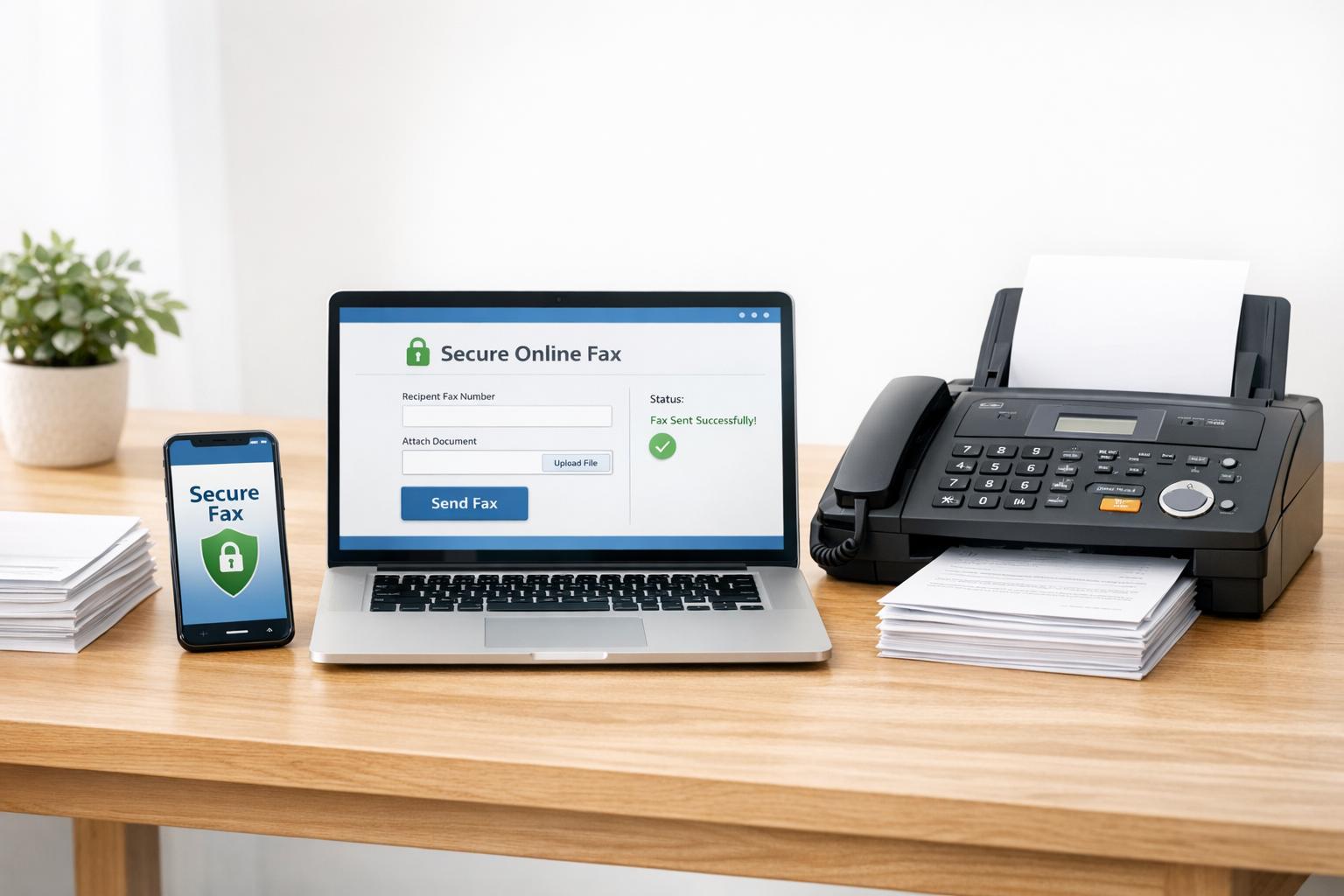
Modern encrypted online faxing remains the most secure, HIPAA-compliant way to share medical records — patients can send documents from phones or computers.
How to Explain ‘We Still Fax’ to Patients in a Secured, Modern Way
Yes, clinics still use faxing in 2025 - and for good reasons. While it may seem outdated, faxing remains a secure, compliant, and widely accepted method for transmitting sensitive medical information. Here's why it matters and how to address patient concerns:
- Security: Modern digital faxing uses advanced encryption (AES-256, TLS 1.2+) to protect data during transmission, making it safer than email.
- Compliance: Faxing meets HIPAA requirements and provides detailed audit trails for legal and regulatory needs.
- Practicality: Many organizations, like insurance companies and government agencies, still require faxes due to system incompatibilities.
Patients often dislike faxing because it feels old-fashioned, they don’t own fax machines, and it can be inconvenient. To ease frustrations, clinics should emphasize modern faxing's security, explain its legal necessity, and offer easy alternatives like online fax services.
Key tips for clinics:
- Highlight the use of encrypted, cloud-based fax systems instead of traditional machines.
- Reassure patients with HIPAA compliance and audit trail details.
- Suggest online tools like OneFaxNow, allowing patients to fax from their smartphone or computer without needing a physical machine.
Faxing may not be glamorous, but it's still a secure, reliable, and necessary part of healthcare communication.
Why Patients Dislike Hearing 'We Need a Fax'
Even though faxing still holds legal importance in healthcare, it often leaves patients feeling frustrated. When a front desk staff member says, "We'll need that fax", the reaction is usually one of annoyance. Understanding why patients view faxing as outdated can help staff respond more effectively and address concerns.
Fax Feels Like Old Technology
The history of fax machines plays a big role in how patients perceive them. The first modern fax machine was introduced in 1964 - more than 60 years ago. In an era dominated by email, texting, and cloud-based sharing, faxing feels like a relic of the past. Patients often associate it with outdated practices, and being asked to fax documents might make them question whether the clinic is staying current with modern tools.
Most Patients Don't Own Fax Machines
Beyond perception, there's a practical barrier: most people simply don’t have fax machines anymore. In fact, 93% of patients prefer doctors who communicate via email [6]. For those under 40, owning a fax machine - or even a landline - is almost unheard of. This often forces patients to find alternatives, like visiting a FedEx or UPS store, paying per-page fees, and dealing with potential transmission errors. The process is inconvenient, time-consuming, and adds unnecessary costs. For patients, this creates a sense of being stuck between clinic policies and the ease of modern digital communication, making the whole experience feel like an unnecessary hassle.
How to Reframe Fax as Secure and Required
Once staff recognize why patients often find faxing frustrating, the next step is to explain how modern faxing is a secure, compliant, and sometimes legally required method of communication. The focus isn't on defending outdated technology but rather on highlighting how digital faxing employs encryption to safeguard sensitive information. This updated approach enhances data protection while meeting strict compliance standards.
Fax as a Secure Communication Method
Modern digital fax services are a far cry from the clunky machines patients may remember. Clinics using HIPAA-compliant online fax services ensure data protection with advanced encryption - AES-256 secures data at rest, while TLS 1.2+ protects it during transmission [3][4]. This level of encryption is comparable to the security of a private phone call, significantly reducing the risk of interception. Additionally, fax networks are largely insulated from common threats like phishing attacks and ransomware. The HIPAA Privacy Rule acknowledges faxing as a secure way to transmit Protected Health Information (PHI), provided safeguards like encryption and a signed Business Associate Agreement (BAA) are in place [2][4].
Some Agencies Still Require Fax
Beyond security, regulatory requirements often make faxing a necessity. It's not just about preference - many organizations, including insurance companies, government agencies, and specialist offices, mandate faxing because their internal systems aren't designed to communicate seamlessly with others. Incompatible Electronic Health Record (EHR) platforms often operate in isolation, and faxing serves as a universal bridge to connect these systems [2]. Legacy system constraints in these organizations mean fax remains essential for secure and compliant communication. When patients ask, "Why not just email it?" staff can clarify that the receiving organization’s compliance rules often dictate the use of fax.
Fax Creates a Clear Paper Trail
Digital fax services offer a significant advantage over email by providing a detailed and verifiable audit trail. Every transmission is logged with precise timestamps, recipient details, and delivery confirmations [7][3]. These records carry legal credibility, whether they’re needed for a medical lawsuit or an insurance dispute [5]. Services like OneFaxNow even document retry attempts, showing that every effort was made to deliver the information [7]. Unlike traditional paper faxes, which can be misplaced or misfiled, encrypted online faxes are stored in searchable cloud environments. This ensures quick access for audits and helps maintain compliance in today’s healthcare practices [3][5]. Such thorough documentation protects both the clinic and the patient.
What Staff Should Say to Patients About Faxing
When discussing faxing with patients, your team has the opportunity to shift perceptions from frustration to trust. By framing the conversation around security, compliance, and convenience, staff can highlight the advantages of modern faxing methods instead of apologizing for using what some might consider outdated technology.
"We Use Encrypted Online Fax, Not an Old Machine"
The word "fax" often brings to mind bulky, outdated machines. Staff should clarify that your clinic uses a cloud-based, encrypted fax service designed to protect sensitive data, much like a secure phone call. Unlike traditional faxing, modern systems operate over HTTPS and secure cloud networks, eliminating the need for physical machines, paper, or toner [9].
Here’s an example of how staff might explain this:
"We don’t use an old-fashioned fax machine. Our system securely sends your document online. Your information goes straight into a password-protected inbox, not onto a paper tray where it could be seen by others."
Additionally, staff can point out that 75% of medical communications in the U.S. still rely on faxing because it’s considered more secure than standard email [2]. This not only reassures patients but also highlights the clinic’s commitment to safeguarding their data.
"We Only Send PHI Through HIPAA-Compliant Systems with a BAA"
Patients often worry about the safety of their personal health information (PHI). To address this, staff should emphasize that the clinic uses a HIPAA-compliant fax service backed by a signed Business Associate Agreement (BAA). This legal contract ensures the fax provider follows the same strict privacy standards as the clinic [1].
A clear way to explain this is:
"We use a HIPAA-compliant fax service that’s secured by a signed BAA, ensuring your information is protected at every step."
Staff can also mention that the system creates digital audit trails, showing exactly when and where the information was sent and received. Unlike email, which lacks this level of accountability, these features provide patients with an added sense of security [5].
"You Don't Need Your Own Fax Machine"
Many patients assume they’ll need to visit a store or invest in a fax machine to send documents, leading to unnecessary hassle and costs. Staff should explain that patients can fax documents easily from their smartphone or computer using secure online services, making the process quick and convenient.
A helpful script might be:
"You can fax directly from your smartphone or computer using OneFaxNow - no fax machine needed. Just upload a PDF or take a photo of your document with your phone. For medical documents, select the HIPAA-compliant option to ensure full protection."
Patients can be directed to user-friendly services like OneFaxNow, which allow them to send faxes in about 60 seconds without creating an account or installing software [7]. These services even retry failed faxes up to three times and only charge if the fax is successfully delivered [7]. This modern solution eliminates the inconvenience of traditional faxing while ensuring security and compliance.
sbb-itb-0df24da
Ready-to-Use Patient Handout and Email Text
To make it easier for you to explain our secure and modern fax process to patients, we’ve created ready-to-use templates. These templates ensure your front desk and patient coordinators provide consistent, professional communication. You can use them in appointment reminders, intake forms, or email responses. They not only simplify the process but also highlight our focus on maintaining security and ease of use.
Copy-and-Paste Paragraph for Patient Instructions
Here’s a ready-made paragraph you can use in patient portal messages, email replies, or printed handouts when requesting documents:
To protect your health information and comply with HIPAA standards, we use a secure, encrypted online fax system. You can send documents directly from any internet-enabled device - no physical fax machine is needed. Please fax your documents to our secure fax line at [Your Clinic Fax Number]. Be sure to include a cover sheet with your full name, date of birth, and the total number of pages. If you need help with online faxing, our staff is here to assist you.
This message covers the three most common patient concerns: why faxing is still used (for HIPAA compliance and security), how to send documents without a fax machine (via online services), and what details to include (cover sheet information). Don’t forget to replace the placeholder with your actual fax number.
How to Direct Patients to Online Fax Services
For patients worried about not having a fax machine, here’s a simple solution you can share:
Visit onefaxnow.com/hipaa-fax, upload your document, enter our fax number, and select the HIPAA-compliant option. You’ll only be charged once the fax is successfully delivered, and no account setup is required.
For patients who prefer mobile apps, you can recommend options like the Municorn Fax App, which has an impressive 4.8/5 rating and has processed over 50 million faxes [2]. OneFaxNow is particularly handy for one-time medical document submissions as it doesn’t require software installation. It also operates on a “pay only on success” model and automatically retries up to three times if the fax doesn’t go through on the first attempt [7]. Additionally, patients can track the delivery status in real time through an email link.
Consider adding these links to your website's "Patient Resources" section or including them in appointment confirmation emails. This approach not only reduces incoming calls and speeds up the intake process but also shows that your practice prioritizes security and convenience for its patients.
OneFaxNow vs Other Fax Services for HIPAA Compliance
HIPAA-Compliant Fax Services Comparison: OneFaxNow vs eFax vs Fax.Plus vs SRFax vs In-Store
Feature and Pricing Comparison Table
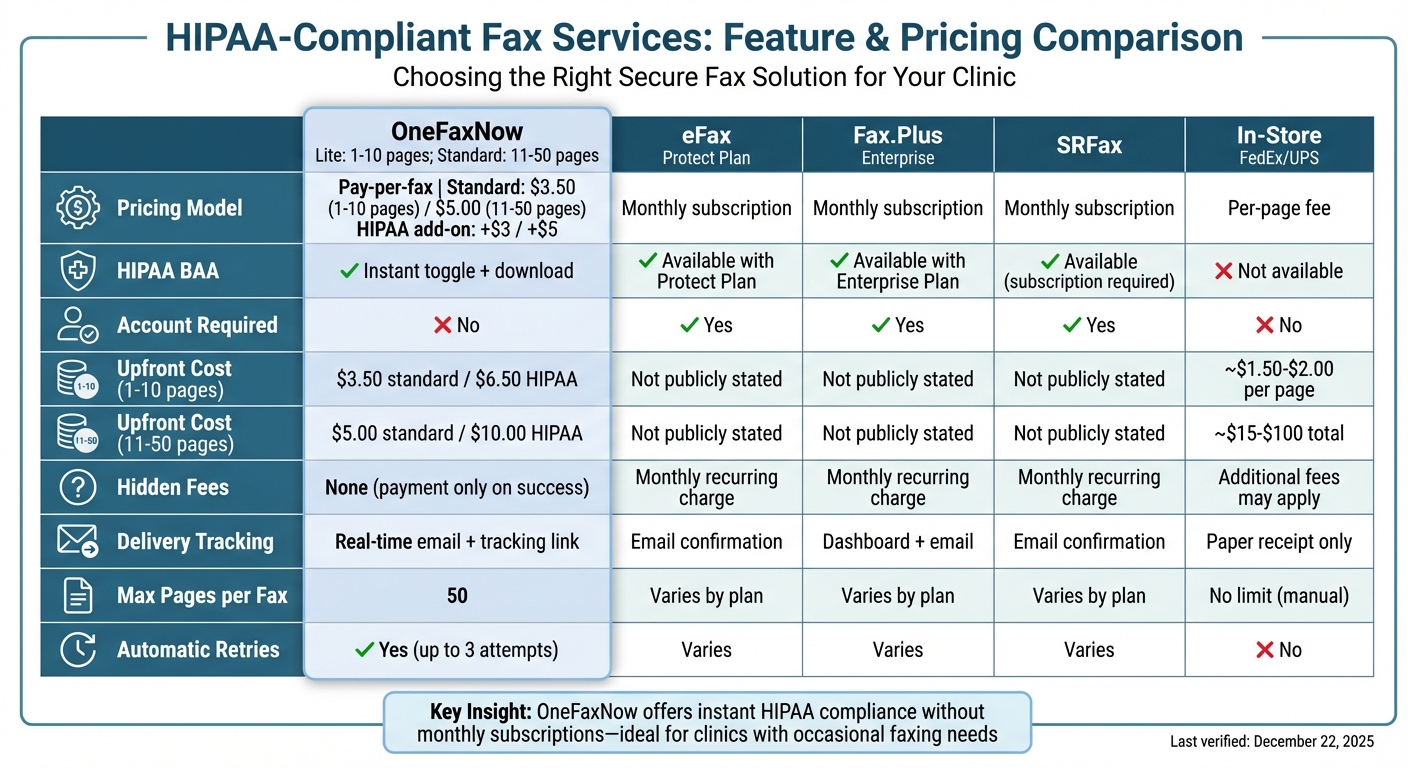
Choosing a secure, HIPAA-compliant fax solution for your clinic can be tricky. Pricing structures and access to HIPAA compliance often vary, and these differences can affect your budget - especially if your faxing needs are minimal. Here's a side-by-side comparison of OneFaxNow and other popular options, including in-store services:
| Feature | OneFaxNow<br>(Lite: 1–10 pages; Standard: 11–50 pages) | eFax (Protect Plan) | Fax.Plus (Enterprise) | SRFax | In‑Store (FedEx/UPS) |
|---|---|---|---|---|---|
| Pricing Model | Pay-per-fax Standard: $3.50 (1–10 pages) / $5.00 (11–50 pages) HIPAA add-on: +$3 / +$5 |
Monthly subscription | Monthly subscription | Monthly subscription | Per-page fee |
| HIPAA BAA | Instant toggle + download | Available with Protect Plan | Available with Enterprise Plan | Available (subscription required) | Not available |
| Account Required | No | Yes | Yes | Yes | No |
| Upfront Cost (1–10 pages) | $3.50 standard / $6.50 HIPAA | Not publicly stated | Not publicly stated | Not publicly stated | Around $1.50–$2.00 per page* |
| Upfront Cost (11–50 pages) | $5.00 standard / $10.00 HIPAA | Not publicly stated | Not publicly stated | Not publicly stated | Around $15–$100 total* |
| Hidden Fees | None (payment captured only on success) | Monthly recurring charge | Monthly recurring charge | Monthly recurring charge | Additional fees may apply |
| Delivery Tracking | Real-time email + tracking link | Email confirmation | Dashboard + email | Email confirmation | Paper receipt only |
| Max Pages per Fax | 50 | Varies by plan | Varies by plan | Varies by plan | No limit (manual) |
| Automatic Retries | Yes (up to 3 attempts) | Varies | Varies | Varies | No |
*In-store faxing costs are estimates and may differ.
Last verified: December 22, 2025.
This table highlights how OneFaxNow’s pay-per-fax model and instant HIPAA BAA (Business Associate Agreement) setup offer a more flexible and cost-conscious solution, especially for clinics that don’t fax frequently.
Many premium fax services restrict HIPAA compliance to their higher-tier plans. For instance, Fax.Plus specifies: “HIPAA use of Fax.Plus requires Enterprise with Advanced Security Controls (ASC) enabled and a signed BAA. Basic/Premium/Business plans don’t include a BAA” [3]. Similarly, eFax limits HIPAA compliance to its "eFax Protect" plan [5][6]. So, even if your clinic sends only a few faxes monthly, you could end up locked into an expensive Enterprise subscription.
On the other hand, in-store faxing at places like FedEx or UPS doesn’t provide a BAA, leaving you exposed to compliance risks. Documents left unattended in these settings can also create privacy concerns [1][8]. Despite its old-school reputation, faxing remains a critical part of healthcare compliance.
Why OneFaxNow Works Well for Clinics
OneFaxNow eliminates the hassle of monthly fees with its straightforward pay-per-fax model - you only pay when your fax is successfully delivered. The service also simplifies HIPAA compliance with an instant BAA toggle during checkout, avoiding the delays of phone calls or contracts [4][7]. Plus, their "Zero-Risk Guarantee" ensures you won’t be charged if your fax fails after up to three automatic retry attempts.
For clinics that send occasional insurance claims, referrals, or patient records, this approach saves both time and money. Patients can submit documents directly via onefaxnow.com/hipaa-fax, and they’ll receive real-time email tracking - no software or account setup required. OneFaxNow supports a wide range of file types, including PDF, DOCX, TXT, JPG, PNG, and TIFF, with a maximum of 50 pages or 20 MB per file [7]. This makes it a practical solution for handling the diverse document needs of your front desk, all while ensuring secure and compliant faxing without the burden of subscription costs.
Send a Fax Online - No Account Required | Learn About HIPAA Fax
How to Explain Faxing to Patients: Summary
Main Points for Clinic Staff
When you tell patients, "we need a fax", they might imagine clunky, outdated machines. It's important to shift this perception by explaining that modern faxing is both secure and efficient. Let them know your clinic uses a HIPAA-compliant, cloud-based fax system that’s protected with AES-256 encryption, one of the most secure standards available.
Highlight the legal protections in place by mentioning that your fax provider has signed a Business Associate Agreement (BAA). This agreement ensures the provider is contractually obligated to keep patient data safe. Faxing remains a reliable and legally accepted method of communication, offering a direct, point-to-point connection that’s extremely difficult for hackers to compromise [1][2].
Reassure patients that they don’t need a physical fax machine to send documents. Instead, they can use a secure, no-account-required service like OneFaxNow from their phone or computer. The system automatically retries failed transmissions and only charges if the fax is successfully sent [7]. In essence, modern faxing combines strong security with convenience, making it an ideal solution for your clinic’s communication needs.
Try OneFaxNow for Your Clinic's Faxing Needs
OneFaxNow simplifies faxing for both your staff and patients with a secure, HIPAA-compliant system. During checkout, you can instantly toggle on a BAA to ensure compliance in seconds. Whether you’re sending insurance claims, referral letters, or patient records, OneFaxNow’s pay-per-fax model offers an affordable and hassle-free option. Pricing starts at $3.50 for 1–10 pages and $5.00 for 11–50 pages, with optional HIPAA add-ons available for $3 or $5. This straightforward approach reinforces the security and efficiency your clinic needs.
Send a Fax Online - No Account Required | Learn About HIPAA Fax
FAQs
Why is faxing still used in healthcare today?
Faxing continues to play a critical role in healthcare communication because it satisfies regulatory and practical needs that many modern tools can't fully address. Government agencies, insurance companies, and older health systems often require faxing as a secure, traceable method for exchanging protected health information (PHI). A fax creates an unalterable record of what was sent, when it was sent, and to whom - essential for meeting compliance standards and resolving any disputes.
Today's faxing technology has come a long way. Cloud-based fax services now provide end-to-end encryption, real-time delivery notifications, and detailed audit logs, all while keeping the process as straightforward as traditional faxing. Plus, faxing is universally compatible, enabling clinics to communicate seamlessly without needing shared platforms or specialized software. These advancements make faxing a dependable, secure, and practical choice for healthcare organizations, even in a world dominated by digital tools.
How does digital faxing keep patient information secure and HIPAA-compliant?
Digital faxing offers a secure way to handle protected health information (PHI) while meeting HIPAA requirements. By using encrypted, cloud-based systems, services like OneFaxNow ensure that sensitive data stays protected. Their HIPAA mode includes robust safeguards such as encryption, strict access controls, and automatic creation of a Business Associate Agreement (BAA). These features make sure that only authorized individuals can send or access confidential documents.
To add another layer of security, digital faxing provides an audit trail. This includes real-time delivery tracking, email confirmations, and automatic retries, ensuring every step is transparent and accountable. Files are only stored temporarily to complete the transmission, minimizing the risk of unauthorized access. This modern approach not only enhances security but also allows clinics to assure patients that they’re using reliable, up-to-date fax solutions that fully comply with HIPAA standards.
What can patients do if they don’t have a fax machine?
Patients who don’t have access to a fax machine can still send documents effortlessly through secure online fax services. These platforms let users upload files and send them as HIPAA-compliant faxes straight from their computer or smartphone, ensuring both ease and privacy.
For those who only need to fax occasionally, many services offer pay-per-fax options, eliminating the need for a subscription. Additionally, numerous clinics collaborate with these services to make the process even more straightforward for their patients.