How to Request a Police Report and Then Fax It to Your Insurance Company
Skip delays: obtain the police report, correct errors, and fax it securely to your insurer using pay-per-fax for instant confirmation.
How to Request a Police Report and Then Fax It to Your Insurance Company
When dealing with a car accident claim, getting a police report is often necessary. This document helps your insurance company verify details, determine fault, and process your claim faster. Here’s a quick guide:
- Requesting the Report: You can request a police report online, in person, or by mail. Online portals are typically faster (5–10 business days), while mail requests may take 3–4 weeks. Fees vary by department, ranging from $2 to $29.
- Review for Accuracy: Check for errors in names, dates, vehicle details, or incident facts. Contact the reporting officer to fix any mistakes.
- Send to Your Insurer: Upload it to your insurer’s portal, mail a certified copy, or fax it for secure and quick delivery. Faxing often provides instant confirmation.
For faxing, services like OneFaxNow let you send documents without a subscription. Upload your report, enter the fax number, and pay per fax ($3.50–$5.00). This ensures fast and reliable transmission, especially for urgent claims.
Pro Tip: Always include your claim number and contact details when sending the report to avoid delays.
Step 1: How to Request a Police Report
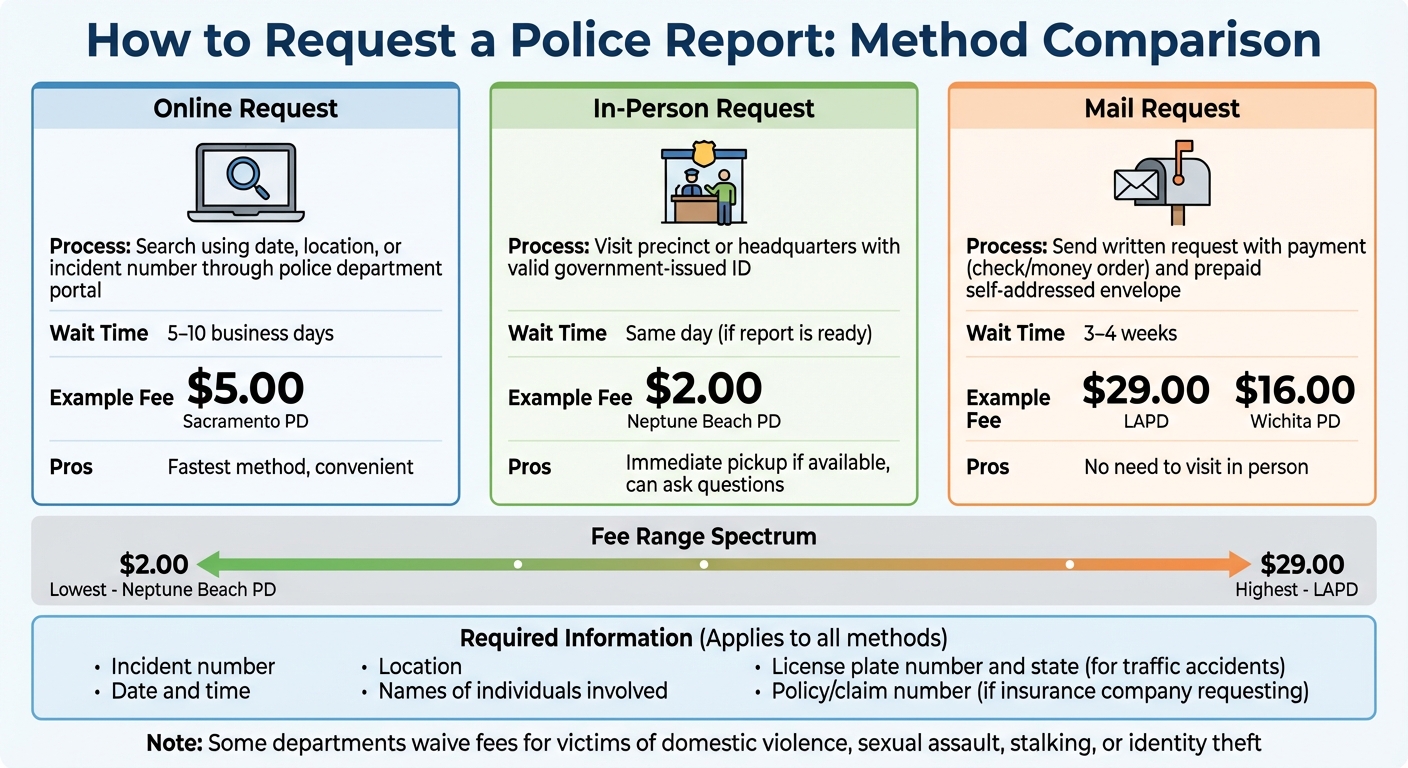
Police Report Request Methods: Fees, Wait Times, and Processes Compared
Getting a police report can be done online, in person, or via mail. Each method has its own process and timeline, so the best choice depends on how quickly you need the report.
Requesting a Report Online
Many police departments now have online portals for accessing collision reports. You can typically search using details like the date, location, or incident number. For instance, the NYPD offers a Collision Report Retrieval Portal, while the Sacramento Police Department provides online access to accident reports for $5.00 per report [3]. Generally, online reports are available within 5 to 10 business days after the incident [3].
Requesting a Report In-Person or by Mail
If you prefer to request a report in person, head to the precinct or headquarters where the incident occurred. Be sure to bring a valid government-issued ID and call ahead to confirm the report is ready for pickup [2].
For mail requests, send a written request or the department's specific form along with payment (usually by check or money order) and a prepaid, self-addressed envelope [4]. Keep in mind, mail requests often take 3 to 4 weeks to process [3].
"Police report information shall not be released without first establishing both the 'right to know' and the 'need to know.'" - Sacramento Police Department [3]
Fees, Wait Times, and Required Information
Fees for police reports vary by department. For example: LAPD charges $29.00, Wichita PD charges $16.00, and Neptune Beach PD charges $2.00 [2][4][6]. Some departments waive fees for victims of domestic violence, sexual assault, stalking, or identity theft.
When making your request, you’ll need to provide key details like the incident number, date and time, location, and names of the individuals involved [3]. For traffic accident reports, include the vehicle’s license plate number and state of registration [3]. If an insurance company is requesting the report, they must also provide their policy or claim number [3].
Here’s a quick comparison of fees, methods, and wait times:
| Department | Method | Fee | Typical Wait Time |
|---|---|---|---|
| Sacramento PD | Online | $5.00 | 5–10 days [3] |
| LAPD | Mail/In-Person | $29.00 | Varies [4] |
| Wichita PD | Mail/In-Person | $16.00 | 10–15 days [6] |
| Neptune Beach PD | Mail/In-Person | $2.00 | Processed in order [2] |
Pick the method that best fits your timeline and convenience. Once you have the report, review it carefully before sharing it with your insurance company.
Step 2: Review the Police Report Before Sending
Before sending the police report to your insurance company, take the time to review it for errors. A thorough check can help avoid claim delays and confusion during the settlement process. Even small mistakes - such as incorrect names, dates, or vehicle details - can slow things down. Insurance adjusters depend on accurate information to assess liability and process payments efficiently [1].
Check Names, Dates, and Vehicle Information
Start by confirming all personal details, including names, addresses, and dates of birth. Double-check the incident details, like the date, time, and location of the event [4][6][3][7]. Next, verify vehicle-related information, such as license plate numbers, states of registration, and VINs for all involved vehicles [3][7]. Also, ensure that the Report Number is accurate [4][6][7].
Don’t forget to review any insurance-related information, including policy and claim numbers, as well as the classification of the incident type [4][3][5]. Once everything checks out, address any discrepancies immediately.
How to Correct Errors with the Police Department
If you find errors, reach out to the officer who prepared the report. Keep in mind that police records staff typically cannot make changes to a filed report [2].
"Changes to any report must be made by the reporting officer. Additions to reports must be made by the officer assigned to investigate the crime. Records personnel are not authorized to make any changes or additions." - Neptune Beach Police Department [2]
When contacting the department, have the Incident Number handy to help them locate your report quickly [4][6]. Simple factual corrections, like fixing a misspelled name, are usually easy to resolve. However, altering disputed facts - such as fault determination - may require submitting a supplemental statement [1].
Step 3: How to Send the Police Report to Your Insurance Company
Once you have an accurate police report, the next step is getting it to your insurance company. You can do this by uploading it online, mailing it, or faxing it. Each method has its own perks, so pick the one that works best for your situation and aligns with your insurer's preferences.
Upload to Your Insurer's Online Portal
Many insurers offer a secure online portal for document submissions. This is often the quickest and most convenient option, with the added benefit of instant confirmation that your report has been received. Simply log into your account, head to the claims section, and look for an upload or document submission tool. Be sure to include your claim number to ensure everything is matched correctly.
Mail the Report
If you prefer traditional methods, mailing the report is another option. Keep in mind that delivery usually takes 3–7 days, so this might not be the fastest choice. To ensure safe delivery, use certified mail with tracking. Include a cover letter with your claim number, policy number, and contact information so your insurer can process it without delays.
Fax the Report
For those who need a quick and secure alternative, faxing is a solid option. It’s fast - usually transmitting in just 1–3 minutes - and provides a delivery receipt for added peace of mind. Plus, faxing is known for its security, as it uses dedicated phone lines to send documents directly to the recipient.
"Traditional fax machines use dedicated phone lines, ensuring that your documents are sent directly to the recipient without the risk of being intercepted by malicious actors." - Documo [9]
If you’re using an online fax service, you’ll get additional perks like automatic retries (at intervals of 3, 6, and 12 minutes) if the recipient’s line is busy. What’s more, these services often only charge you if the fax is successfully delivered [8].
sbb-itb-0df24da
How to Fax a Police Report with OneFaxNow
Why Use Online Faxing
Online faxing makes life easier by removing the need for a bulky fax machine, a dedicated phone line, or a trip to a copy shop. With OneFaxNow, you can send your police report directly from your phone or computer in just about a minute. Most faxes are delivered within 1–3 minutes, and you'll get an email confirmation with a tracking link once it's sent successfully [8]. If the fax line is busy, the system will automatically retry. Plus, you only pay if the fax goes through - failed attempts cost you nothing [8]. This quick and hassle-free process is particularly helpful for time-sensitive tasks like insurance claims. Here's a quick guide on how to use OneFaxNow.
Step-by-Step: Faxing with OneFaxNow
Here’s how to send your police report using OneFaxNow:
- Go to the OneFaxNow Pay-Per-Fax page: Start by visiting this page and upload your police report.
- Supported file types: The service works with PDFs, DOCX, TXT, JPG, PNG, and TIFF files. You can upload up to 10 files, which will automatically be combined into one fax [8][10]. The total size can include up to 50 pages, with each file capped at 20 MB [10].
- Enter the fax number: Input the fax number for your insurance company’s claims department. Double-check to ensure it’s the correct number and not a general office line.
- Add a cover page (optional): You can include a cover page with your name, claim number, and contact details. OneFaxNow offers an easy way to create this during checkout [10].
- Choose your pricing: Select a pricing option - $3.50 for 1–10 pages (Lite Fax) or $5.00 for 11–50 pages (Standard Fax). Payments are processed securely through Stripe, and you’ll receive real-time updates on your fax’s status [8].
OneFaxNow vs. Other Online Fax Services
OneFaxNow stands out because it doesn’t require a subscription, unlike many other online fax services. Instead, it uses a simple pay-per-fax model. Here’s a quick comparison to show how it stacks up:
| Feature | OneFaxNow | eFax | Fax.Plus |
|---|---|---|---|
| Account Required | No [10] | Yes [11] | Yes |
| Pricing Model | Pay-per-fax ($3.50–$5.00) [10] | Subscription ($15+/month) [11] | Subscription |
| File Support | PDF, DOCX, TXT, JPG, PNG, TIFF (up to 10 files/50 pages) [8] | PDF, TIFF [11] | Not publicly stated |
| Automatic Retries | 3 retries at 3, 6, and 12 minutes [8] | Standard features [11] | Not publicly stated |
| Payment on Failure | $0 if fax fails [8] | Monthly fee regardless | Not publicly stated |
| HIPAA Mode | Optional (+$3–$5), instant BAA [8] | Not publicly stated | Not publicly stated |
Last verified: December 25, 2025.
Why Choose OneFaxNow for Insurance Claims
If you need to send a one-time police report to your insurance company, OneFaxNow is a convenient option. It spares you from dealing with subscriptions or setting up an account. The pay-per-fax pricing, combined with features like automatic retries and billing only for successful transmissions, makes it a cost-effective and reliable choice for handling urgent documents.
Ready to send your police report? Send a Fax Online - No Account Required
For documents needing HIPAA-compliant handling, check out OneFaxNow's HIPAA fax options.
Conclusion
Handling post-accident documentation doesn’t have to be overwhelming. Start by identifying the agency that responded to your accident and request your police report - whether online, by mail, or in person. Make sure you have key details on hand, like your incident number, accident date, location, and insurance claim number. Be prepared to pay any required fees. Once you receive the report, review it carefully for errors in names, dates, or vehicle details before passing it along to your insurer.
When it’s time to send the report, you’ve got three main options: uploading it through your insurer’s online portal, mailing a physical copy, or faxing it. Many insurance companies favor faxing because it offers a secure and traceable way to handle sensitive documents. Services like OneFaxNow make this process straightforward with a pay-per-fax option that doesn’t require an account or subscription. You only pay if the fax is successfully delivered [8].
Using OneFaxNow is simple. Upload your police report in formats like PDF, DOCX, or even an image file, enter your insurer’s fax number, and send it in under a minute. The service automatically retries if the line is busy and provides confirmation once it’s delivered. With prices starting at $3.50 for 1–10 pages, it’s a practical alternative to subscription fax services or trips to a local copy shop [8].
By double-checking your report for accuracy and selecting the right delivery method, you can ensure your claim is processed efficiently. Whether your claim is straightforward or requires some adjustments, these steps will help you get the necessary documentation to your insurer securely and without delays.
Ready to send your police report? Send a Fax Online - No Account Required
For documents requiring HIPAA-compliant handling, explore OneFaxNow's HIPAA fax options.
FAQs
How can I fix errors in a police report before sending it to my insurance company?
When reviewing a police report, it’s crucial to check for any factual mistakes. Look for things like misspelled names, incorrect license plate numbers, VINs, or inaccurate dates. To verify the details, gather supporting documents such as a copy of your driver’s license, vehicle registration, or photos of your car.
If you spot an error, reach out to the police department or agency that issued the report to request a correction. Many agencies may ask you to appear in person with your evidence to make the necessary changes. If specific forms, like amendment forms for license or vehicle details, are required, the department can guide you through the process.
In cases where the agency is unable or unwilling to amend the report, you can still submit it to your insurance company. Include a written note explaining the errors and attach your supporting documents to clarify the discrepancies. This ensures your insurer has accurate information when handling your claim.
What are the advantages of using OneFaxNow to send a police report to your insurance company?
Using OneFaxNow to send a police report to your insurer comes with several advantages that make the process simple and efficient. It’s a pay-per-fax service, which means there’s no need for a subscription, and you can use it without creating an account - ideal for one-time or occasional use. The setup is simple, letting you send documents securely and without hassle.
The service supports a wide range of file types, including PDFs and images, and offers real-time delivery tracking to ensure your fax gets where it needs to go. If there’s an issue, automatic retries are in place to handle it. For added security, especially when dealing with sensitive information, you can enable the optional HIPAA-compliant mode, which includes instant BAA execution. As an added bonus, you’ll get a confirmation email to keep for your records - something that can be especially helpful when filing insurance claims.
How long does it usually take to get a police report after requesting it online?
When you request a police report online, the processing time is usually around 10 days. That said, it could take up to 14 additional days in certain situations, depending on the agency and how complex the report is. It's a good idea to confirm the exact processing times with the specific police department you're dealing with.