FOIA Fax Checklist: What to Include Before You Hit Send
FOIA fax checklist: include contact details, agency fax, precise records description, fee limit or waiver, delivery format, and ID to avoid delays.
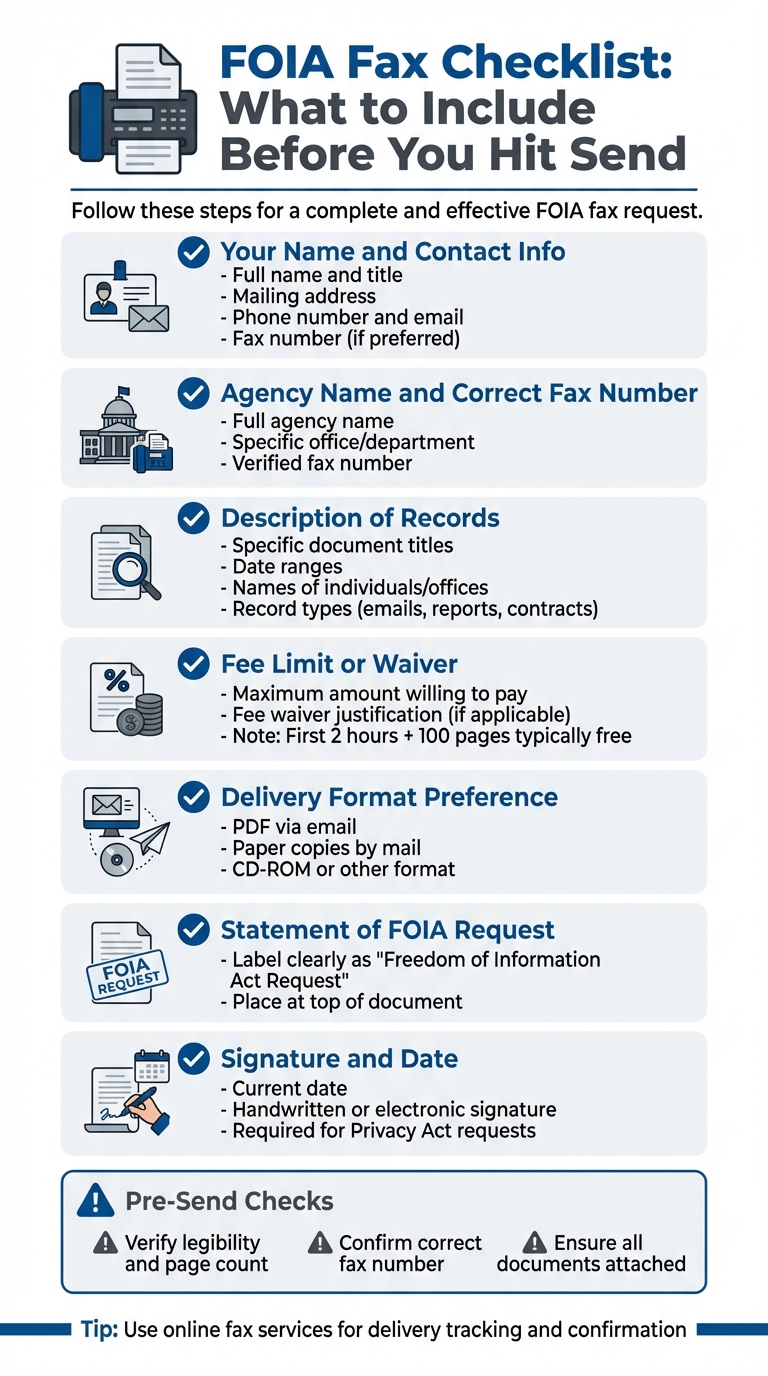
FOIA Fax Checklist: What to Include Before You Hit Send
When submitting a FOIA request via fax, missing key details can delay or derail the process. Agencies require specific information to process your request efficiently. Here's what you need to include:
- Your Name and Contact Info: Full name, mailing address, phone number, and email.
- Agency Name and Correct Fax Number: Ensure it's directed to the right department and verify the number.
- Description of Records: Be specific - include dates, titles, and other identifiers.
- Fee Limit or Waiver: State how much you're willing to pay or justify a fee waiver.
- Delivery Format: Indicate whether you prefer email, paper copies, or another format.
- Statement of FOIA Request: Clearly label the document as a FOIA request.
- Signature and Date: Some requests require this, especially for personal records.
For requests involving your personal data, include proof of identity (e.g., a signed statement under penalty of perjury). If acting on someone else’s behalf, attach third-party authorization.
Before sending, double-check:
- Legibility and page count.
- The correct fax number.
- All required documents are attached.
Using a reliable online fax service like OneFaxNow can simplify the process, offering pay-per-fax pricing, real-time delivery tracking, and optional HIPAA compliance for sensitive data.
FOIA Fax Request Checklist: 7 Essential Items to Include
FOIA Basics and Fax Submission Rules
Before diving into your fax request list, it’s important to understand the key elements of FOIA and the specific procedures that vary by agency.
What FOIA Does
Since 1967, the Freedom of Information Act (FOIA) has allowed anyone - including non-U.S. citizens - to legally request records from federal agencies. Its primary goal is to ensure transparency in government operations and decisions [4].
FOIA only applies to federal executive branch agencies, meaning it doesn’t cover Congress, federal courts, or state and local governments. It pertains strictly to existing records - agencies aren’t obligated to create new documents, conduct research, or answer questions as part of fulfilling a request. Records must be released unless they fall under exemptions for reasons like privacy, national security, or law enforcement.
For most requests, the first two hours of search time and the first 100 pages of copies are provided at no cost. With over 100 federal agencies processing FOIA requests independently, there’s no centralized FOIA office, so each agency handles its own requests.
It’s equally important to note that submission rules differ depending on the agency.
Rules Vary by Agency
FOIA operates on a decentralized basis, meaning each federal agency has its own submission guidelines, which are published in the Code of Federal Regulations (CFR). Large agencies are often divided into smaller components - such as offices, bureaus, or directorates - and your request must be directed to the specific component responsible for the records you’re seeking [2].
"The FOIA is administered on a decentralized basis, meaning each of over 100 agencies is responsible for receiving, processing, and responding to its own FOIA requests." - FOIA.gov [2]
This decentralized system means you’ll need to confirm the fax details for each agency before submitting your request. Always verify the correct fax number through FOIA.gov or the agency’s website. The agency’s regulations will outline where to send your request, how to describe the records you need, and whether you’ll need to provide identity verification for Privacy Act requests. Agencies generally respond within 20 working days [3], though simpler requests may be processed more quickly than complex ones involving multiple offices or large volumes of records.
Faxing offers several advantages for submitting FOIA requests. Unlike email, which may get caught in spam filters or lack reliable delivery proof, fax transmissions provide timestamped confirmation and a record of the recipient’s details. This creates a clear paper trail. Additionally, faxed documents are widely accepted as legally binding and are often more readily admitted as evidence than emails.
FOIA Fax Checklist: What to Include
When sending a FOIA fax request, including all the necessary details is crucial. A well-prepared request helps avoid delays and ensures the agency processes it within the required legal timeframe. Here's what to include:
Your Name and Contact Information
Start with your full name and title (e.g., Mr., Ms., Dr.) at the very top. Include your mailing address, daytime phone number, and email address so the agency can easily contact you with questions or deliver the records. If you prefer correspondence via fax, be sure to include your fax number as well.
For requests involving records about yourself (under the Privacy Act), you’ll need to certify your identity. This means including a signed statement under penalty of perjury. As FOIA.gov explains:
"To ensure that one person's records are not improperly disclosed to another person, individuals requesting records on themselves may be asked to certify their identity by signing a sworn statement confirming that they are who they say they are."
After your contact information, clearly address the agency to ensure your request is directed to the correct office.
Agency Name and Correct Fax Number
Write out the full name of the agency and the specific office or department that holds the records you’re requesting. Double-check the fax number before sending by consulting FOIA.gov or the Department of Justice's FOIA contact directory.
Description of Records You Want
You need to "reasonably describe" the records so the agency can locate them without unnecessary effort. The Digital Media Law Project clarifies:
"The only requirement is that you 'reasonably describe' the records. Basically, this means that you must give enough information that a record-keeper would be able to find the records without an undue amount of searching."
Be specific and include details like document titles, date ranges, names of individuals or offices involved, and types of records (e.g., emails, reports, contracts). For instance: "All emails between John Smith and Jane Doe at the Office of Public Affairs from January 1, 2025, to March 31, 2025, regarding the XYZ contract."
Avoid overloading your request with unnecessary details. According to the Office of Government Information Services:
"It may be tempting to describe what you are looking for and why you want it at length, but too much information may complicate the process."
Remember, FOIA only applies to existing records. Agencies aren’t required to answer questions, create new documents, or conduct research. Also, specify your preferred format for receiving records - whether PDF, Excel, paper copies, or CD-ROM - and consider narrowing your request by date range or office to expedite processing.
Fee Limit or Fee Waiver Language
Clearly state how much you’re willing to pay in fees. For example: "I am willing to pay up to $50.00 in fees. If the cost exceeds this amount, please contact me before processing my request." Non-commercial requesters typically get the first two hours of search time and the first 100 pages free. For reference, agencies like the FCC charge $0.10 per page for paper copies and $5.00 for computer disks. If search fees are expected to exceed $25.00, the agency will notify you.
If you’re requesting a fee waiver, explain why the disclosure serves the public interest. Fee waivers aren’t granted solely because you can’t afford the fees; you must show that the information will significantly enhance public understanding of government operations.
How You Want to Receive Records
Specify how you’d like to receive the records. For example: "Please send the records as PDF attachments via email to [your email address]" or "Please mail paper copies to [your mailing address]." Providing clear delivery instructions minimizes confusion and speeds up the process.
Statement That This Is a FOIA Request
Label your fax as a "Freedom of Information Act Request" right at the top. The Digital Media Law Project emphasizes:
"Written requests are the only way to legally assert your FOIA rights."
This ensures your request is routed correctly and processed within the required statutory timelines.
Signature and Date (When Required)
Always date your request to establish the timeline for the agency’s legal response. Some agencies may require a signature, particularly for Privacy Act requests involving your personal records. Check the agency’s specific requirements on FOIA.gov to confirm whether a handwritten or electronic signature is needed before faxing your request.
When to Attach Supporting Documents
Some FOIA requests may require you to verify your identity or provide authorization for accessing third-party records. Including the right supporting documents can save you from unnecessary delays or rejections. As mentioned earlier, your FOIA fax must be thorough, and supporting documents ensure your request aligns with agency verification protocols. Here’s what you might need to include.
Proof of Identity
If you're requesting records about yourself - especially under the Privacy Act - you'll need to verify your identity. This typically applies to U.S. citizens and lawful permanent residents seeking records tied to personal details like your name or Social Security number.
Most agencies allow you to submit a signed statement under penalty of perjury instead of requiring notarization. Use this exact language:
"I declare under penalty of perjury that the foregoing is true and correct. Executed on [date]. [Signature]" [7][8]
Some agencies may have additional requirements. For example:
- The IRS asks for a handwritten signature and a copy of your driver's license for tax records [7].
- The FBI’s eFOIA system requires a scanned government-issued photo ID for all requests [6].
If you're requesting records for someone who has passed away, include proof of death, such as an obituary or death certificate [1]. For records involving a minor or an incapacitated adult, you’ll need to provide documentation proving your role as a parent, guardian, or executor [7].
When acting on behalf of others, you’ll also need to include further documentation.
Third-Party Authorization
If you’re submitting a FOIA request for someone else, a signed authorization form from that person is mandatory. Without it, agencies may redact or withhold information to safeguard the subject’s privacy [4]. Note that some agencies require this authorization to be recent, so check the specific agency’s FOIA guidelines [8][9].
When faxing your request, bundle your FOIA request letter, identity verification, and authorization forms into a single transmission to avoid pages getting separated. Make sure all documents are clear and easy to read, as fax machines can struggle with poor-quality scans [2]. If you’re sending additional documents after your initial request, include your FOIA tracking number on every page to ensure they are properly matched to your file [1].
sbb-itb-0df24da
Pre-Send Checks Before You Fax
Before you hit "send" on your FOIA fax request, take a moment to double-check everything. A quick review can save you from unnecessary delays and ensure your request meets all the necessary guidelines.
Check Legibility and Page Count
If your documents are scanned, make sure every page is clear and easy to read. Blurry or poor-quality scans can slow down the process. Number your pages clearly - like "Page 1 of 5" or "Page 2 of 5" - so the receiving agency can confirm they’ve received the full set. Don’t forget to include a cover sheet with your contact details.
Once you’ve confirmed the document quality, double-check the fax recipient's details to avoid any missteps.
Verify Fax Number and Agency Details
Remember, FOIA isn’t centralized. Over 100 federal agencies handle their own requests, and larger agencies often have separate divisions with unique fax numbers. Sending your request to the wrong office - like the Department of Defense headquarters when you actually need Army records - can lead to frustrating delays. The Office of Government Information Services (OGIS) puts it plainly:
"Submitting a request for Army records to the main DoD FOIA office will waste time and resources" [5]
To avoid this, confirm the exact fax number through FOIA.gov or the agency’s official website. This step ensures your request lands in the right hands.
Confirm All Documents Are Attached
Go through your packet one last time to make sure it’s complete. Include any required documents, like identity certification, signed authorizations, or proof of death. Double-check that all signatures are in place and any fee-related statements are included. If you’re faxing an appeal, don’t forget to attach your original request, the agency’s response, and any tracking numbers they’ve assigned.
Finally, hold onto your fax confirmation receipt and any tracking details the agency provides. These could be crucial if you need to follow up later.
Comparing Online Fax Services for FOIA Requests
When it comes to Freedom of Information Act (FOIA) requests, ensuring your fax is delivered accurately and on time is non-negotiable. Choosing the right online fax service can make this process smoother and more efficient. Online fax options generally fall into two categories: subscription-based services and pay-per-fax models. For those who only send a few FOIA requests each year, the pay-per-fax model often makes more sense. Here's a breakdown of how OneFaxNow stacks up against other online fax services, focusing on pricing, HIPAA compliance, and delivery tracking.
OneFaxNow vs Other Online Fax Services
Subscription services like eFax, Fax.Plus, iFax, SRFax, and MyFax charge monthly fees ranging from $8.99 to $22.99. For example, Fax.Plus offers 200 pages for $8.99 per month (or $6.99 per month with annual billing), while SRFax starts at $11.45 monthly. RingCentral's standalone fax plan costs $22.99 per month for a hefty 3,000 pages. If you exceed your limit, additional pages typically cost extra - Fax.Plus, for instance, charges $0.10 per page [10]. These plans are ideal for heavy fax users, but for occasional FOIA filers, they may not be cost-effective.
Pay-per-fax services like OneFaxNow, FaxZero, and GotFreeFax cater to users who send faxes infrequently. OneFaxNow, for example, charges $3.50 for 1–10 pages and $5.00 for 11–50 pages. You simply upload your FOIA request (PDF, DOCX, JPG, or other supported formats), enter the recipient's fax number, and pay securely via Stripe. Importantly, payment is only processed upon successful delivery. OneFaxNow also offers real-time tracking and email updates, so you’re always in the loop.
For HIPAA-compliant faxing, which is crucial if your FOIA request contains sensitive personal information, OneFaxNow provides an optional HIPAA mode for an extra $3.00 (Lite) or $5.00 (Standard). This mode includes stricter security measures, audit logs, and instant BAA (Business Associate Agreement) execution through your dashboard. Other services handle HIPAA compliance differently. For instance, iFax includes free BAA signing with plans starting at $8.33 per month [12], while SRFax offers a Healthcare Lite plan for $12.60 per month [10]. eFax, on the other hand, provides ISO 27001 security but requires a subscription [13]. As Emily Roberts, a Medical Billing Specialist, explains:
"Managing medical records securely is critical, and OnlineFaxService.com makes it so easy. Their HIPAA‐compliant faxing ensures my clients' information is always protected" [11].
Delivery tracking also varies widely. OneFaxNow stands out with a real-time Fax Status page that lets you monitor your transmission as it happens [14]. In contrast, many subscription-based services only provide confirmation emails, often without live updates or a refund if delivery fails.
| Service | Pricing Model | 1–10 Pages Cost | 11–50 Pages Cost | Account Required | HIPAA/BAA | Delivery Tracking |
|---|---|---|---|---|---|---|
| OneFaxNow | Pay-per-fax | $3.50 | $5.00 | No | Optional (+$3/$5); instant BAA | Real-time link + email |
| eFax | Subscription | ~$16.99/mo (150 pages) | Included in plan | Yes | Supported (ISO 27001) | Email confirmation |
| Fax.Plus | Subscription | $8.99/mo (200 pages) | Included in plan | Yes | Enterprise plans only | Email confirmation |
| iFax | Subscription | $8.33/mo | Included in plan | Yes | Free BAA | Email confirmation |
| SRFax | Subscription | $11.45/mo (200 pages) | Included in plan | Yes | Healthcare Lite at $12.60/mo | Email confirmation |
| FaxZero | Pay-per-fax (with ads) | Free (up to 5 pages) | Not supported | No | Not available | Email confirmation |
Last verified: January 1, 2026
Why Choose OneFaxNow for FOIA Requests: Most FOIA filers send just one or two requests annually. Spending over $100 per year on a subscription you rarely use doesn’t make sense. OneFaxNow’s pay-per-fax model ensures you only pay when you send a fax - and only if it’s successfully delivered. The real-time tracking link confirms that your fax reached its destination, and the optional HIPAA mode offers added security for sensitive information.
OneFaxNow vs In-Store Faxing (FedEx/UPS)
Traditional in-store faxing services, like those offered by FedEx Office and UPS, seem outdated when compared to the convenience of online options. FedEx charges $1.89 for the first page and $0.89 for each additional page. For a 10-page FOIA request, you’re looking at about $10.50, while a 50-page packet can exceed $45. Plus, you’ll need to drive to the store, wait in line, and pay in person - without delivery confirmation or a refund if the fax fails.
OneFaxNow, on the other hand, charges $3.50 for up to 10 pages and $5.00 for up to 50 pages. You can send your fax from your laptop or phone in under a minute, track its delivery in real time, and only pay if it goes through. For FOIA requests, where you may need to contact multiple agencies, the time and cost savings are significant.
Send a Fax Online - No Account Required or explore HIPAA-compliant faxing.
Conclusion
When filing a FOIA request by fax, providing all necessary details is key to avoiding delays. Missing elements - like a fee limit, proper identity verification, or a clear description of the records - can result in your request being marked "invalid." This means the 20-day response clock won't start until you supply the missing information [8].
To ensure a smooth process, double-check everything before sending. Include your name, contact details, and the correct fax number for the agency. Make sure your record description is specific and clear, and state the maximum fee you're willing to pay (or provide a fee waiver justification). For personal records, attach proper identity verification - either notarized or signed under penalty of perjury [8]. As the U.S. Department of State notes:
"If you submit an invalid request (usually because of missing information), you will be informed of what you need to do to validate your request" [8].
Accuracy and completeness matter. Verify that your documents are legible, ensure the total number of pages matches what you're sending, and confirm you're using the correct fax number for the specific bureau or department handling your request [15]. Since agencies process requests in the order they’re received, submitting a complete fax on your first attempt gets you into the queue faster [2].
Using a reliable fax service can also make a big difference. OneFaxNow offers real-time tracking, automatic retries, and a "success-only" payment model - you pay only if the fax is successfully sent. For FOIA requests involving sensitive personal data, their optional HIPAA mode adds extra security with audit logs and instant BAA execution through your dashboard.
Before you hit send, go through your checklist one last time. A complete, clear, and properly addressed fax is the quickest way to get your FOIA request into the system and start the countdown on your response.
Send a Fax Online - No Account Required | Learn More About FOIA Faxing
FAQs
What should I include in a FOIA fax request to avoid delays or rejections?
To make sure your FOIA fax request is handled smoothly, include these key details:
- Your full name, title (if it applies), address, daytime phone number, and email address for the agency to reach you if needed.
- The agency’s name and the correct FOIA fax number to ensure it gets to the right place.
- A clear statement identifying your request as a Freedom of Information Act (FOIA) request.
- A detailed description of the records you’re requesting, including specifics like date ranges, topics, and your preferred format for receiving the information.
- Your fee limit or a request for a fee waiver, if applicable.
- Your signature and the date, if the agency requires them.
Before hitting "send", review your fax to ensure everything is clear and complete. Make sure all pages are legible, numbered correctly, and include any required documents, such as proof of identity. These steps can help avoid unnecessary delays or issues with your request.
How can I confirm the correct fax number for sending a FOIA request to an agency?
To make sure you're using the right fax number, head to the agency’s official .gov FOIA page or look through the contact list on FOIA.gov. Try searching for “[Agency Name] FOIA fax.” If you’re still uncertain, give the agency’s FOIA office a call to double-check the number before sending your request.
A quick verification can save time and help avoid unnecessary delays.
Why is faxing sometimes better than emailing for FOIA requests?
Faxing can sometimes work better than emailing when submitting FOIA requests because many agencies either prefer or require written submissions to be sent via a specific FOIA fax number. One key advantage of faxing is that it generates a time-stamped record, which agencies recognize as an official document. Unlike emails, which might get delayed or caught in spam filters, faxes go straight to the agency's fax line, ensuring they reach their destination.
Another benefit is that fax services usually provide a transmission receipt, which acts as proof of delivery - something agencies may ask for to track your request. If the agency allows fax submissions or if you want a reliable method with a clear delivery trail, faxing is a solid option.