HIPAA Fax Mistakes Clinics Still Make in 2025 (Even When They Think They’re Compliant)
Seven common HIPAA faxing errors clinics still make — from missing BAAs and unencrypted backups to unattended printers and misdialed numbers.
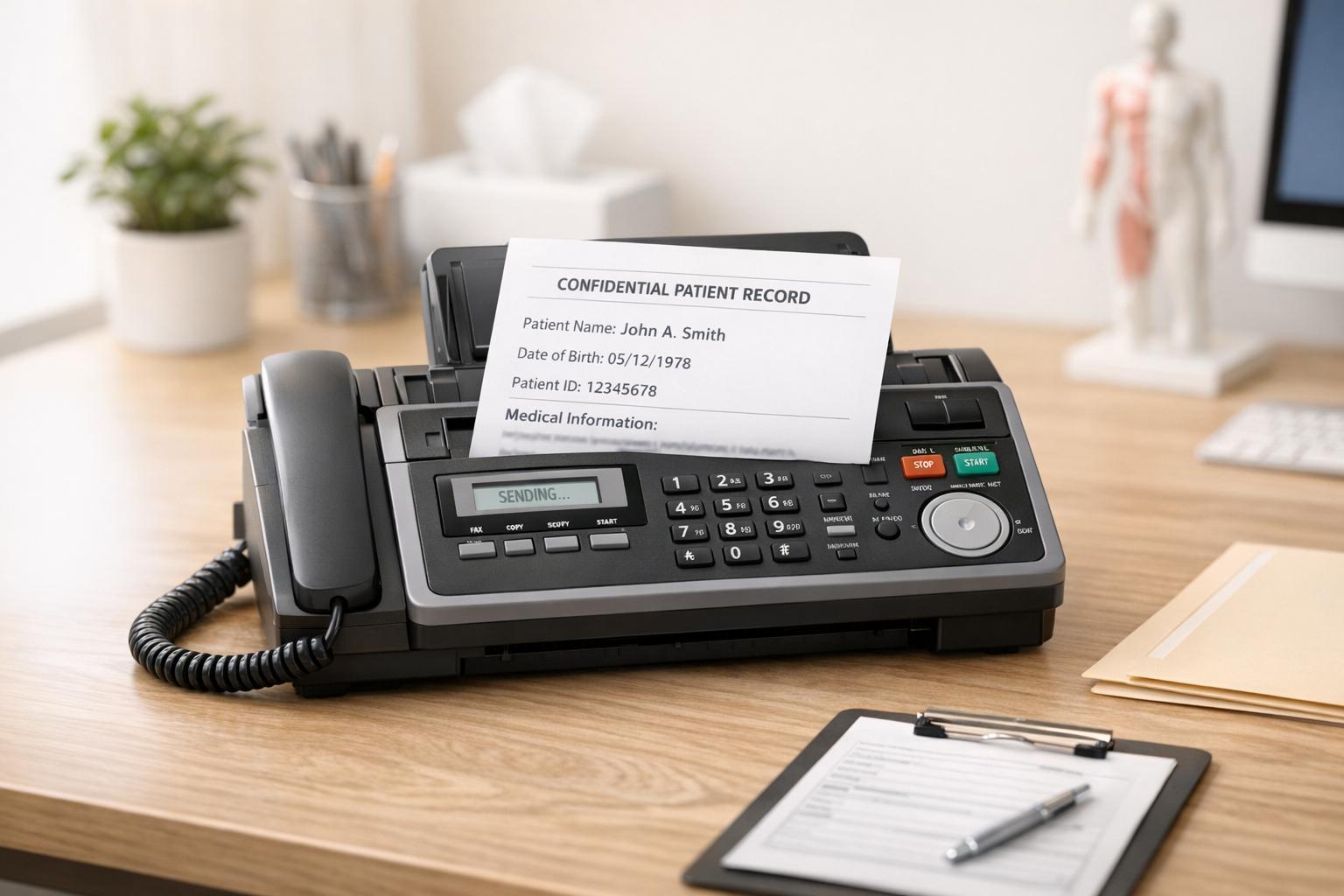
HIPAA Fax Mistakes Clinics Still Make in 2025 (Even When They Think They’re Compliant)
Even in 2025, faxing remains a key method for transmitting Protected Health Information (PHI) in U.S. healthcare. But many clinics still make critical mistakes that violate HIPAA regulations, often without realizing it. These errors can lead to fines ranging from $100 to $1.5 million per violation. The problem isn’t the technology - it’s how it’s used.
Here are the 7 most common faxing mistakes clinics make:
- Assuming any online fax vendor is HIPAA-compliant: Without a signed Business Associate Agreement (BAA) and proper safeguards like encryption and audit logs, your faxes violate HIPAA.
- Using retail or public fax machines: These lack security measures, such as encryption and physical safeguards, and do not comply with HIPAA.
- Leaving faxes unattended: Documents left on printers or desks can be accessed by unauthorized individuals, leading to privacy breaches.
- Sending faxes to the wrong number: Mis-dialing without verification or proper incident documentation is a common and costly mistake.
- Using unencrypted email for failed faxes: Emailing PHI as a backup exposes sensitive data to unauthorized access.
- Relying solely on IT for compliance: Managing audit logs, access controls, and retention schedules is an organization-wide responsibility - not just IT’s.
- Having outdated or incomplete BAAs with fax vendors: Missing or improperly scoped agreements can result in severe penalties.
Key takeaway: HIPAA compliance requires more than just using a fax machine or online service. Clinics must ensure proper safeguards, immediate retrieval of faxes, and valid BAAs with vendors. Modern HIPAA-compliant fax solutions, like OneFaxNow, simplify compliance with features like encryption, detailed audit logs, and instant BAA generation.
Quick Tip: If your faxing process lacks encryption, audit trails, or a current BAA, it’s time to reassess your setup.
1. Assuming Any Online Fax Vendor Is 'HIPAA Compliant'
Just because a vendor claims to be "secure" or "HIPAA-ready" doesn't mean they're legally compliant. Many clinics mistakenly believe that using a modern online fax service automatically ensures compliance with PHI regulations - but that's not the case.
Under HIPAA, covered entities must confirm that any business associate handling electronic Protected Health Information (ePHI) has implemented specific technical, administrative, and physical safeguards. These safeguards must be outlined in a signed Business Associate Agreement (BAA) [3]. Without a BAA in place, any fax containing PHI is considered non-compliant [8].
"If your company doesn't have a BAA signed with both the HIPAA-compliant email provider and the online fax service, then any faxes that it sends will not be HIPAA-compliant, which could lead to incredibly hefty penalties." - LuxSci [8]
A BAA is more than just a formality - it's a legal contract that specifies how data is handled, the encryption standards used, log retention requirements (a minimum of six years), and breach response protocols [3][8]. To meet compliance, a vendor needs to provide a signed BAA, end-to-end encryption, role-based access controls, detailed audit logs (kept for six years), and secure data disposal methods [3][8]. Failing to meet these standards can result in severe penalties, as demonstrated by real-world cases [1].
What to look for in a compliant fax vendor:
- A signed BAA
- AES-256 encryption for data in transit and at rest
- Audit logs retained for six years
- Role-based access controls
- Documented incident response procedures [3][7]
This checklist should be your starting point before tackling other faxing compliance challenges.
For example, OneFaxNow offers an optional HIPAA mode that includes all required safeguards. Their service provides instant BAA generation and download, accessible directly from your dashboard. For more details, visit HIPAA Fax or check out their guide on How to Send HIPAA Compliant Faxes Online.
2. Faxing PHI From Retail Stores And Shared Public Machines
If you've ever stopped by a FedEx, UPS, or Staples, you might have noticed their fax machines available for public use. While they may seem like a convenient option for sending documents, these machines are far from secure when it comes to transmitting sensitive medical information.
Here’s why retail fax machines are risky for handling Protected Health Information (PHI):
- No HIPAA Compliance: Retail fax providers like FedEx or Staples are not classified as Business Associates under HIPAA. This means they won’t sign a Business Associate Agreement (BAA) with your clinic [3]. Without a BAA, sending PHI through these services violates HIPAA regulations.
- Public Access: These machines are often placed in open, unmonitored areas. Documents left on the output tray can be easily viewed or taken by unauthorized individuals [2]. This lack of control breaches HIPAA’s physical safeguard requirements.
- No Security Features: Retail fax machines typically lack encryption, audit trails, or secure disposal options for sensitive information [2].
"Traditional fax machines pose security risks that can compromise the confidentiality of PHI, including: Easy access by unauthorized individuals with prying eyes who can view or steal sensitive information." - Updox [9]
Using a public fax machine to send an entire medical record can also violate HIPAA’s “minimum necessary” standard, which requires limiting the amount of disclosed PHI to only what’s needed [3]. A well-known example of the consequences of unsecured devices occurred in 2013 when Affinity Health Plan was fined $1.2 million for failing to wipe the hard drives of a leased copier. This oversight exposed the records of over 350,000 patients [1]. While this case involved a copier, the takeaway is clear: unsecured devices, like publicly accessible fax machines, come with serious risks and potential penalties.
For clinics still relying on retail fax services, the risks aren’t worth it. Instead, consider secure alternatives like OneFaxNow’s HIPAA mode, which provides encryption, instant BAA execution, and detailed audit logs. For more information, visit HIPAA Fax or check out Do I Need a BAA to Fax Medical Records? for a quick compliance guide.
3. Leaving Faxes On Unattended Printers And Front Desks
Picture this: a fax containing a patient’s complete medical history lands on the printer at your front desk. The receptionist is busy, and the document sits there, unattended. During this time, anyone passing by - a delivery driver, a vendor, or even another patient - could accidentally pick it up and see private information. That’s a HIPAA violation, plain and simple. This kind of mistake doesn’t just break the rules - it creates opportunities for serious privacy breaches.
"Always keep an eye on your documents. Even if you need to do a quick task while sending a fax, leaving patient records unattended can lead to a HIPAA violation. You also need to store these faxes in a secure location." - iFax [3]
Unattended faxes open the door to identity theft, privacy violations, and even damage to your organization’s reputation [3][10]. Physical access to faxed documents must be tightly controlled. The penalties for non-compliance are steep - fines can range from $100 to $50,000 per incident, with annual caps reaching $1.5 million [1][3][7][10].
To comply with HIPAA, fax outputs need to be retrieved immediately and handed directly to authorized staff [1][4][7]. Fax machines should also be located in secure areas, away from public access. Simply relying on a front desk that’s open to unauthorized individuals doesn’t meet compliance standards.
For clinics still using traditional fax machines, it’s critical to implement strict retrieval protocols and provide staff with the necessary training. Alternatively, switching to digital fax solutions with built-in HIPAA compliance features - like OneFaxNow's HIPAA mode - can eliminate these risks. Digital options offer audit logs and controlled access, ensuring sensitive information stays secure. Learn more by visiting How to Send HIPAA Compliant Faxes Online. These challenges highlight why modern, secure solutions are no longer optional - they’re essential.
4. Mis-Dialed Numbers Without Verification or Incident Logs
A single wrong digit in a fax number can lead to a serious HIPAA breach. If patient records end up in the hands of the wrong recipient, it’s considered an unauthorized disclosure of Protected Health Information (PHI) [3][6]. This situation becomes even more problematic if clinics don’t have proper verification procedures in place or fail to document the incident - both of which can significantly increase risks during an OCR audit [7].
HIPAA mandates that covered entities maintain logs of misdialed fax events for at least six years [3]. Without documented corrective measures, penalties can range from $10,000 to $50,000 for cases of willful neglect, and fines can climb as high as $1.5 million for unresolved issues [3][7].
To comply with these rules and minimize risks, clinics should establish strong verification processes. Always double-check fax numbers before sending, and consider pre-programming frequently used numbers while periodically testing them to reduce dialing mistakes [4][6]. Additionally, configure your fax system to generate confirmation reports for every transmission, which can serve as your first line of documentation [4]. If a fax is sent to the wrong recipient, act immediately: document the discovery, notify the sender, ensure any misdirected PHI is destroyed, and log all corrective actions taken [4]. These steps not only address immediate concerns but also set the stage for adopting digital solutions that streamline compliance.
Digital fax solutions with built-in audit trails can make managing these issues much easier. For instance, OneFaxNow's HIPAA mode automatically tracks and timestamps all fax activities, providing audit-ready documentation. Each transmission is logged and accessible through a compliance dashboard, eliminating the need for manual tracking and ensuring you’re prepared for audits. For more information about BAA requirements, check out Do I Need a BAA to Fax Medical Records?
5. 'Fixing' Failed Faxes With Unencrypted Email Attachments
When a fax fails, some staff resort to emailing the document as a quick fix. However, this creates a serious risk of exposing Protected Health Information (PHI). Why? Standard email transmits data in plain text, lacks encryption, and often operates without a Business Associate Agreement (BAA). These vulnerabilities make sensitive information easy prey for interception during transmission or while sitting in an inbox [6].
"Email itself is not HIPAA-compliant. When you send a standard email, it travels in plain text from your mail server to your recipient's. That means anyone can intercept the email during transit, including when it's left unread in the recipient's inbox." – eFax Content Team [6]
Using email without a BAA isn't just risky - it’s a compliance violation. Penalties for such breaches are steep, ranging from $100 to $1.5 million per violation [8][7].
A better approach? Opt for a HIPAA-compliant online fax service with features like end-to-end encryption, audit trails, and a signed BAA [2]. If email absolutely must be used, ensure it’s through an encrypted, HIPAA-compliant service that includes a BAA.
To stay ahead of these challenges, organizations should establish secure backup methods before a fax failure occurs. Train employees on the dangers of unencrypted transmissions, make secure alternatives easily accessible, and configure systems to default to encryption.
Modern HIPAA-compliant fax solutions eliminate the need for risky email workarounds. For instance, OneFaxNow's HIPAA mode offers features like automatic retries, real-time delivery tracking, and success-only payment models. If a fax doesn’t go through, you’re notified immediately and can resend via the same secure, encrypted channel. Plus, their compliance dashboard simplifies the process of signing a BAA and tracking all transmissions for audits. For more details on secure faxing, explore How to Send HIPAA-Compliant Faxes Online.
sbb-itb-0df24da
6. Treating Fax Logs, Access Controls, And Retention As 'IT's Problem'
It’s a common misconception in many clinics that tasks like managing audit trails, access controls, and retention schedules fall squarely on the IT department. In reality, HIPAA compliance is a responsibility that stretches across the entire organization, requiring collaboration and oversight from all departments [3].
Unlike purely technical issues, these responsibilities demand a broader approach. Relying solely on IT to handle them can create compliance gaps. While IT teams are crucial, they often lack the specialized HIPAA knowledge or organizational authority needed to enforce policies across departments. This can lead to missing documentation, incomplete audit trails, or access controls that exist only in theory - any of which could result in compliance violations and hefty fines.
To avoid these pitfalls, compliance officers should take the lead on managing fax logs, access controls, and retention schedules. This means establishing clear procedures, conducting regular audits, and ensuring staff receive appropriate training. For example, HIPAA requires that fax audit trails be stored for at least six years, with raw logs kept for 6 to 12 months before being compressed [2].
Modern HIPAA fax solutions make it easier to maintain compliance. Take OneFaxNow's HIPAA mode, for instance. Its compliance dashboard gives compliance officers instant access to audit logs, the ability to download a signed Business Associate Agreement (BAA), and tools to track all fax transmissions - without having to rely entirely on IT. Each fax is logged with timestamps and recipient details, ensuring the organization is always prepared for an audit. This kind of streamlined oversight complements the advanced features of modern HIPAA fax solutions discussed earlier. For further insights into compliance, check out Do I Need a BAA to Fax Medical Records?.
7. Missing, Outdated, Or Incorrectly Scoped BAAs With Fax Vendors
Many clinics understand the importance of having a Business Associate Agreement (BAA) in place, but they often fall short when it comes to managing the details. A BAA must be up-to-date, signed, and specifically outline how a fax vendor handles Protected Health Information (PHI) [9]. However, it’s not uncommon for clinics to rely on outdated or unsigned agreements - or worse, agreements that overlook critical aspects like fax transmission and storage. These lapses don’t just jeopardize compliance; they can also lead to hefty penalties.
Take Advocate Health Care, for example. In 2016, they were hit with a $5.55 million HIPAA fine for failing to execute a proper BAA with a vendor [11]. Without a fully executed BAA, clinics lack the documentation to show they’ve taken the necessary steps to protect PHI.
But it’s not just about having a signature - the scope of the agreement is equally important. For fax services that use store-and-forward technology, the BAA must specifically address the risks associated with intermediary storage [5]. Similarly, if you’re using email-to-fax services, you’ll need separate BAAs for both the email provider and the fax vendor, as each plays a role in handling electronic PHI (ePHI) [8]. These complexities highlight why managing BAAs effectively is so important.
Fortunately, modern HIPAA-compliant fax solutions make this process easier. For instance, OneFaxNow’s HIPAA mode allows compliance officers to instantly generate and download a signed, scoped BAA directly from their dashboard. This includes breach notification procedures, ensuring everything is ready for immediate execution. For further guidance on when a BAA is required, check out Do I Need a BAA to Fax Medical Records?
What HIPAA-Compliant Faxing Actually Looks Like: Comparison Table
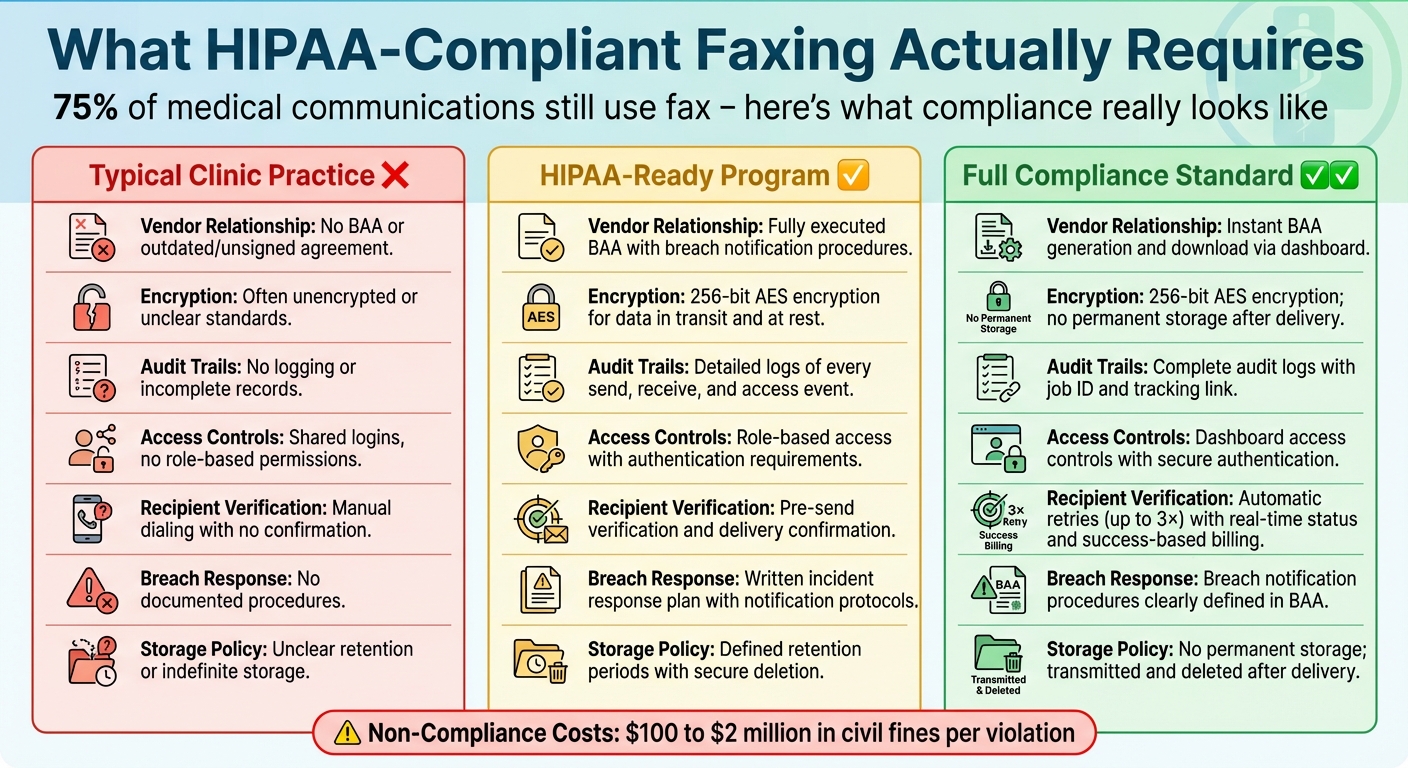
HIPAA-Compliant Faxing Requirements Comparison: Standard vs Compliant Practices
Did you know that about 75% of medical communications in the U.S. still rely on fax? That’s why it’s so important to understand the difference between basic faxing and truly HIPAA-compliant faxing. It’s not just about choosing a "secure" vendor - it’s about ensuring every step of the process is safeguarded.
Here’s a comparison table that highlights the key differences between standard clinic practices, HIPAA-ready programs, and OneFaxNow’s HIPAA mode. It sheds light on common gaps like weak encryption, lack of audit trails, and inadequate breach responses.
| Compliance Element | Typical Clinic Practice | HIPAA-Ready Program | OneFaxNow HIPAA Mode |
|---|---|---|---|
| Vendor Relationship | No BAA or outdated/unsigned agreement | Fully executed BAA with breach notification procedures | Instant BAA generation and download via dashboard |
| Encryption | Often unencrypted or unclear standards | 256-bit AES encryption for data in transit and at rest [12] | 256-bit AES encryption; no permanent storage after delivery |
| Audit Trails | No logging or incomplete records | Detailed logs of every send, receive, and access event | Complete audit logs with job ID and tracking link |
| Access Controls | Shared logins, no role-based permissions | Role-based access with authentication requirements | Dashboard access controls with secure authentication |
| Recipient Verification | Manual dialing with no confirmation | Pre-send verification and delivery confirmation | Automatic retries (up to three times) with real-time status and success-based billing |
| Breach Response | No documented procedures | Written incident response plan with notification protocols | Breach notification procedures clearly defined in the BAA |
| Storage Policy | Unclear retention or indefinite storage | Defined retention periods with secure deletion | No permanent storage; transmitted and deleted after delivery |
"Standard online fax services lack the encryption, audit trails, and Business Associate Agreements required under HIPAA." - eFax Corporate [12]
Non-compliance isn’t just risky; it’s expensive. Civil fines for violations range from $100 to over $2 million [13]. That’s why it’s crucial to choose a fax solution that doesn’t just talk about compliance but actually delivers it. Each of the seven compliance elements listed above should be clearly documented, implemented, and included in your Business Associate Agreement (BAA).
Why OneFaxNow Stands Out for HIPAA-Compliant Faxing
OneFaxNow’s HIPAA mode offers a straightforward, pay-as-you-go option ($6.50 for 1–10 pages; $10.00 for 11–50 pages) with no subscription required. It provides instant BAA execution, detailed audit trails, and billing based only on successful transmissions. Compliance officers can easily generate and download a signed BAA directly from the dashboard, ensuring every fax meets HIPAA standards.
Want to dive deeper? Check out how to send HIPAA-compliant faxes online or explore OneFaxNow's HIPAA fax solution.
Conclusion
Staying compliant with HIPAA isn't a one-and-done task - it requires consistent effort, including keeping up with vendor agreements, maintaining thorough documentation, and implementing up-to-date security measures. Shockingly, over 70% of providers still rely on faxing [14], where even a single mistake can result in penalties ranging from $100 to $1.5 million [2].
These common missteps highlight a critical point: believing you're compliant doesn't always mean you are. Many clinics that assume they're following the rules still face violations. The good news? These errors are entirely avoidable with the right combination of training, modern technology, and a vendor that takes HIPAA seriously.
To assess your current faxing setup, ask yourself three key questions: Does your fax provider sign a BAA? Are faxes encrypted and logged for audits? Do you have documented procedures for handling misdirected faxes? If you hesitated or answered "no" to any of these, it might be time to rethink your approach to compliance.
OneFaxNow's HIPAA mode addresses these concerns head-on. Starting at just $6.50 for 1–10 pages with no subscription required, it offers instant BAA generation, 256-bit AES encryption, no permanent storage after delivery, and detailed audit logs. Compliance officers can even download a signed BAA directly from the dashboard, making the process seamless.
Want to ensure your next fax meets HIPAA standards? Send a Fax Online - No Account Required or check out OneFaxNow's HIPAA fax solution to see how easily you can fax securely and confidently.
FAQs
What should I consider when choosing a HIPAA-compliant fax service?
When choosing a HIPAA-compliant fax service, it's crucial to focus on security, compliance, and ease of use to ensure that protected health information (PHI) is managed correctly.
Key features to look for include end-to-end encryption, which protects your data both during transmission and while stored. Make sure the provider offers a Business Associate Agreement (BAA) that can be signed without delay. Other must-haves include secure, U.S.-based data storage and audit-ready logs to track and monitor access to sensitive information effectively.
It's also important to select a service with role-based access controls, ensuring only authorized users can access PHI. The service should have clear protocols for managing failed or misdirected faxes, as well as transparent pricing - preferably with a pay-per-fax option to avoid unnecessary subscription costs. A dependable provider will also offer modern payment methods and a straightforward, user-friendly experience for both occasional and regular faxing needs.
Why isn’t it safe to send PHI using public fax machines?
Public fax machines, like those in retail stores or shared office spaces, pose a serious risk when it comes to transmitting Protected Health Information (PHI). These machines are often placed in areas where anyone can access them, making it easy for sensitive information to be intercepted, read, or even taken by someone who shouldn't have access.
On top of that, most public fax services lack a Business Associate Agreement (BAA) - a key requirement under HIPAA for handling PHI. Without a BAA, there's no guarantee that the vendor has the necessary safeguards in place to protect patient information. Using these machines could lead to compliance violations and even data breaches.
What steps can clinics take to prevent faxing sensitive information to the wrong number?
To minimize the risk of faxing sensitive information to the wrong number, clinics can take a few straightforward yet effective precautions. Start by maintaining a secure, centralized contact list with verified fax numbers. This helps eliminate errors from manual number entry. Many digital fax systems even allow staff to choose numbers exclusively from pre-approved lists, adding an extra layer of accuracy.
Next, implement a double-check process. Before sending a fax, the sender should cross-check the number with the patient’s record or read it aloud to confirm accuracy. This simple step can catch mistakes before they happen.
Another important safeguard is ensuring your fax system includes audit logs and delivery tracking. These features provide a detailed record of each transmission, including timestamps, recipient information, and delivery status. Such logs are invaluable for identifying and addressing any errors.
Lastly, have a misdirected fax protocol in place. This should guide staff on what to do if a fax is sent to the wrong recipient. Key actions include notifying the unintended recipient, ensuring the document is either secured or destroyed, and documenting the incident for compliance purposes. Following these measures can greatly reduce the chances of HIPAA violations stemming from faxing errors.