How to Organize a Multi-Provider Medical Records Fax (Lab, Imaging, Specialist)
Step-by-step guide to indexing, merging, and securely faxing multi-provider medical records while meeting HIPAA requirements.
How to Organize a Multi-Provider Medical Records Fax (Lab, Imaging, Specialist)
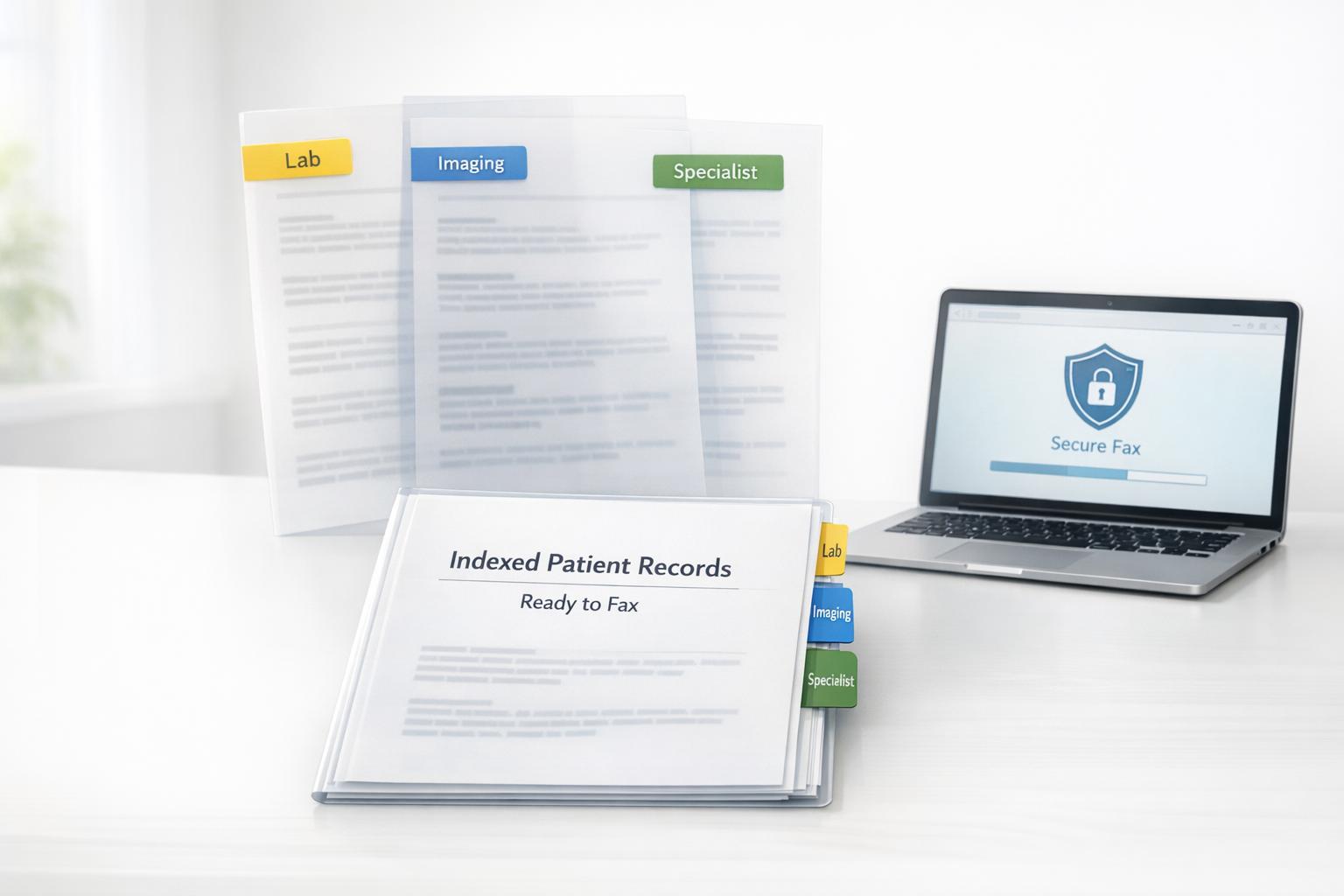
When sending medical records from labs, imaging centers, and specialists via fax, organization is key. Disorganized packets can delay processing by 2–5 days, increase compliance risks, and waste time for both senders and recipients. A clear, indexed document not only speeds up reviews but also reduces errors and ensures HIPAA compliance. Here's a quick breakdown of how to properly organize and send multi-provider faxes:
- Create a Cover Sheet Index: Include sender/recipient details, page count, a document index (e.g., "Pages 2–5: Lab Results"), and a HIPAA confidentiality disclaimer.
- Merge Files into One Document: Combine PDFs, JPGs, and other formats into a single file in the correct order. Use clear file names to avoid confusion.
- Choose the Right Delivery Method: Fax for urgent needs, mail for large archives, or secure upload portals for EHR integration.
- Verify Recipient Details: Confirm fax numbers and recipient information to avoid sending sensitive data to the wrong location.
- Ensure Secure Transmission: Use a HIPAA-compliant fax service with encryption, audit logs, and automatic deletion of PHI after delivery.
Step 1: Create a Cover Sheet Index
A well-organized cover sheet index turns a chaotic pile of pages into an easy-to-navigate document. With just a glance, the recipient should know exactly where to find each provider's records, eliminating the need to sift through the entire packet.
What to Include on the Cover Sheet
Start with the basics: sender and recipient names along with their contact details. This ensures the records are routed correctly and makes follow-up simpler.
Next, include the total page count (e.g., "Total Pages: 20"). This helps the recipient quickly verify that all pages have arrived. Missing pages in a medical record can create delays in treatment or insurance approvals.
The heart of the cover sheet is the document index. Break down the packet into sections by page ranges and provider types. For example:
- Pages 2–5: Lab Results (Quest Diagnostics)
- Pages 6–10: Imaging Reports (Radiology Associates)
- Pages 11–15: Specialist Consultation Notes (Dr. Sarah Chen, Cardiology)
This index streamlines the review process and keeps everything organized. Also, include transmission metadata - the date and time the fax was sent. Many online fax services automatically timestamp transmissions, but adding it to the cover sheet ensures a complete record for audits and filing.
Finally, ensure the entire process aligns with HIPAA guidelines to protect patient information.
Follow HIPAA Confidentiality Standards
To comply with HIPAA, every medical fax cover sheet must feature a confidentiality disclaimer. This protects sensitive health information and provides instructions for handling a misdirected fax. A standard disclaimer might read:
"This transmission contains confidential health information intended only for the recipient listed above. If you received this fax in error, please destroy it immediately and notify the sender."
Keep in mind that the cover sheet is the most exposed part of the document during transmission. Avoid including detailed clinical information here - use it strictly for routing and indexing. This reduces the risk of exposing Protected Health Information (PHI).
Double-check the recipient's fax number to avoid accidental HIPAA breaches. Using a HIPAA-compliant fax service, such as OneFaxNow, offers added security. These services provide encryption during transmission and storage, a Business Associate Agreement (BAA), and audit logs - all essential for managing PHI securely. Pricing for standard HIPAA-compliant faxing starts at $6.50 for 1–10 pages or $10.00 for 11–50 pages, which includes the BAA and audit logs.
sbb-itb-0df24da
Step 2: Combine Multiple File Types into One Document
Medical records often come in various formats - PDFs from patient portals, JPG scans from imaging centers, and Word documents from specialists. To simplify navigation, it’s helpful to merge these files into a single, organized document.
Merge PDFs, JPGs, and Other Files
Modern online fax services make merging files straightforward. Simply upload your files in order, starting with the cover sheet, followed by lab reports, imaging scans, and specialist notes. Platforms like OneFaxNow support multiple file types, including PDF, DOCX, TXT, JPG, PNG, and TIFF. These services automatically convert everything into a unified fax format. You can attach up to 15 individual files per transmission, with each file capped at 20MB, and the final packet supporting up to 50 pages [2]. This process ensures all records are neatly compiled and easy to access.
For image files, the system optimizes them to 300 DPI during processing to ensure readability [5]. If you're scanning documents with a phone, use a dedicated scanning app. These apps help align documents properly and minimize glare. Always double-check for any cut-off text or reflections before uploading [2].
The validation process, which checks file formats and page counts, typically takes just 2 to 5 seconds [2]. Files downloaded directly from patient portals are often high-quality and require little to no additional adjustments. Once merged, take a moment to organize and verify the packet before sending.
Use Clear File Names and Folders
To keep everything orderly, use clear file names and folder structures. Group files by provider type (e.g., Labs, Imaging, Specialists) before uploading. Assign descriptive names to each file, like "Quest_Labs_03-15-2026.pdf" or "Radiology_MRI_Report.jpg", instead of generic ones like "Document1.pdf." This approach ensures files are uploaded in the correct sequence and helps prevent errors during transmission.
Check the Final Packet Before Sending
After uploading, review the status page to confirm that the cover sheet is first and all sections are in the correct order [3]. Double-check the total page count to ensure it matches the recipient’s expectations - this helps avoid any delays. Most fax services provide a summary before you finalize the transmission, giving you one last chance to catch mistakes. Remember, the cover sheet is included in the total page count, so a 19-page document plus a cover sheet equals 20 pages in total.
Step 3: Choose Between Fax, Mail, or Secure Upload
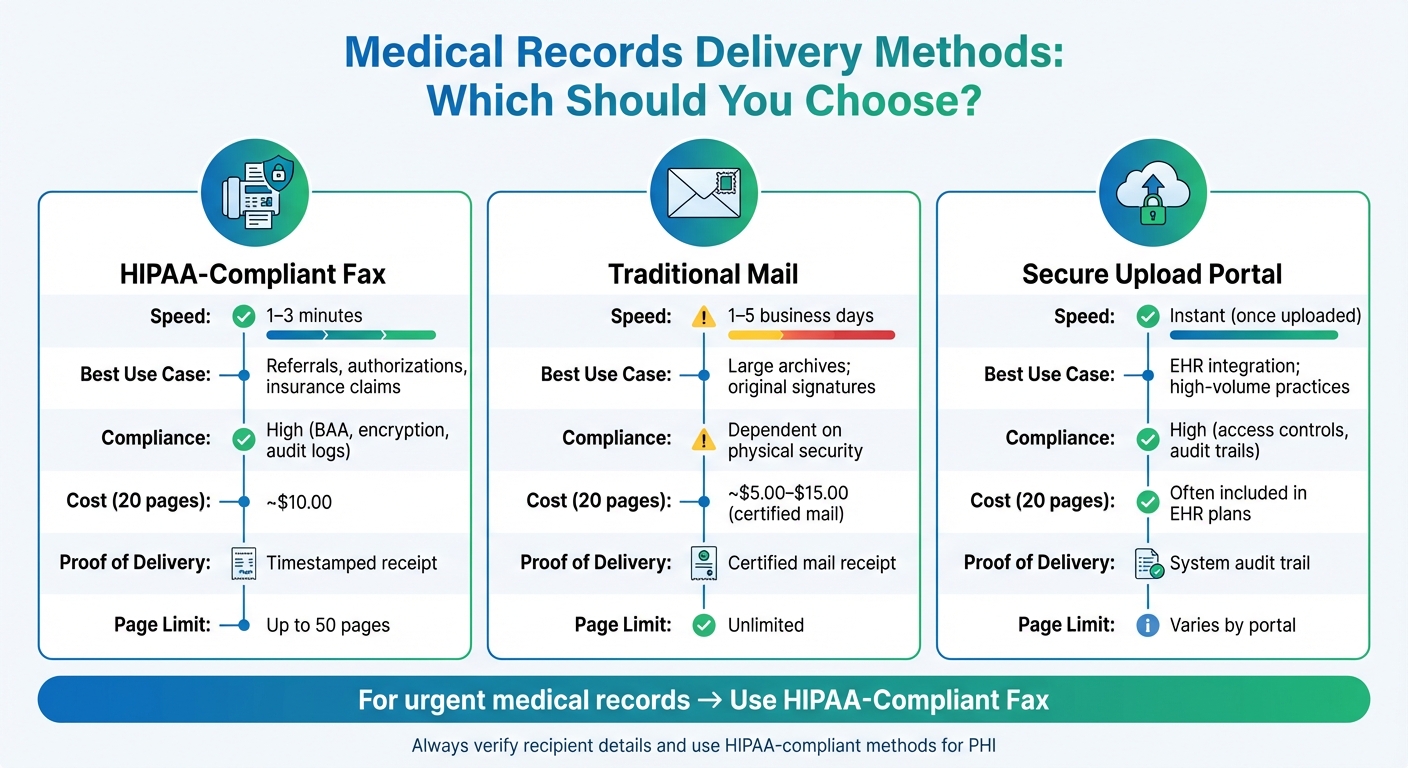
Medical Records Delivery Methods Comparison: Fax vs Mail vs Secure Upload
Once your multi-provider packet is organized, the next step is picking the delivery method that’s reliable, secure, and fits the situation. Each method has its own perks, so your choice depends on factors like urgency, file size, and compliance requirements.
When to Fax Medical Records
Faxing is ideal for time-sensitive situations. Digital faxes take just 1–3 minutes to deliver, making them perfect for referrals, insurance approvals, or cases where a specialist needs lab results ASAP. For example, if an insurer has a same-day deadline for a claim appeal, faxing ensures the documents arrive quickly.
A HIPAA-compliant fax service provides an added layer of security and reliability. It generates a timestamped receipt and an audit log, which can be crucial for meeting legal or insurance deadlines. The U.S. Department of Health & Human Services notes:
HIPAA permits sharing protected health information by phone, fax, or email, provided reasonable safeguards are used [7].
Platforms like OneFaxNow offer features like AES-256 encryption, automatic deletion of sensitive data after transmission, and an instant Business Associate Agreement (BAA). These safeguards ensure compliance while keeping things efficient.
Faxing is also a cost-effective option for smaller packets. Sending a 20-page medical record packet via an online HIPAA-compliant fax service costs around $10.00 - significantly less than the $26 to $44 charged by retail fax providers [4][3]. However, keep in mind that most services limit transmissions to 50 pages [1][2].
When to Mail Medical Records
Mailing is the go-to option when dealing with large volumes of records or when original signatures are required. For example, if you’re sending hundreds of pages of historical documents or if a court requests paper copies, traditional mail is often the best choice - especially if the recipient doesn’t have access to a fax machine or secure upload portal.
That said, mail is slower. Deliveries typically take 1 to 5 business days, so it’s not ideal for urgent needs. If speed is a concern, secure upload portals might be a better alternative.
When to Use Secure Upload Portals
Secure upload portals are excellent for direct integration with Electronic Health Records (EHR) systems. Many hospitals and clinics allow patients to upload records directly through these portals, offering strong access controls, centralized audit trails, and instant delivery [8]. This method works particularly well for high-volume practices that need to manage a lot of data efficiently.
However, not all organizations use portals. While 86% of hospitals have updated EHR systems, only 44% of clinicians feel these systems offer the expected level of integration with external organizations [6]. Always confirm that the recipient has a portal and that you have the correct credentials or upload link before choosing this method.
Delivery Method Comparison Table
| Factor | HIPAA-Compliant Fax | Traditional Mail | Secure Upload Portal |
|---|---|---|---|
| Speed | 1–3 minutes | 1–5 business days | Instant (once uploaded) |
| Best Use Case | Referrals, authorizations, insurance claims | Large archives; original signatures | EHR integration; high-volume practices |
| Compliance | High (BAA, encryption, audit logs) | Dependent on physical security | High (access controls, audit trails) |
| Cost (20 pages) | ~$10.00 | ~$5.00–$15.00 (certified mail) | Often included in EHR plans |
| Proof of Delivery | Timestamped receipt | Certified mail receipt | System audit trail |
| Page Limit | Up to 50 pages | Unlimited | Varies by portal |
This table makes it easy to weigh your options and choose the best delivery method for secure and efficient record sharing.
Why Choose OneFaxNow for Medical Records?
When you need to send lab results, imaging reports, or specialist notes quickly and securely, OneFaxNow simplifies the process. It can merge up to 15 files (PDF, DOCX, JPG, PNG, TIFF) into a 50-page HIPAA-compliant packet and deliver it in under 60 seconds. You’ll get instant tracking, automatic retries for failed deliveries, and a BAA generated directly through your dashboard. Plus, sensitive data is automatically deleted after transmission [1][3].
Step 4: Verify Recipient Information Before Sending
Double-checking recipient details is crucial before sending multi-provider records. Even a minor typo in a fax number can result in Protected Health Information (PHI) being sent to the wrong location, leading to serious privacy issues and delays in patient care. Mistakenly sent faxes, especially to public or unverified numbers, pose a significant risk to privacy and compliance [4]. This final verification step ensures your carefully organized packet reaches the correct recipient securely.
Double-Check Contact Details
Always contact the recipient's office directly to confirm their fax number before sending. Fax lines and clinic phone numbers can change more often than you might think, and relying on outdated information can lead to failed deliveries - or worse, sensitive records being sent to the wrong place.
When calling, verify the fax number and identify the authorized recipient, such as the Medical Records Department. This information should also appear on your cover sheet to ensure the packet is routed correctly within busy facilities [9]. As Laverne Gibbons, Supervisor in the Patient Billing Services Department at Memorial Sloan Kettering, explains:
People just want to get a person on the other end of the line [9].
Additionally, make sure to confirm the recipient's organization name and verify that they are authorized to handle PHI. Whether you're sending records to a new specialist, a hospital admissions office, a health insurer, or an HR department processing FMLA claims, accurate details are essential for compliance and preventing unauthorized exposure of PHI [1].
Keep a Verified Contact List
After verifying, save the fax number in a secure and regularly updated directory. This list should include the recipient's name, organization, department, fax number, and the date of the last verification.
Update this directory whenever you encounter changes, such as delivery confirmations indicating new contact details or failed transmissions due to outdated numbers. A well-maintained contact list not only saves time but also minimizes errors and ensures smooth future transmissions. For HIPAA-compliant workflows, use an audit dashboard to export transmission logs (in CSV or PDF format). These logs act as a permanent record of successful deliveries to verified providers [1][3].
Tip: Tools like OneFaxNow can validate fax numbers in real time, helping you catch formatting errors before sending [2]. They also provide a real-time status page and email confirmations with timestamped records, giving you proof that your packet was delivered to the correct recipient [1][2].
Step 5: Transmit Securely and Stay HIPAA Compliant
After organizing your multi-provider packet and confirming recipient details, the final step is securely transmitting the records. Handling Protected Health Information (PHI) requires encryption, audit trails, and a Business Associate Agreement (BAA) to meet HIPAA standards. Non-compliance can lead to penalties of up to $1.5 million per violation [10]. Here's how to ensure secure transmission while staying HIPAA compliant.
Use a HIPAA-Compliant Fax Service
Opt for a fax service that encrypts files both during transit and while stored. This ensures PHI, such as diagnoses, lab results, or treatment notes, remains protected even if intercepted.
Activate HIPAA Mode before sending any PHI. Services like OneFaxNow provide a dedicated HIPAA-compliant option, which includes stricter handling of files, automatic deletion of PHI after delivery, and instant access to a downloadable BAA [1][3]. A BAA is crucial for defining legal responsibilities between you and the service provider.
Additionally, HIPAA-compliant fax services offer real-time tracking links and timestamped delivery confirmations. These features provide proof of successful delivery and are essential for audits and compliance reviews [1][2]. Keep in mind that using HIPAA Mode may add $3.00 to $5.00 to standard faxing rates. For example, sending a 1–10 page fax costs approximately $6.50, while an 11–50 page fax costs around $10.00 [1][3].
Handle Failed Transmissions
If a transmission fails, document every attempt to ensure PHI remains secure. Services like OneFaxNow automatically retry failed transmissions at 3, 6, and 12-minute intervals after an initial busy signal, with progress updates available on a live status page [2].
In cases where all retries fail, the service should delete PHI files from their servers and release your payment authorization at no cost [2][3]. This "zero-risk guarantee" protects both patient privacy and your budget. Even failed attempts should be logged with timestamps and failure reasons to demonstrate compliance [2].
Before attempting a manual resend, revisit Step 4 for recipient verification procedures to avoid further issues.
Store Transmission Logs and Compliance Records
HIPAA regulations require fax audit trails to be stored for at least six years [11]. These logs should include details like timestamps, recipient information, page counts, and delivery outcomes. Store them in an encrypted cloud environment to reduce the risk of breaches, as nearly 50% of HIPAA violations result from stolen laptops or other devices [11].
Services with exportable audit dashboards make it easier to maintain compliance. Look for options that allow you to download logs in CSV or PDF formats for internal record-keeping and external audits [1][3]. While PHI files are deleted immediately after transmission to minimize risks, metadata such as delivery status, receipts, and audit logs are retained for compliance purposes [1].
Wrapping It All Up
Sending multi-provider medical records via fax doesn't have to be complicated. By following five key steps - index creation, file merging, method selection, recipient verification, and secure transmission - you can ensure that your process is both efficient and compliant. Each step builds on the previous one, creating a smooth workflow.
When done right, a well-organized fax packet can reduce recipient confusion by almost 50% while tripling the speed of processing. This streamlined process is made possible by tools that merge, secure, and track fax transmissions effortlessly.
A great example of this approach is OneFaxNow. Their service simplifies the process with features like automatic file merging, secure HIPAA mode, real-time tracking, and upfront flat-rate pricing. Without needing an account, you can combine multiple file types (PDFs, JPGs, DOCX) into a single fax of up to 50 pages. Transmissions are encrypted in HIPAA Mode, and the service even provides an instant BAA (Business Associate Agreement) at checkout. Plus, real-time tracking links, automatic retries at 3, 6, and 12-minute intervals, and a zero-risk guarantee (no charge if the fax fails) make it a reliable choice. And with flat-rate pricing, it’s far more cost-effective than traditional retail faxing, especially for HIPAA-compliant needs.
Say goodbye to manual merging and compliance headaches. Send your next fax online with ease - no account needed, fully HIPAA-compliant, and delivered with audit-ready logs for your peace of mind.
FAQs
What’s the easiest way to create a cover sheet index for mixed medical records?
When organizing documents, one simple approach is to create a cover sheet that outlines each document type (like labs, imaging reports, or provider notes) along with its corresponding page range. For example:
- Pages 2–5: Labs
- Pages 6–10: Imaging
Using a clear table or bullet points makes it easier to navigate. Another helpful tip? Combine all files into a single, well-labeled PDF or JPG. This keeps everything streamlined and accessible for whoever needs to review the materials.
How do I merge PDFs and photos into one fax in the right order?
To combine PDFs and photos into a single fax in the right sequence, start by uploading all your files to OneFaxNow. The platform works with various file types, including PDFs, JPGs, PNGs, and TIFFs, and lets you rearrange the order before sending.
Make sure your files are organized ahead of time. After uploading, use the interface to adjust their order as needed. You can also add a cover sheet if desired. Once everything looks good, simply input the recipient’s fax number and hit send.
What should I do if the fax fails or pages go missing?
If a fax doesn’t go through or pages get lost, OneFaxNow steps in to make things easier. It automatically retries up to three times if the line is busy or the delivery fails, boosting the chances of success without requiring any extra work from you. Plus, if all attempts fail, you won’t be charged - payment only applies for successful transmissions.
To keep you in the loop, the service offers real-time tracking and sends email notifications so you can confirm delivery or quickly resend if necessary.