5 Things People Don’t Realize About Faxing at FedEx, UPS, Staples, and Office Depot
Retail faxing can be costly, exposes documents at public counters, adds printing fees, has limited hours, and isn't HIPAA-compliant.
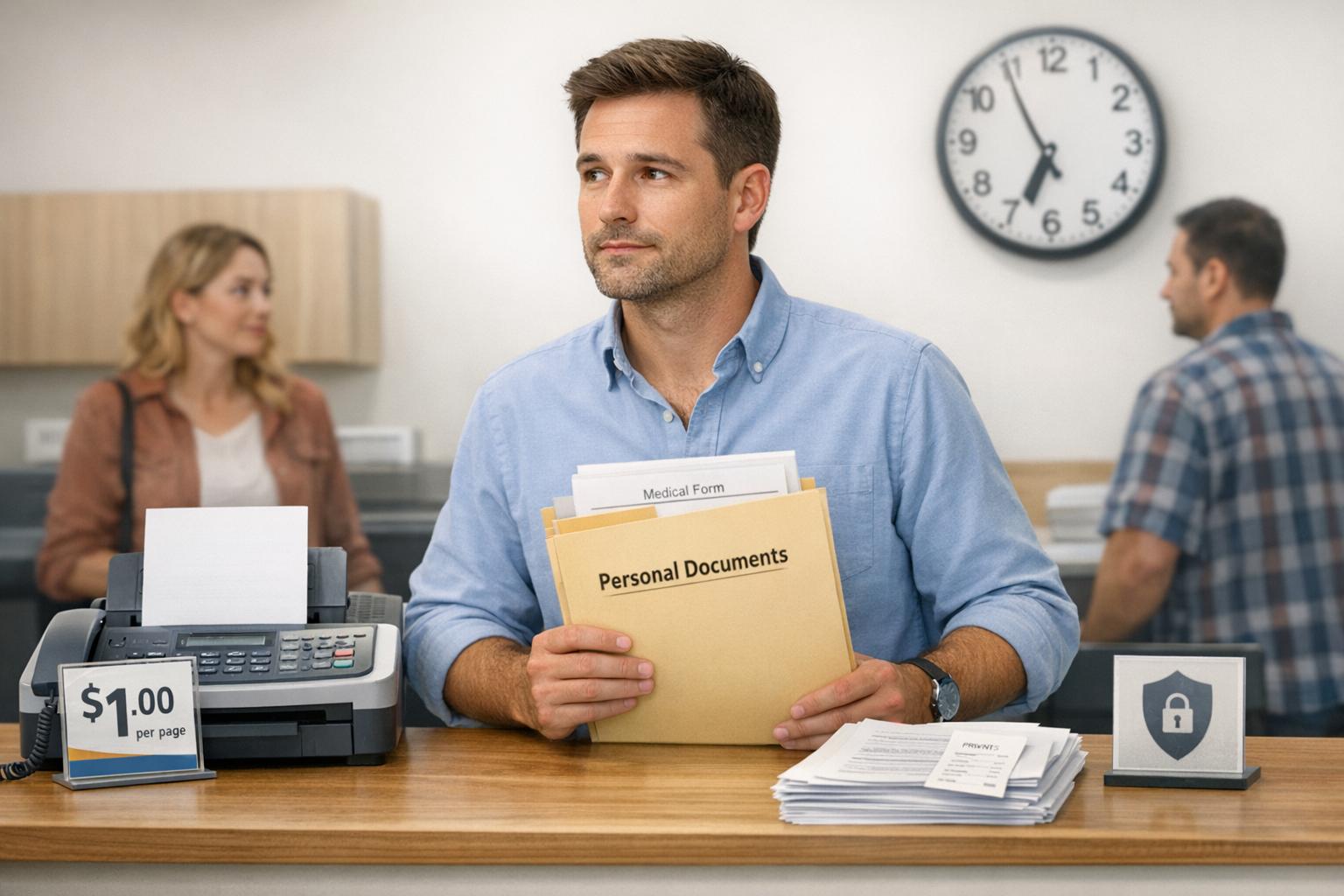
5 Things People Don’t Realize About Faxing at FedEx, UPS, Staples, and Office Depot
Faxing at retail stores like FedEx, UPS, Staples, and Office Depot can be more costly, inconvenient, and risky than most people expect. Here's what you need to know before heading to these locations:
- High Costs: Sending multi-page faxes can cost $20–$30 or more, with international rates climbing even higher.
- Extra Fees: Bringing digital files? You'll need to pay for printing before faxing.
- Privacy Risks: Sensitive documents are exposed at public counters and shared trays.
- Limited Hours: Store schedules and wait times can delay urgent faxes.
- Non-HIPAA Compliant: Retail services lack the legal safeguards required for medical records.
Key takeaway: Retail faxing works for quick, non-sensitive tasks. But for larger, private, or time-sensitive documents, online fax services offer lower costs, better security, and 24/7 convenience.
Quick Comparison
| Feature | Retail Faxing (FedEx, UPS, Staples, Office Depot) | Online Fax Services (e.g., OneFaxNow) |
|---|---|---|
| Cost | $1.79–$2.49/page (domestic), $7.99+ (international) | $3.50 (up to 10 pages), $5.00 (up to 50 pages) |
| Privacy | Documents exposed to staff and public | Encrypted, sent directly to recipient |
| HIPAA Compliance | Not provided | Includes signed BAA and audit trails |
| Availability | Limited to store hours | 24/7 access from any device |
| Convenience | Requires physical trip and potential wait times | No travel, instant upload and send |
Bottom line: For affordable, secure, and hassle-free faxing, online options are a better choice.
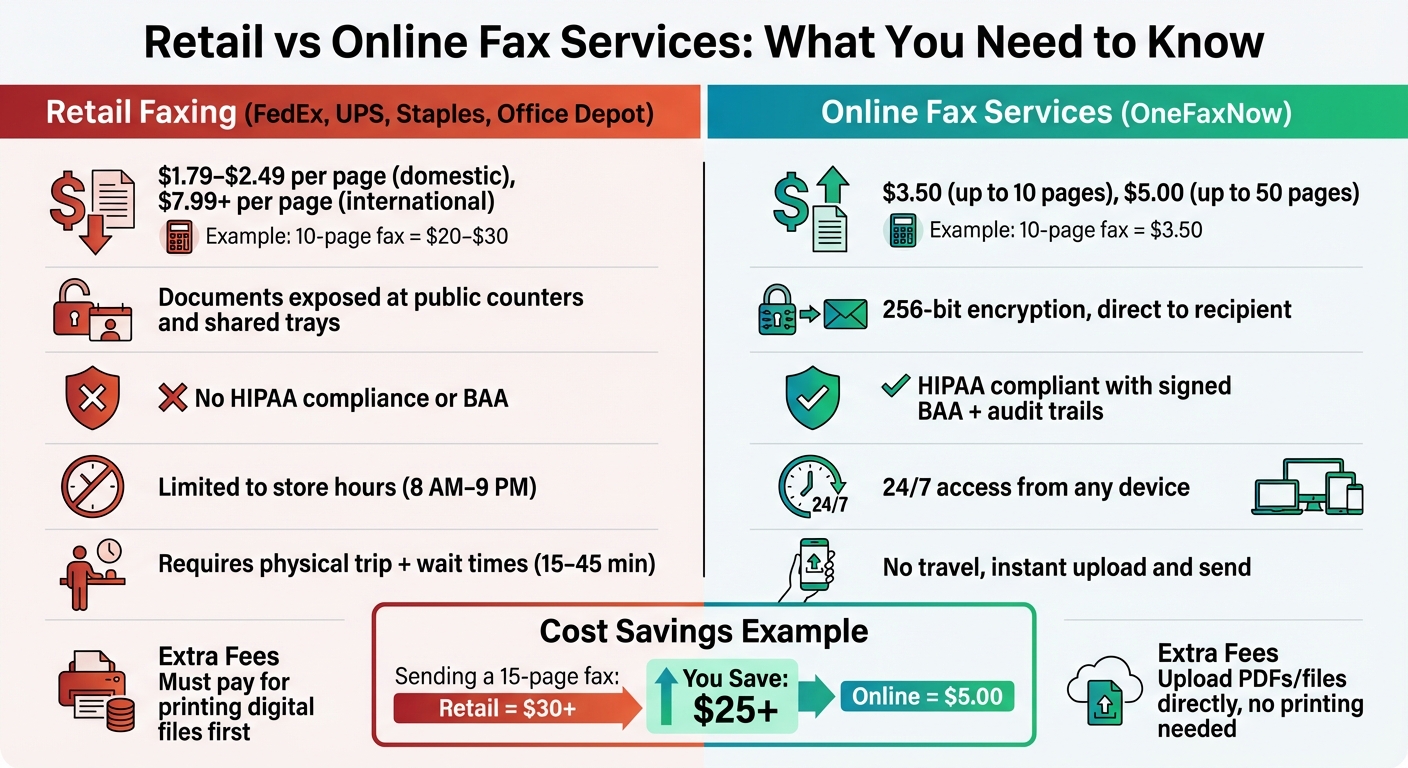
Retail vs Online Fax Services Cost and Features Comparison
1. Per-Page Pricing Gets Expensive for Multi-Page Documents
Retail faxing might seem like an affordable option at first glance, but the per-page pricing model used by places like FedEx Office, UPS Store, Staples, and Office Depot can make multi-page documents surprisingly pricey.
Domestic fax rates: Most retail outlets charge between $1.79 and $2.49 for the first page, with each additional page costing $1.59 to $2.19[3][6]. For instance, sending a 10-page fax at FedEx Office would cost you about $20.50, while Staples charges around $21.80 for the same document[3].
International faxing is even pricier. At Office Depot, the first page alone costs $7.99, and each additional page adds $3.99[6]. That means a 10-page international fax can easily surpass $40.00.
In contrast, online pay-per-fax services offer a much more affordable alternative. For example, OneFaxNow provides flat-rate pricing: $3.50 for up to 10 pages and $5.00 for 11–50 pages[2]. A 15-page fax sent through OneFaxNow would save you over $26.00 compared to retail options. Plus, they only charge if the fax is successfully delivered, with up to three automatic retries included[2].
For multi-page documents like contracts, medical records, or tax forms, online faxing through services like OneFaxNow is not only cheaper but also faster and more dependable. Retail faxing’s steep costs make it a less practical choice for handling extensive or sensitive documents.
2. You'll Pay Extra to Print Your Digital Files First
Retail fax machines are designed to handle physical documents, so if you arrive with a digital file - like a PDF on a USB drive or an email attachment - it must be printed before faxing. This means you'll be charged separately for both printing and faxing, which can quickly increase your total cost [5].
Stores like Office Depot, FedEx Office, and Staples enforce this process by requiring digital files to be printed at their in-store print centers prior to faxing. This "double fee" often surprises customers who aren't expecting the added expense.
To save money, consider bringing pre-printed copies of your documents. You can also skip the additional $1.50–$2.00 charge for a cover sheet by including the recipient's details on the first page of your document [5].
Alternatively, online fax services like OneFaxNow offer a hassle-free solution for digital files. With these services, you simply upload your document - whether it’s a PDF, Word file, or image - enter the recipient's fax number, and hit send. No printing, no extra fees, and no trips to the store required.
3. Your Documents Are Exposed at Public Counters and Shared Trays
Retail faxing doesn't just come with high costs - it also puts your document privacy at risk. Public fax counters are often in busy areas, leaving your sensitive information exposed to both staff and other customers. At full-service counters like those at UPS or Office Depot, employees handle your pages directly to process the fax. Meanwhile, at self-service kiosks, other customers might "shoulder surf" as you load your documents into the machine, compromising your privacy [1][5].
"When you send a fax from a public machine, your documents pass through equipment that dozens of strangers (and staff members) use every day." - FaxBurner [1]
The risks don't stop there. Printed receipts and pages often linger in shared output trays, making it easy for the next user to accidentally (or intentionally) see or take them. Misprinted pages are another issue - they frequently end up in regular trash bins without any secure disposal process [1][5].
Online fax services eliminate these vulnerabilities entirely. Instead of relying on public machines, documents are delivered directly to a secure digital inbox. This is especially critical for confidential information like medical records, legal agreements, or financial documents, ensuring they reach the recipient without any public exposure [3][7].
4. You're Limited by Store Hours and Wait Times
Retail fax services are tied to store operating hours. Most FedEx, UPS, Office Depot, and Staples locations open around 8:00 AM and close between 7:00 PM and 9:00 PM on weekdays, with shorter hours on weekends [3][5]. If you need to send an urgent fax outside these times, you're out of luck. This schedule adds an extra layer of inconvenience to an already time-consuming process.
"Because these services follow store hours, not your schedule, you're stuck working around someone else's clock." - Paul Rydell, FaxBurner [1]
The hassle doesn't stop there. Just getting to the store can eat up your time. Finding parking, waiting in line - especially during peak hours like 4:00–6:00 PM - can turn a simple task into a 15–45 minute ordeal [5][8]. And if you're sending a larger document, like a 20-page fax, expect additional delays since transmission takes roughly one minute per page [4].
Calling ahead rarely helps. Machines might be out of service, or staff could be too busy to assist you promptly [8][1]. Even services offering appointments, such as some FedEx Office locations [3], require planning in advance, which defeats the purpose of quick service.
Online fax services completely sidestep these issues. Platforms like OneFaxNow operate 24/7, letting you send documents instantly from your phone or computer. No travel, no waiting, and no worrying about store hours. For urgent or time-sensitive needs, digital faxing offers a far more efficient and convenient solution.
sbb-itb-0df24da
5. No HIPAA Business Associate Agreement or Audit Trails for Medical Records
If you're faxing protected health information (PHI), retail stores like FedEx, UPS, Staples, and Office Depot fall short of meeting HIPAA compliance standards. These locations don’t provide Business Associate Agreements (BAAs) - a legally required contract when a third party handles PHI on your behalf. Without a signed BAA, you bear full legal responsibility for any PHI breaches [9]. This gap in compliance not only exposes you to legal risks but also compromises the integrity of sensitive medical communications.
"Look for a provider that offers a signed Business Associate Agreement (BAA). Without one, you're assuming full legal responsibility for how PHI is handled." - Gil Vidals, CEO, HIPAA Vault [9]
Retail stores also lack the compliance-grade audit trails necessary for HIPAA adherence. While they might provide a basic confirmation receipt, these receipts don’t include critical details like who sent the fax, the exact time it was transmitted, or its final destination [9]. If a breach investigation arises, you won’t have the detailed logs needed to prove compliance or trace unauthorized access [9][10].
The physical setup of retail fax counters adds another layer of risk. PHI is often processed using shared equipment accessible to multiple people, handled by staff who aren’t trained as Business Associates, and left in areas like shared output trays where others can easily view it [1][5]. Unlike specialized services, retail stores don’t offer safeguards like 256-bit encryption, secure document disposal, or HIPAA-compliant transmission channels [2][5].
Failing to meet HIPAA standards doesn’t just jeopardize privacy - it can result in hefty penalties. Cases like CVS Pharmacy’s $2.25 million settlement and Walgreens’ $1.4 million fine highlight the financial consequences of mishandling PHI [11]. For healthcare providers and anyone managing medical documents, services like OneFaxNow's HIPAA mode offer a safer alternative. Features include instant BAA execution, encrypted transmissions, and a complete audit dashboard - all for $6.50 for 1–10 pages. (Last verified: February 5, 2026)
Retail Fax Services Comparison: FedEx, UPS, Staples, and Office Depot
When comparing retail fax services, pricing, privacy, and compliance are key factors to consider. Unfortunately, retail faxing often comes with high per-page costs and potential privacy risks.
FedEx Office charges approximately $1.89 for the first local page and $1.59 for additional pages, while national faxes start at about $2.49 [1]. They offer self-service kiosks, which provide a bit of privacy, but these machines are still located in public spaces.
The UPS Store has a pricing range of $1.00 to $2.00 per page. However, since staff handle your documents, there’s a chance your information will be viewed by third parties [1]. This hands-on approach highlights a notable difference in how retail faxing operates.
Staples typically charges around $2.00 per page, with some locations pricing additional pages as high as $2.20. While they use self-service printers, they do not provide encryption or a HIPAA Business Associate Agreement (BAA), which could be a concern for sensitive documents [1].
Office Depot, which merged with OfficeMax in 2013, charges about $1.59 per page for local faxes and $1.99 for long-distance faxes. They also charge a separate fee for cover pages. Customers can choose between self-service and full-service options, and they offer secure document disposal as an add-on for extra peace of mind [5].
Despite the convenience of retail fax services, they lack critical security features like encryption and HIPAA compliance. Online fax providers often address these gaps by offering BAAs and encrypted transmissions, making them a safer choice for professionals handling sensitive information.
For example, OneFaxNow's HIPAA mode provides instant BAA execution, a detailed audit dashboard, and advanced security measures, with pricing starting at $6.50 for 1–10 pages (Last verified: February 5, 2026).
Another limitation of retail faxing is availability. Store hours restrict access, whereas online faxing offers 24/7 convenience. These differences explain why many professionals are moving toward secure, on-demand online fax services.
When to Use Retail Fax Services vs. Online Fax
Retail faxing can be a practical choice in certain situations. For instance, if you're already at FedEx, UPS, Staples, or Office Depot for shipping or printing and need to send just 1–2 non-sensitive pages, it’s convenient to handle everything in one stop [1][5]. Similarly, if you need an immediate printed receipt or assistance from staff to prepare your documents, a retail counter might be the better option [1][3]. However, for anything beyond a quick in-store fax, online faxing is often the smarter choice.
Retail faxing fees add up quickly for longer documents. For example, sending a 15-page fax at Office Depot can cost over $30 [5]. In contrast, OneFaxNow's flat-rate pricing is far more affordable, charging $3.50 for up to 10 pages or $5.00 for 11–50 pages, whether the fax is local or national (Last verified: February 5, 2026).
Security is another critical factor. Sensitive documents like medical records, legal contracts, or financial forms should not be faxed from public counters, where they can be seen by staff or other customers [1][3][5]. Online fax services offer 256-bit encryption, ensuring files are delivered securely to the recipient’s inbox. If you're dealing with Protected Health Information (PHI), you'll need a HIPAA Business Associate Agreement (BAA), which retail stores don’t provide. OneFaxNow, however, offers this instantly along with full audit logs [2].
Online faxing also stands out for its flexibility. While retail stores usually close by 9 PM, online services are available 24/7, letting you fax from your phone, laptop, or tablet anytime [1][5][6]. They also handle automatic retries for busy signals and only charge for successful deliveries, unlike retail machines that often charge for failed attempts [2][5]. If you need to fax outside of business hours or send more than a couple of pages, skipping the drive and using an online service is the way to go.
FAQs
Why is online faxing often cheaper and more convenient than using retail stores?
Online faxing is often a cheaper and more convenient alternative to using retail stores like FedEx, UPS, Staples, or Office Depot. These stores typically charge $1.59 to $2.19 per page, which can become expensive quickly if you're sending multi-page documents. On the other hand, online services like OneFaxNow offer flat, straightforward pricing - for example, $3.50 for 1–10 pages or $5.00 for 11–50 pages - without requiring a subscription.
Aside from saving money, online faxing also spares you the hassle of driving to a store, waiting in line, or being limited by store hours. Plus, you avoid extra costs like printing fees or charges for failed transmissions, as many online services only charge for successful faxes. For occasional or non-sensitive faxing needs, online services offer a faster, easier, and more cost-effective solution than heading to a retail fax counter.
Why is online faxing more secure and private than using in-store fax services?
Online faxing offers a higher level of security and privacy compared to in-store faxing, thanks to features like encryption and secure file management. Services such as OneFaxNow use HIPAA-compliant encryption to safeguard your documents during transmission, ensuring they remain protected from interception or unauthorized access. Many platforms also include automatic file deletion after delivery, reducing the chance of sensitive information being exposed.
In contrast, in-store faxing poses risks like documents being left in shared trays or handled at public counters, which can compromise privacy. Online faxing eliminates these concerns by keeping your information digital and private. Plus, most services offer real-time delivery tracking and detailed audit logs, helping you confirm secure delivery and stay compliant with legal or regulatory standards. These features make online faxing a smart choice for sending healthcare, legal, or other sensitive documents.
What challenges should I consider when using retail fax services for urgent or sensitive documents?
Using retail fax services for sending urgent or sensitive documents can come with several downsides. For starters, costs can escalate quickly, especially if you're faxing multi-page documents. Many of these services charge per page, and if you need the store to print your document before faxing it, you might face additional fees.
Privacy is another major issue. Retail fax counters are often located in public spaces, and shared output trays can leave your sensitive information exposed to others. On top of that, store hours and potential wait times can be a hassle, particularly when you're working against the clock.
Another drawback is the lack of compliance features. Retail fax services typically don't offer essentials like HIPAA Business Associate Agreements (BAA) or audit trails, which are critical for handling protected health information (PHI) or other confidential materials. For situations requiring speed and security, online faxing solutions provide a more reliable and convenient alternative.