One PDF. Sent in order.
Send a long document by fax
Over the regular 50-page limit? Skip the manual splitting. Upload your PDF once and we'll split it into parts, then send them one at a time.
- Review every page range and price before paying.
- Follow each part from waiting to confirmed delivery.
- Pay only for the parts confirmed delivered.
One PDF · Up to 250 original pages · 50 MB
U.S. and Canada destinations · No subscription
Standard fax only. Need a BAA? Use HIPAA fax.
See exactly which part has arrived
Actual status screen with sample data
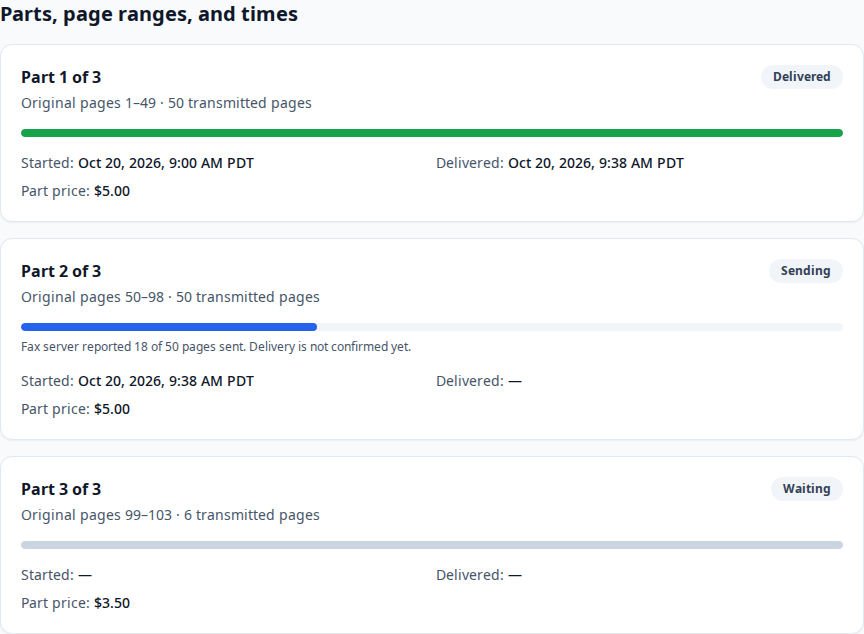 View full-size example (opens a new tab)
Less work for a longer fax
Keep your PDF in one piece
No separate files to name, upload, and send. We prepare each part within the 50-page fax limit, including its cover.
Help the recipient follow along
Numbered covers identify the part and original page range. The next part starts only after the previous one is confirmed delivered.
Keep a record for every part
See progress, start and delivery times, and the final charge. Reopen the status page from your email after closing the browser.
Prepare your document
Upload one PDF to review its parts, covers, and price.
No payment or fax transmission until you review and authorize.
Before you send a long document
How is my PDF split?
Each fax contains at most 50 transmitted pages. Numbered covers are on by default, so each part holds up to 49 original pages plus one cover. For example, a 103-page PDF becomes parts with original pages 1–49, 50–98, and 99–103. If you turn covers off, each part can hold 50 original pages.
How much does it cost?
Each part costs $3.50 for 1–10 transmitted pages or $5.00 for 11–50, before applicable tax. Covers count as pages. We authorize the total once for that sending session and charge only for confirmed delivered parts. You see the split, prices, and full authorization total before confirming your card.
What happens if one part fails?
We retry eligible failures automatically. If a part exhausts its retries or the result needs checking, later parts pause. Only confirmed delivered parts are charged. A failed part may have reached the recipient in part, so check with them before resending it.
Can I come back and send the remaining parts?
Yes, while the resume option is available on your status page. Open the link from your email and reupload the exact original PDF. Confirmed delivered parts are skipped; remaining parts get a new quote and a separate card authorization. Keep your original PDF because we do not keep it indefinitely.
Can I send a Word file, multiple PDFs, or a document over the limit?
This flow accepts one PDF up to 250 original pages and 50 MB. Convert other formats and combine documents into one PDF before starting. Files above these limits need to be reduced or split first.
Does this include HIPAA mode?
No. Long-document splitting currently supports standard fax only and does not include a BAA. Use the separate HIPAA fax flow when you need HIPAA mode.