Why Online Pay-Per-Fax Beats Free Trials and ‘Cancel Anytime’ Fax Apps for One-Off Needs
Prefer one-time faxing? Pay-per-fax avoids trials, account setup, and surprise charges while offering delivery proof and HIPAA options.
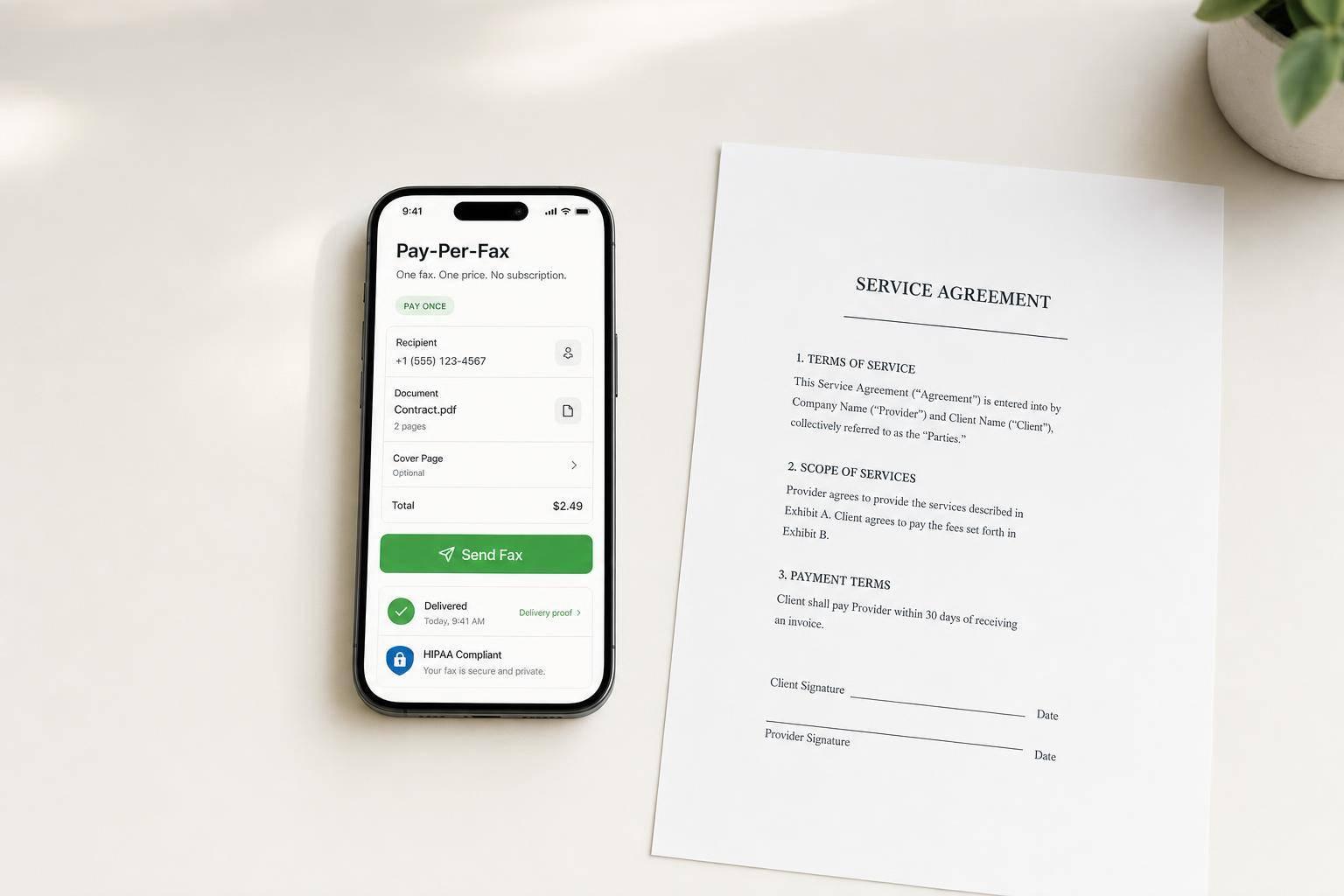
Why Online Pay-Per-Fax Beats Free Trials and ‘Cancel Anytime’ Fax Apps for One-Off Needs
If I only need to send one fax, a monthly fax plan is usually the wrong tool. For a one-off fax, I’d rather pay $3.50 to $5.00 once than start a free trial, enter card details, watch a cancel date, and risk a monthly charge.
Here’s the short version:
- Trial-based fax apps like eFax, Fax.Plus, iFax, HelloFax/Dropbox Fax, SRFax, MyFax, and MetroFax are built for repeat use, not a single send.
- Free-send tools like FaxZero and GotFreeFax can work, but they may add branding or ads to the cover page.
- Retail faxing at FedEx or UPS skips account setup, but a 10-page fax can cost about $15.00 to $30.00.
- Pay-per-fax works better for one-off use because there’s no account, no trial clock, and no monthly billing.
- For PHI, some services lock HIPAA options behind higher-priced plans, while OneFaxNow offers HIPAA mode as a per-send add-on.
If I were comparing these options for one-time use, I’d focus on just a few things: price, setup, billing risk, delivery proof, file support, and PHI handling. That’s what matters when the job is simple: upload, send, confirm, done.
Quick Comparison
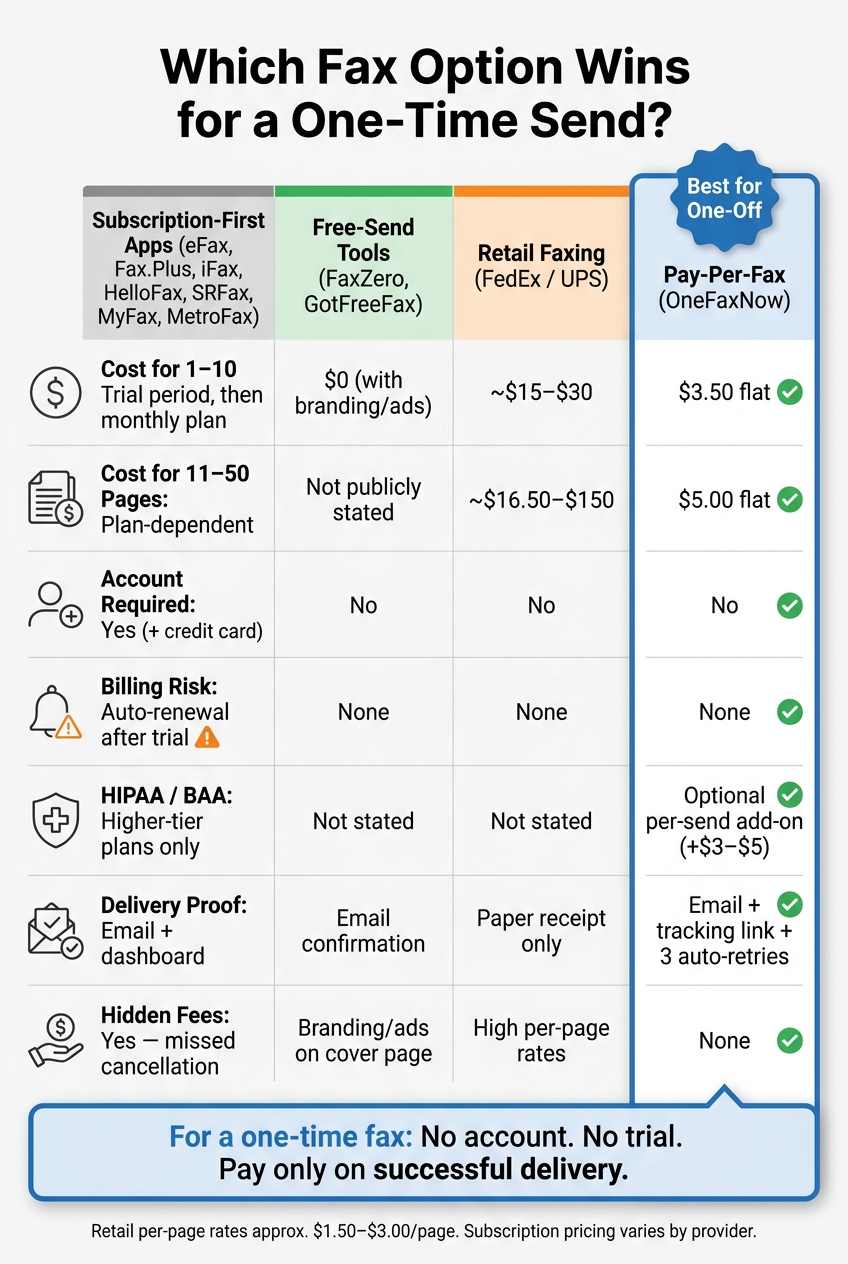
Pay-Per-Fax vs. Subscription vs. Free vs. Retail: One-Time Fax Cost Comparison
| Option | Best For | Setup | Cost for 1–10 Pages | Main Catch |
|---|---|---|---|---|
| Trial-based fax apps | People who fax often | Account + card required | Trial first, then monthly plan | You may forget to cancel |
| Free-send tools | Very basic one-off faxing | Usually no account | $0 | Branding or ads may appear |
| FedEx / UPS | People who want in-person service | No account | About $15.00–$30.00 for 10 pages | Price adds up fast |
| OneFaxNow | One-time online faxing | No account | $3.50 | Outbound sending only |
My takeaway: for a one-off fax, the main issue isn’t online vs. traditional fax features. It’s avoiding extra steps and extra charges. That’s why pay-per-fax stands out in this comparison.
sbb-itb-0df24da
The problem with free trials and cancel-anytime fax apps for one-off use
If you only need to fax once, the main problem isn’t the feature set. It’s whether a simple task turns into a subscription. Many trial-based fax services, including eFax alternatives, Fax.Plus, and iFax, start by putting you into a subscription trial. If your goal is just one fax, that’s a bad fit.
Trial risks: renewal dates, surprise charges, and cancellation steps
With most trials, you’re not just testing a tool. You’re creating a full account and entering a credit card before you’ve even sent a single page. The trial timer starts right away. Miss the cancellation window, and billing starts on its own [1]. Then there’s the extra chore of canceling, which becomes one more thing to track.
For one-time senders, the only question that matters is simple: Can I send the fax without getting pulled into recurring billing?
Why a full fax account adds no value for a single outbound fax
Subscription-first services package features that make sense for people who fax often, like an inbound fax number, page limits, and cloud storage [2]. That setup works for steady use.
But if you’re sending one court filing or one insurance form, those extras don’t help. You don’t need a fax inbox. You don’t need storage. You just need the document to go out.
A subscription-first fax account is built for repeat faxing. For one outbound fax, it adds setup work and billing friction without giving you anything useful.
That mismatch is why the next section looks at pay-per-fax options, free-send tools, retail faxing, and trial-based services based on the things that matter most.
Side-by-side comparison: trials, free-send tools, retail faxing, and pay-per-fax
Fax options fit different jobs. The big differences come down to account setup, billing risk, and whether the service is meant for a single fax or steady, repeat use.
Trial-based and subscription-first services: eFax, Fax.Plus, iFax, HelloFax/Dropbox Fax, SRFax, MyFax, and MetroFax
These services usually ask for an account and a credit card before the trial even begins [1]. If you don’t cancel in time, the trial rolls into a paid month. HIPAA support is usually tied to higher-priced plans, not the basic trial. And if you only need to send one fax, logging back in just to cancel and deal with billing is extra hassle.
Free-send and one-off options: FaxZero, GotFreeFax, PayPerFax, and in-store faxing at FedEx or UPS
FaxZero and GotFreeFax let you send faxes for free, but there’s a tradeoff: they add their own branding or ads to the cover page. HIPAA/BAA status is not publicly stated. For medical, insurance, or court documents, that kind of branding can feel like the last thing you want.
Retail faxing at FedEx or UPS cuts out account setup. You walk in, hand over the documents, and pay at the counter. The catch is cost. Per-page rates are often around $1.50 to $3.00 per page, so a 10-page fax can land around $15 to $30. You’ll usually get a paper receipt, but not a digital delivery confirmation.
The table below narrows things down to the details that matter most for one-time faxing: cost, setup friction, and PHI handling.
| Criteria | Subscription-First (eFax, Fax.Plus, iFax, HelloFax, SRFax, MyFax, MetroFax) | Free-Send (FaxZero, GotFreeFax) | Retail (FedEx / UPS) | Pay-Per-Fax (OneFaxNow) |
|---|---|---|---|---|
| Pricing model | Monthly/annual subscription | Free (limited) | Per-page retail | One-time fee per fax |
| 1–10 pages | Trial period, then monthly subscription | $0 (limited) | About $1.50–$3.00 per page | $3.50 |
| 11–50 pages | Plan-dependent | Not publicly stated | About $16.50–$150 | $5.00 |
| Hidden fees | Auto-renewal after trial [1] | Branding/ads on the cover page | Not publicly stated | None |
| Account required | Yes | No | No | No |
| HIPAA / BAA | Higher-tier plans only | Not publicly stated | Not publicly stated | Optional HIPAA mode; BAA available |
| Delivery tracking | Email + dashboard | Email confirmation | Paper receipt only | Email + tracking link; auto-retries up to 3x |
| File support | Varies by service | Not publicly stated | Physical documents only | PDF, DOCX, TXT, JPG/JPEG, PNG, TIF/TIFF |
| Pay on success only | Not publicly stated | Not publicly stated | Not publicly stated | Yes - payment is captured on delivery |
That’s where pay-per-fax stands out for a one-time send. Why OneFaxNow for this use case: OneFaxNow skips the account setup, the trial countdown, and the cancellation step. Payment is captured only when the fax is delivered. If you need tighter PHI handling, the optional HIPAA mode adds stricter handling and audit logging, and a BAA is available right away in the dashboard, with no subscription required. See the full pay-per-fax pricing breakdown or compare models in the online fax pricing comparison.
How OneFaxNow removes trial and subscription friction for one-off faxing
OneFaxNow is the simpler pick for one-off faxing: no account, no renewal date, and delivery proof when the fax goes through.
You see that right away in the pricing and checkout flow.
One-time pricing instead of a trial clock
One-time pricing is $3.50 for 1–10 pages and $5.00 for 11–50 pages. Stripe checkout captures payment only after successful delivery, with up to 3 automatic retries.
Here’s the one-off flow from upload to delivery.
| Step | What You Do | What You Receive |
|---|---|---|
| 1. Upload | Add your DOCX, PDF, TXT, JPG/JPEG, PNG, or TIF/TIFF file (up to 50 pages) | File validation |
| 2. Destination | Enter the recipient's U.S. or Canada fax number | Destination verification |
| 3. Checkout | Pay via Stripe | Capture held until delivery |
| 4. Send | Fax transmits automatically | Real-time tracking link + email status updates |
| 5. Confirm | Review final status | Delivery receipt; payment captured on success only |
That setup is the main difference. You upload the file, enter the number, pay, and track the fax as it moves through delivery. No trial timer hanging over your head. No plan to cancel later.
For PHI, the next part is HIPAA handling.
Optional HIPAA mode for occasional PHI without a subscription
If the fax contains PHI, the issue shifts from convenience to compliance.
OneFaxNow offers optional HIPAA mode with stricter handling and audit logging. It’s a per-send add-on, not a plan upgrade.
HIPAA mode adds $3.00 on Lite, for a total of $6.50, and $5.00 on Standard, for a total of $10.00. A BAA is available in the dashboard for immediate execution.
Conclusion: when pay-per-fax wins and when a subscription makes more sense
Matching the right model to your use case
Choose based on how often you fax and whether you need to receive faxes.
OneFaxNow wins when you need to send a single document and probably won’t fax again for a while. If you’re a one-time sender, you likely don’t need an inbox, a dedicated fax number, or a free trial that might turn into a paid plan.
A subscription makes more sense when faxing is part of regular work - like for a clinic, billing team, or another group that sends and receives fax traffic on a routine basis. In that case, the monthly fee can make sense because of the higher volume.
If you want the short version, use this table to match fax frequency to the right model.
| Use Case | Best Model | Why |
|---|---|---|
| Patient sending one-time medical records | OneFaxNow (HIPAA Mode) | No recurring fees; delivery confirmation; HIPAA mode |
| Legal admin sending a single court packet | OneFaxNow | Avoids trial expiration and surprise charges |
| Insurance paperwork, one-off submission | OneFaxNow | Fixed cost, no account to manage afterward |
| Clinic receiving daily referrals | Subscription | Dedicated inbound number; shared inboxes; workflow tools |
| High-volume faxing | Subscription | Monthly fee is offset by volume |
For one-off senders, OneFaxNow is the simplest fit: no account, no renewal date, and payment captured only on successful delivery. If you’re sending PHI, HIPAA Mode adds stricter handling, audit logging, and an available BAA without a monthly plan. Learn more about how digital fax security protects your data.
If you only need one fax, skip the trial and send it directly.
Send a Fax Online - No Account Required →
Sending PHI? Add HIPAA Mode at checkout - includes stricter handling, audit logging, and an instantly executable BAA.
FAQs
How fast can a one-time fax be delivered?
For one-time faxing, pay-per-fax services are usually the cleaner option than subscription plans built around free trials.
The big reason is simple: pricing is easier to understand. You pay only for a successful transmission, which makes more sense for occasional use. There’s no extra account hanging around, no pressure to cancel on time, and less chance of getting hit with surprise charges.
That also means less friction overall. Pay-per-fax services skip a lot of the usual headaches, like:
- surprise charges
- cancellation hassles
- unused accounts
Subscription plans tend to make more sense when you send a lot of faxes or need to receive them on a regular basis.
What happens if my fax doesn’t go through?
With a pay-per-fax service, you usually pay only for a successful transmission. That helps you skip the surprise charges and annoying cancellation issues that often come with free trials and subscriptions.
That setup makes pay-per-fax a better choice for one-time use. Subscriptions tend to make more sense if you send a lot of faxes or need to receive faxes on a regular basis.
Do I need HIPAA mode for medical records?
For one-off faxing, pay-per-fax services are often a simpler, clearer choice than a subscription.
Free trials can come with friction. You might get hit with surprise charges after the trial ends, or have to deal with the usual account-canceling hassle.
Pay-per-fax cuts out those headaches. It requires no account and charges you only for successful transmissions. Subscription plans usually make more sense if you send a lot of faxes or need to receive faxes on a regular basis.