Privacy Risks of Public Fax Machines (and How To Avoid Them Without Overreacting)
Public fax machines expose PHI/PII via shared trays, staff handling, misdials, or stored images. Redact, double-check numbers, or use encrypted online faxing.
Privacy Risks of Public Fax Machines (and How To Avoid Them Without Overreacting)
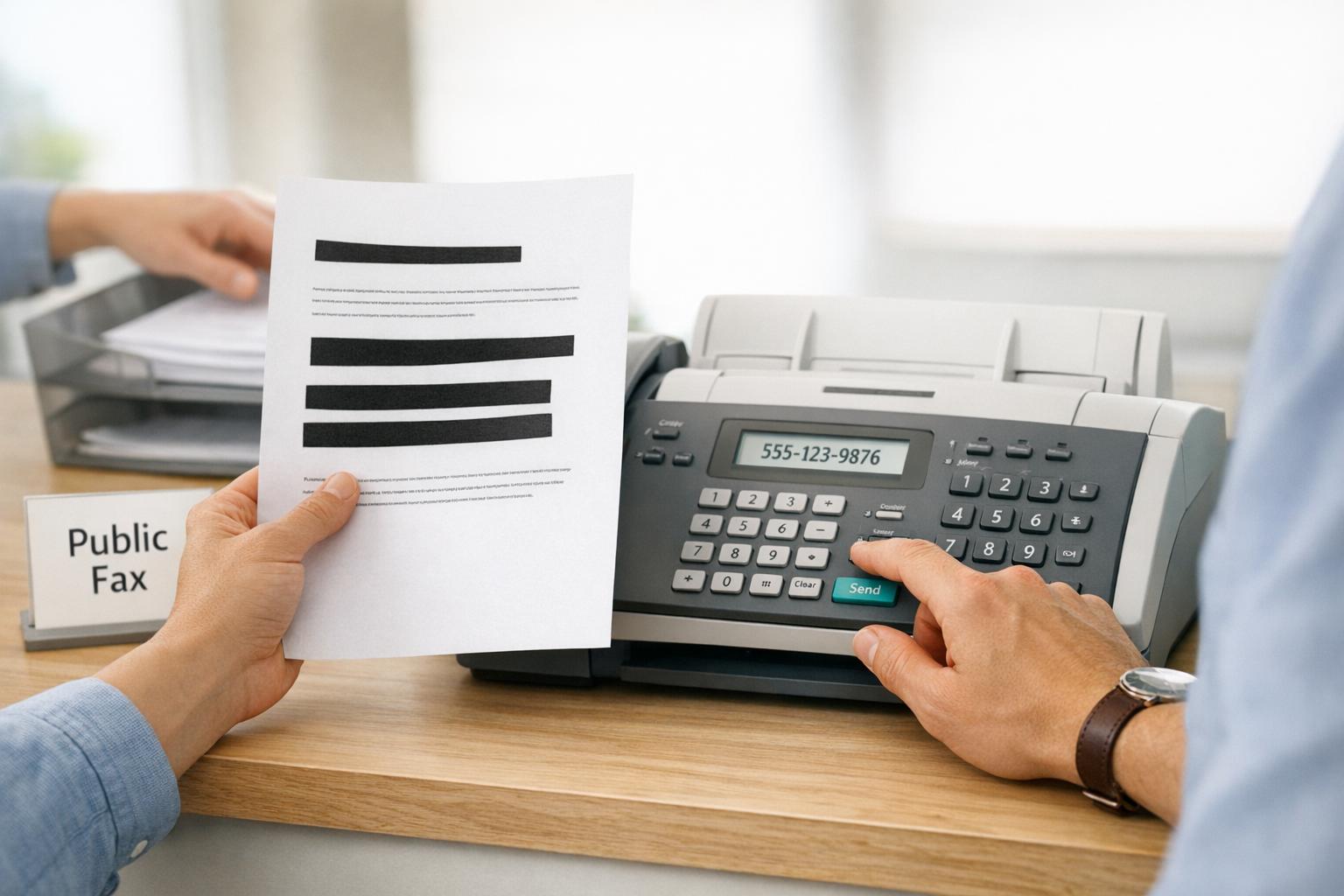
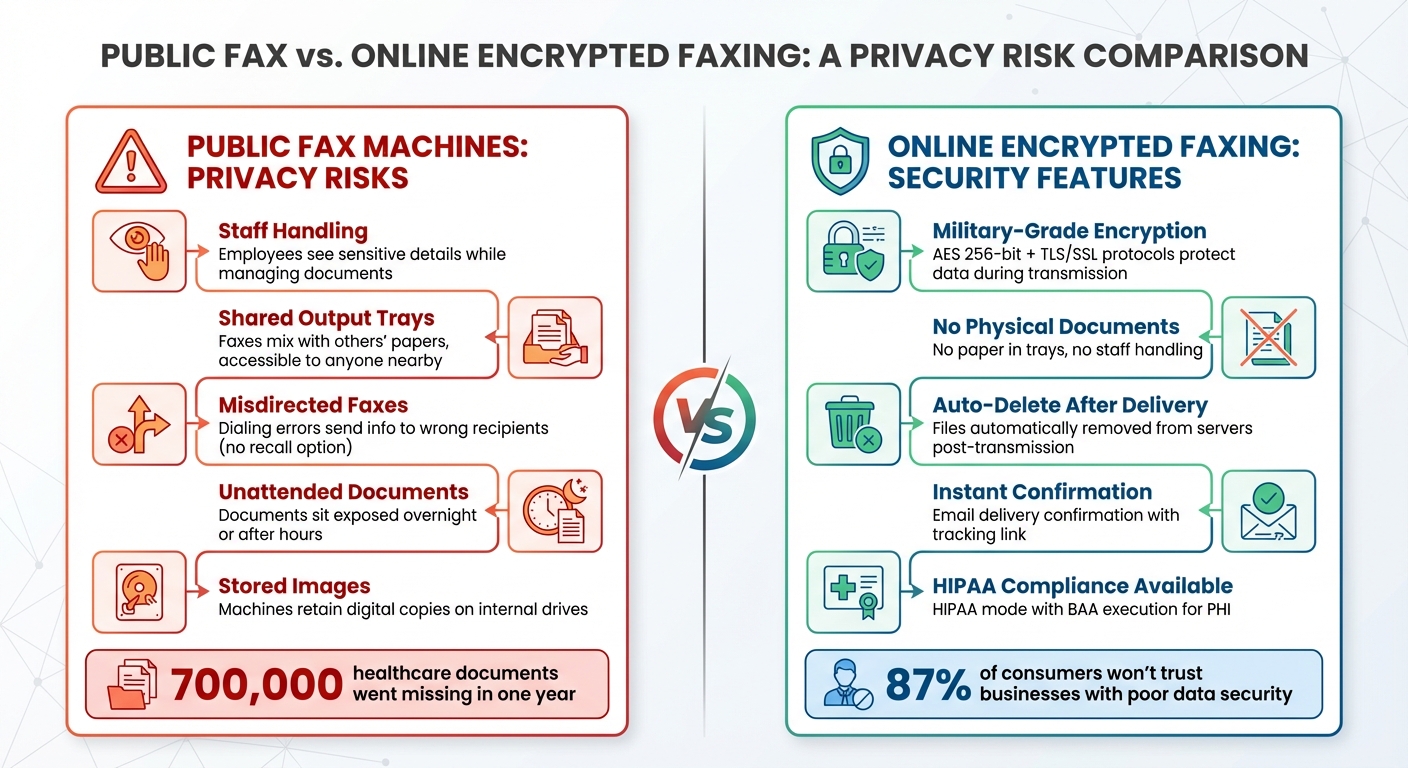
Using public fax machines can expose your sensitive information to risks like unauthorized viewing, misdirected faxes, and documents left unattended. These machines, often found in busy retail locations, lack privacy safeguards, making them unsuitable for transmitting medical, legal, or financial data. Common issues include:
- Staff Handling: Employees may see sensitive details while managing your documents.
- Shared Output Trays: Faxes can mix with others' papers, leading to accidental exposure.
- Misdirected Faxes: Dialing errors can send your information to the wrong recipient.
- Unattended Documents: Faxes left in trays or after hours are vulnerable to prying eyes.
- Stored Images: Some machines retain digital copies of documents, posing long-term risks.
To protect your privacy, redact sensitive details, verify fax numbers, and avoid using public machines for Protected Health Information (PHI). If you must transmit medical data, ensure you send a HIPAA-compliant fax using a service that provides a BAA. Instead, consider online encrypted fax services, which offer secure transmission, instant delivery confirmation, and compliance features like HIPAA mode for handling sensitive data.
Public Fax Machines vs Online Encrypted Faxing: Privacy Risk Comparison
What Happens at Public Fax Counters
When you visit a retail location like The UPS Store, FedEx Office, or Staples to send a fax, you’re stepping into a shared space with limited privacy measures. Understanding how these services operate can help you identify where your sensitive information might be at risk.
Staff Handle Your Documents
At most public fax counters, employees manage the faxing process for you. Unlike using an ATM, where you control every step, you hand over your documents to staff who then load them into the machine. This means they may see everything on the pages you’re faxing - whether it’s medical records, financial statements, or legal contracts. Details like Social Security numbers, account balances, or private diagnoses could be inadvertently viewed.
"Faxes are often transmitted into a centralized location. This allows for the possibility that the entire contents of a faxed message can be easily read by all passers-by, thereby undermining the security of the information." - Ann Cavoukian, Ph.D., Commissioner, Information and Privacy Commissioner/Ontario [6]
Since faxing is typically a secondary service offered alongside shipping, packaging, or notary tasks, employees are often multitasking. This can lead to your documents sitting out in the open longer than you’d prefer, increasing the risk of exposure.
Output Trays Are Shared Spaces
Both incoming and outgoing faxes end up in shared trays, making them accessible to anyone nearby. If you’re not present when your fax is delivered, someone else could see, take, or accidentally mix up your documents with theirs [2].
"If you're sending it to an office, your fax could be piling up along with all the other faxes they receive." - Technology Safety Canada [4]
This problem is especially concerning during busy times in high-traffic locations. For example, your medical records might sit next to someone else’s shipping label, creating opportunities for accidental mix-ups or intentional snooping.
Documents Get Left Behind
Sometimes, the biggest risk comes from delays in retrieving documents. Faxes that arrive after hours or are forgotten by customers remain exposed until someone removes them. Store hours can leave these documents unattended overnight, where they might be accessed by cleaning crews, late-shift employees, or early-morning visitors. Even during the day, it’s not uncommon for people to leave behind confirmation pages, exposing sensitive details to the next person in line.
Additionally, many modern fax machines store images of all processed documents on internal hard drives. If these machines are sold or returned without being wiped, any previously faxed documents could potentially be recovered by the next owner [4][5]. These risks highlight why it’s important to consider safer alternatives. Using a secure online fax service allows you to send documents directly from your device, bypassing public trays and staff handling entirely.
sbb-itb-0df24da
Real Privacy Risks at Public Fax Machines
Public fax machines at retail counters or shared spaces can create serious privacy concerns when handling sensitive documents.
Someone Can See Your PHI or PII
Public fax machines often sit in busy areas like retail counters, hallways, or waiting rooms, where anyone passing by can see your private information. This includes other customers, employees, or even people walking past the output tray. Sensitive details - such as medical diagnoses, Social Security numbers, and financial account information - can easily become exposed to unwanted eyes [7][9].
"Public areas inappropriate for the location of such equipment include, but are not limited to, primary hallways, waiting rooms, multi-use and conference rooms, and elevator lobbies." - UW-Madison Policy Library [7]
While HIPAA allows for some incidental disclosures, it requires reasonable safeguards to protect your data. Unfortunately, most retail counters lack basic privacy measures like locked rooms or screens, leaving your information vulnerable [10]. The importance of health data privacy is underscored by the fact that over 52,000 public comments were submitted during the creation of the HIPAA Privacy Rule [10].
But unauthorized viewing isn’t the only issue - errors during transmission can also compromise your privacy.
Faxes Get Sent to Wrong Numbers
A simple dialing mistake can send your fax to the wrong recipient. Unlike email, where you might recall a message, fax transmissions are permanent once sent. Correcting the error often depends on the recipient's goodwill to destroy the document, and there’s no way to confirm they actually did [1][7].
"A misdirected fax may also be a breach of unsecured PHI requiring notification under the HIPAA Breach Notification Rule." - American Dental Association [1]
This risk is higher at public counters, where employees - often juggling multiple tasks - manually enter numbers on your behalf. Even if you input the number yourself, the hectic environment of a retail setting can lead to mistakes.
On top of misdirected faxes, unattended documents present yet another privacy issue.
Documents Sit Exposed Overnight
Faxes sent after business hours sit in open trays until staff retrieve them the next day. This leaves them accessible to cleaning crews, security staff, or early-morning visitors if the machine isn’t secured in a locked room [7]. For example, in one year alone, 700,000 healthcare-related documents went missing [2].
"Unless your recipient is at the machine at the time of delivery... there is potential for an unauthorized individual to access the document. They may do so accidentally or intentionally, but as there is no security around access to paper fax documents on the machine, unauthorized viewing is a major concern." - eFax Team [2]
Adding to the risk, many traditional fax machines store digital copies of transmitted documents in their internal memory. If these machines aren’t wiped before being retired or serviced, your data could remain accessible long after you’ve left [8]. HIPAA regulations even extend protections for health information 50 years after a person’s death, meaning old faxes can carry legal risks [9].
These vulnerabilities make it clear why safer alternatives to public fax machines are worth considering, as explored in the next section.
How to Reduce Risks at Public Fax Locations
Using public fax machines can pose risks to your privacy, but there are steps you can take to minimize them.
Redact Before You Fax
Before sending any documents, make sure to redact sensitive information like Social Security numbers, financial account details, dates of birth, or home addresses. For physical documents, use a thick permanent marker or opaque tape to cover the information, then photocopy the redacted version to ensure the hidden text doesn’t show through during scanning. For digital files, rely on professional redaction tools like Adobe Acrobat. These tools ensure that the data is permanently removed, not just visually hidden.
"When using a pen or tape to redact, there is a risk that hidden text or metadata remains on the document and may appear when put through a highly sensitive scanner." - ShareVault [11]
Avoid Sending PHI via Retail Fax Machines
Public fax machines, like those found at FedEx Office or The UPS Store, are often located in shared spaces, which makes them unsuitable for sending Protected Health Information (PHI). In these environments, other customers can easily view your documents, and staff may handle your papers - both of which increase the risk of exposure.
Instead, consider using online encrypted fax services. These platforms protect your information by encrypting data during transmission and deleting files immediately after delivery. They also eliminate the risk of leaving documents in an output tray. Plus, you’ll receive instant email confirmation of delivery, which is far more reliable than a physical receipt that could be misplaced.
Verify the Fax Number Twice
Even after redacting your document and choosing a secure method, it’s crucial to double-check the fax number. A single misdial can send your sensitive information to the wrong recipient, and unlike email, there’s no way to recall a fax once it’s sent.
"Unless you've confirmed the number with the receiving party, it's hard to be certain of who you're actually faxing to unless you send an online test fax first." - eFax [12]
To verify, call the number beforehand using your mobile phone. Listen for the fax tone; if you hear a voice greeting or busy signal instead, don’t send your document. You can also send a test page labeled “Test” to confirm the line is correct [12][13].
Why Online Encrypted Faxing Is Safer
Online encrypted faxing takes the security of your documents to a whole new level, offering a safer alternative to traditional faxing and the risks associated with public machines. By handling everything digitally, it eliminates the physical vulnerabilities often found in retail fax services.
Your Data Gets Encrypted During Transmission
When you use online fax services, your documents are protected with TLS/SSL protocols and AES 256-bit encryption - the same standards used for military-grade security. This ensures that even if someone intercepts your data, it’s completely unreadable [34,35,36,7]. Unlike email, which often passes through multiple unprotected servers, encrypted faxing locks down your data at every step [34,35].
To add another layer of security, many services use multi-factor authentication (MFA). This requires a code sent to your phone or email before you can access your documents, ensuring that only authorized users can view sensitive information [15].
By encrypting everything digitally, online faxing also eliminates the physical risks tied to paper documents.
No Paper Sitting in Trays
One of the biggest advantages of digital faxing is that it removes the risk of exposed paper documents in public spaces. Whether you’re sending a PDF or Word file from your phone or laptop, there’s no need to worry about staff handling your documents or printouts being left unattended [33,36].
Many services, like OneFaxNow, take security a step further by implementing a "no file storage after delivery" policy. That means your document is automatically deleted from their servers as soon as it’s successfully transmitted [3]. You’ll also get an instant email confirmation with a tracking link, offering a more reliable record than a paper receipt.
With 87% of consumers saying they wouldn’t trust a business with poor data security practices, online encrypted faxing provides a reassuring solution by removing human handling from the equation entirely [14].
When to Use HIPAA Mode
For particularly sensitive data, such as medical records or insurance claims, online faxing can be further secured with HIPAA mode. This feature ensures compliance with federal healthcare privacy laws by adding stricter access controls, detailed audit logs, and specialized user authentication [35,7].
For example, OneFaxNow offers a HIPAA mode add-on for healthcare providers and other entities handling Protected Health Information (PHI). For a small fee (+$3.00 for 1–10 pages, +$5.00 for 11–50 pages), you can enable HIPAA mode, which includes immediate Business Associate Agreement (BAA) execution and download directly from your dashboard. This is essential for clinics, hospitals, and legal practices that work with sensitive medical data.
You should enable HIPAA mode whenever transmitting sensitive documents, such as:
- Patient medical records or treatment notes
- Insurance authorization forms or claims
- Pharmacy prescriptions or lab orders
- Legal documents containing health information
For more tips on secure transmission, check out the OneFaxNow HIPAA Fax guide. If you’re comparing options, you can also review the privacy limitations of retail fax services at FedEx, UPS, and Staples or Office Depot.
Wrapping It Up
Using public fax machines at retail stores comes with real privacy concerns that shouldn't be taken lightly. For professionals handling sensitive information - like healthcare providers managing Protected Health Information (PHI) or legal teams working with confidential documents - these risks can lead to serious compliance headaches.
Thankfully, there's a safer option. Online encrypted faxing eliminates those risks entirely. Documents stay digital, are protected with AES 256-bit encryption during transmission, and are automatically deleted after delivery. There’s no paper left sitting in a tray or chance of someone else accidentally picking up your fax.
For less sensitive documents, standard online faxing is a much more secure and convenient alternative to retail fax counters. When dealing with PHI - such as medical records, insurance claims, or pharmacy orders - enabling HIPAA mode ensures compliance with features like immediate BAA execution and detailed audit logs.
Ultimately, the choice comes down to the sensitivity of your documents. Double-check the fax number before sending, select a secure service, and let encryption do the heavy lifting. For those who prioritize privacy, skipping the retail fax counter and opting for online faxing is a no-brainer. Services like OneFaxNow offer everything you need: transparent pricing, no account setup, and instant delivery confirmation.
Send a Fax Online - No Account Required or explore HIPAA-compliant faxing for secure handling of sensitive information.
FAQs
Is it safe to fax sensitive documents at a retail store?
Faxing sensitive documents at retail locations like FedEx, UPS, Staples, or Office Depot can pose serious privacy risks. Shared trays may leave your documents exposed, staff might mishandle them, or they could sit unattended on machines overnight. On top of that, these services typically aren't HIPAA-compliant, meaning they're not a safe choice for transmitting Protected Health Information (PHI) or Personally Identifiable Information (PII). A safer alternative? Online encrypted faxing services. These platforms offer secure transmission and meet stricter privacy regulations, keeping your sensitive information protected.
What’s the biggest privacy risk when using a public fax machine?
The most pressing privacy concern arises from the potential exposure of sensitive documents. For example, faxes left sitting in output trays, mishandled by employees, or forgotten on machines overnight can lead to serious risks. These scenarios significantly heighten the likelihood of unauthorized access to PHI (Protected Health Information) or PII (Personally Identifiable Information), particularly in high-traffic or poorly supervised settings.
When should I use HIPAA mode instead of standard faxing?
When sending sensitive health information, such as medical records or Protected Health Information (PHI), using HIPAA mode is essential. This mode enforces stricter privacy protections, ensuring that data is handled with higher compliance standards. It also facilitates the immediate execution of a Business Associate Agreement (BAA) and provides audit-friendly processes to safeguard the information effectively.