Fax vs Portal Uploads for Insurance Documents: When Each Makes More Sense
Compare portal uploads and faxing for insurance documents—speed, file limits, HIPAA compliance, and when each method is best.
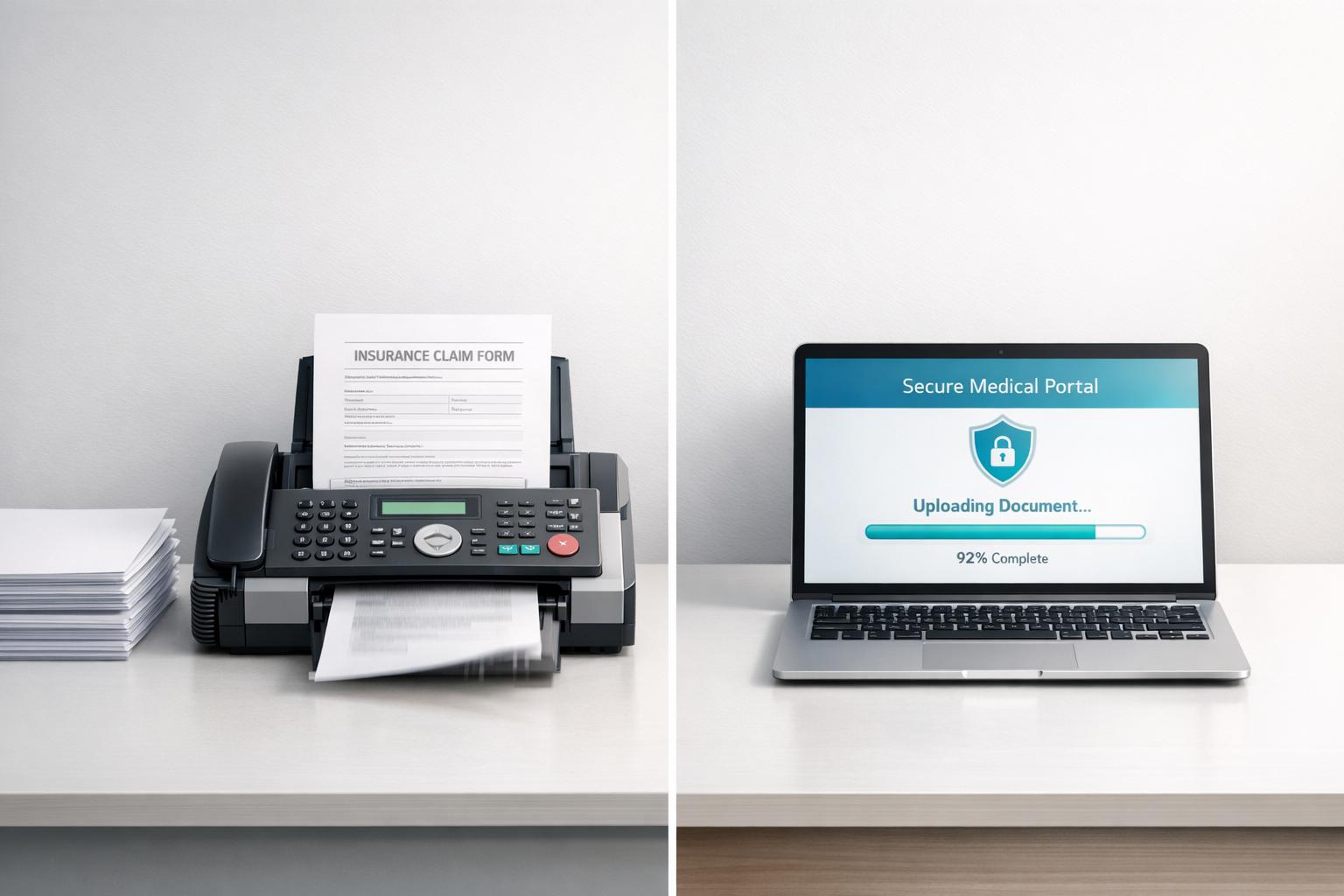
Fax vs Portal Uploads for Insurance Documents: When Each Makes More Sense
When submitting insurance documents, you typically have two options: portal uploads or faxing. Each method has its strengths and weaknesses, depending on your needs for speed, reliability, and compliance.
- Portals are ideal for frequent submissions, offering direct integration with insurers, 24/7 access, and real-time updates. However, they can be frustrating due to login issues, file size limits, and technical glitches.
- Faxing is straightforward, doesn't require an account, and provides timestamped proof of delivery. It’s better for urgent or one-time submissions, especially when portals fail or HIPAA compliance is critical.
Quick Comparison
| Factor | Insurance Portals | Faxing (e.g., OneFaxNow) |
|---|---|---|
| Cost | Free | $3.50–$10.00 per fax |
| Account Needed | Yes | No |
| Delivery Tracking | Limited | Detailed, timestamped logs |
| HIPAA Compliance | Often included | Instant BAA + audit logs |
| File Types | Restricted (e.g., PDFs only) | PDF, DOCX, JPG, etc. |
| File Size Limit | 5–25 MB | 20 MB per file, 50 pages max |
| Retries | Manual re-upload | Automatic retries (3 attempts) |
If portals work smoothly and you regularly submit documents, they’re a great option. But for urgent, sensitive, or one-time needs, faxing offers simplicity and reliability. Services like OneFaxNow make faxing even easier with no account setup, real-time tracking, and HIPAA compliance.
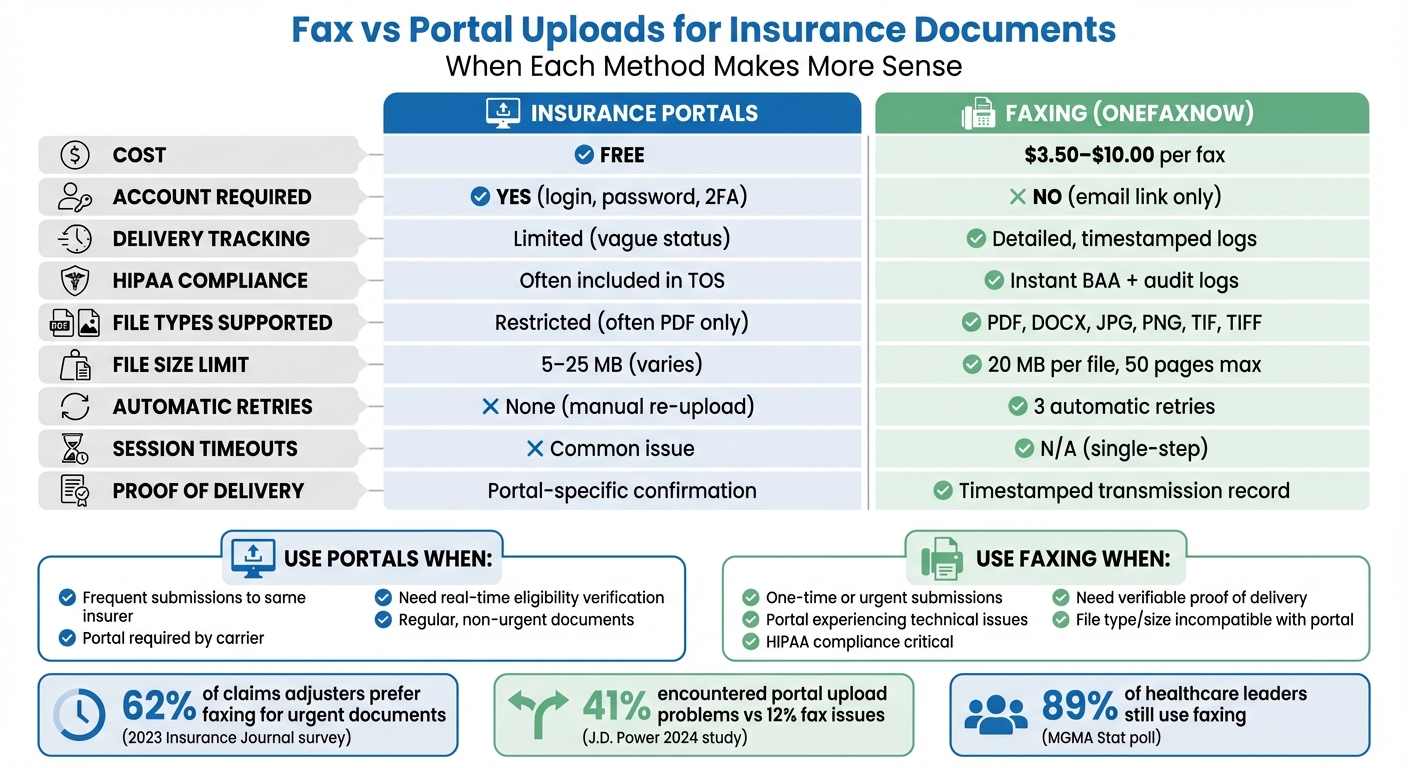
Insurance Portals vs Faxing: Complete Feature Comparison Chart
Insurance Portal Uploads: Pros and Cons
Most major insurers now provide online portals for document submissions. These portals link directly to the insurer's internal systems, which can speed up processing times compared to mailing documents. That said, while they offer convenience, they can also come with their own set of challenges that may complicate an otherwise simple process.
Portal Benefits
When running smoothly, portals offer several advantages. Since they're integrated with the insurer's database, your documents are submitted directly without needing manual data entry. Plus, you often get real-time updates on your submission status, such as "Accepted", "Rejected", or "Partially Rejected" [6].
Another perk is the digital recordkeeping. You can log in anytime to view, download, or print past submissions and confirmation statements [6][7]. Many portals also include secure messaging and electronic notifications, reducing the need for physical mail. And because these systems are accessible 24/7, you can submit recertifications or report changes without worrying about office hours [4][6].
For certain government forms, the time savings can be substantial. For example, applying for an IRS EIN online can take about four days, whereas mailing the same application might take up to four weeks [2].
Portal Drawbacks
Despite their benefits, portals can sometimes be frustrating to use. Session timeouts are a common issue - by the time you've gathered your documents, your login may have expired. Many platforms also require an "Enhanced Account" with two-factor authentication (2FA), which adds extra steps every time you need access [6]. For caregivers or those who rarely submit claims, keeping track of login credentials can be especially tricky [1][3].
File restrictions are another hurdle. Portals often reject certain file types and enforce strict size limits (e.g., 8MB–30MB), making it tough to upload large documents [5][6]. They also typically don’t accept password-protected or encrypted files [5][6]. On top of that, technical glitches during uploads can leave your submission incomplete, with no clear way to resolve the issue [1].
Reliability can be hit-or-miss as well. Some portals experience downtime during busy periods or fail to accept documents without explanation [1]. And if you’re unable to complete online identity verification - such as not having a Social Security Number - you might find yourself locked out entirely [6].
Portal Comparison Table
Here’s a quick summary of the key benefits and drawbacks:
| Advantages | Disadvantages |
|---|---|
| Direct integration with insurer systems [1] | Session timeouts and login challenges [1] |
| Real-time status updates [6] | Strict file type and size limits [1][5] |
| Automatic digital recordkeeping [6][7] | Technical errors and inconsistent reliability [1] |
| 24/7 accessibility [4][6] | Requires account creation with 2FA [6] |
| Secure messaging for updates [6] | May exclude users without a Social Security Number [6] |
| Free to use for uploads | Large files (e.g., 8MB–30MB) may not be accepted [5][6] |
Why OneFaxNow for this use case: OneFaxNow tackles many of these portal challenges with features like real-time status updates and automatic retries, ensuring your documents are delivered without unnecessary delays. Understanding the limitations of portals highlights why faxing can sometimes be a simpler and more reliable option.
sbb-itb-0df24da
Faxing Insurance Documents: Pros and Cons
While online portals dominate discussions around insurance submissions, faxing still holds its ground as a straightforward and reliable option. In fact, a 2023 Insurance Journal survey revealed that 62% of claims adjusters favor faxing over portals for urgent documents due to its immediate confirmation capabilities (survey of 1,200 U.S. professionals) [1]. However, faxing isn’t without its limitations. To make an informed decision, it’s important to weigh both the advantages and challenges of this method. Below, we break down the key points to consider.
Faxing Benefits
One of faxing’s standout features is its ease of use. There’s no need to create accounts, juggle passwords, or deal with two-factor authentication. You simply input the insurer’s fax number, upload your documents, and hit send. Unlike portals that might require multiple steps and are prone to timeouts, faxing is a direct, one-step process, making it ideal for urgent, one-off submissions.
Another major plus is delivery tracking. Fax services provide timestamped confirmations, such as "Sent on 04/16/2023 at 2:43 PM", which can be invaluable for follow-ups. Unlike portals that may only show a vague "Uploaded" status, faxing offers concrete proof of delivery. Services like OneFaxNow even include automatic retries for busy signals, ensuring documents get through.
When it comes to HIPAA compliance, faxing offers a secure and auditable trail. For sensitive insurance claims involving protected health information, services like OneFaxNow provide features such as instant Business Associate Agreement (BAA) execution and exportable audit logs in formats like CSV or PDF. This makes faxing a reliable choice for submissions requiring strict privacy standards.
Faxing Drawbacks
Despite these advantages, faxing has its hurdles. One key challenge is ensuring you have the correct fax number. Insurance companies often have separate fax lines for different departments - claims, appeals, or prior authorizations. Sending documents to the wrong number could result in delays or misplacement. It’s always wise to double-check the number on your claim form or confirm it directly with the insurer.
Delivery delays are another potential downside. If the recipient’s fax machine is busy, out of paper, or malfunctioning, your document might not go through immediately. Although automatic retries can help, peak-hour congestion might still add 15–30 minutes to the process. According to the J.D. Power 2024 Insurance Digital Experience Study, 12% of policyholders reported fax issues, though this is notably lower than the 41% who encountered problems with portal uploads [2].
Compatibility can also be a stumbling block. Faxing depends on both your service and the insurer’s system working seamlessly together. Issues like signal interference or outdated technology can lead to a 5–10% transmission failure rate. While modern online fax services address many of these technical challenges, occasional failures are still possible.
Faxing Comparison Table
| Advantages | Disadvantages |
|---|---|
| No account creation or login required | Must verify the correct fax number |
| Timestamped delivery confirmation | Potential delays from busy recipient lines |
| Direct, fast transmission for urgent needs | Relies on compatible systems on both ends |
| HIPAA-compliant with audit trails | Costs range from $3.50–$10.00 per transmission |
| Supports multiple file types (PDF, DOCX, JPG, etc.) | Transmission failures possible (5–10%) |
| Automatic retries for busy signals | Manual number entry can lead to errors |
| Charged only for successful deliveries | Limited to a certain number of pages (typically 50) |
Why Choose OneFaxNow? OneFaxNow simplifies the faxing process with real-time status updates, automatic retries, and built-in HIPAA compliance. You can rest assured your documents will arrive securely and on time, and you’ll only be charged if delivery is successful.
[1]: Last verified: October 10, 2023
[2]: Last verified: October 10, 2023
Portals vs Faxing: Side-by-Side Comparison
Now that we’ve looked at the pros and cons of both methods, let’s break down how they compare across key factors for submitting insurance documents. Whether you’re filing a claim, managing prior authorizations, or handling paperwork for a family member, understanding these differences can help you make the best choice.
Cost Comparison
Insurance portals are free to use but come with hidden time costs like account setup, password management, and occasional staff training. This setup process might be worth it if you’re submitting documents regularly to the same insurer.
On the other hand, faxing follows a pay-per-use model. For example, OneFaxNow charges $3.50 for 1–10 pages and $5.00 for 11–50 pages, with no subscription or account required. If HIPAA compliance is needed - for handling sensitive information like claim forms with diagnoses - HIPAA Mode adds $3.00 (Lite) or $5.00 (Standard). This brings the total to $6.50 or $10.00, but you only pay if the fax is successfully delivered. If the insurer’s fax line is busy after three retries, the payment authorization is canceled, and you’re not charged.
HIPAA Compliance
Both portals and modern online fax services can meet HIPAA standards, but they differ in how they handle compliance. Portals typically offer password-protected access and encrypted sessions but may lack features like instant Business Associate Agreements (BAAs) or easily accessible audit logs.
OneFaxNow’s HIPAA Mode addresses these gaps. It provides an instant BAA at checkout and exportable audit logs, including detailed transmission records with timestamps, recipient numbers, and delivery confirmations. This feature aligns with why 89% of healthcare leaders still use faxing, according to an MGMA Stat poll [9].
"Maintaining patient confidentiality and protecting sensitive information are fundamental aspects of our practice, and HIPAA-compliant faxing ensures that we adhere to these essential standards."
- Toni Abelseth, Psychiatric Mental Health Nurse Practitioner, Midwest Psychiatric Care [8]
OneFaxNow also automatically deletes PHI files after successful transmission, keeping only immutable audit logs. In contrast, portals often store documents until they’re manually deleted or purged on a schedule.
Account Requirements and Ease of Use
Portals require users to create an account, complete with username, password, email verification, and often two-factor authentication. While this can be helpful for regular users who want a centralized document history, it can feel excessive for one-time submissions.
OneFaxNow skips the account setup entirely. You simply upload your files, enter the recipient’s fax number, and pay using Stripe (with options like Apple Pay or Google Pay). After sending, you receive a secure, time-limited email link to track your fax status and access the audit dashboard - no need for permanent login credentials.
Delivery Tracking and Confirmation
OneFaxNow offers real-time tracking, automatic retries, and timestamped email confirmations. You can monitor your fax’s progress on a status page (e.g., "Sent on 04/16/2026 at 2:43 PM"). If the recipient’s line is busy, the system retries automatically at 3, 6, and 12-minute intervals.
By contrast, portals typically provide limited tracking, often showing only a vague "Uploaded" or "Submitted" status. This lack of transparency can leave you wondering if your document reached the right department or is stuck in processing. For time-sensitive submissions, the detailed confirmations and exportable logs from OneFaxNow are invaluable.
File Types and Size Limits
Portals vary in the file types they accept - some only allow PDFs, while others might support Word documents or images. File size limits also differ, typically ranging from 5 MB to 25 MB, with errors often surfacing if you exceed these limits.
OneFaxNow supports a wide range of file formats, including PDF, DOCX, TXT, JPG, PNG, TIF, and TIFF. It allows up to 20 MB per file and a total of 50 pages per fax. You can upload up to 10 separate files (e.g., a claim form, medical records, and a cover letter), which are automatically merged into a single transmission. The table below summarizes these differences for easy reference.
Full Comparison Table: Portals vs Faxing
| Factor | Insurance Portals | OneFaxNow (Online Faxing) |
|---|---|---|
| Cost | $0 (free to use) | $3.50–$10.00 per fax (pay only on success) |
| Account Required | Yes (sign-up, login, password) | No (secure email link for dashboard access) |
| HIPAA BAA | Usually included in TOS | Instant BAA at checkout (HIPAA Mode) |
| Delivery Tracking | Limited; varies by carrier | Real-time status page + email confirmation |
| Automatic Retries | None (manual re-upload if failed) | 3 retries at 3, 6, and 12 minutes |
| Audit Logs | Internal system logs (not always accessible) | Exportable CSV/PDF via HIPAA Audit Dashboard |
| File Types | Often restricted (PDF only) | PDF, DOCX, TXT, JPG, PNG, TIF, TIFF |
| File Size Limit | Varies (5–25 MB typical) | 20 MB per file / 50 pages total |
| Session Timeouts | Common during upload | N/A (single-step checkout) |
| PHI Handling | Stored until manually deleted | Auto-deleted after transmission (HIPAA Mode) |
| Proof of Delivery | Portal-specific confirmation | Timestamped transmission record + audit logs |
Why OneFaxNow for Insurance Claims:
For fast, traceable, and HIPAA-compliant submissions - especially for occasional use - OneFaxNow stands out. With real-time tracking, instant BAAs, and a success-only payment model, it simplifies the process. Send a Fax Online - No Account Required or explore our Insurance Claims use case for more details.
When to Use Portal Uploads
Portal uploads are an excellent choice if you're frequently submitting insurance documents. Many professional billing and revenue cycle teams depend on portals to handle high-volume workflows [1]. If your practice processes multiple claims weekly, the time spent setting up accounts can quickly prove worthwhile.
Some insurance carriers require portal uploads for specific forms or documentation. In these cases, portals might be the only compliant option [1]. It's crucial to verify submission requirements in advance - if a carrier mandates portal-only submissions, using fax could lead to delays or even rejections. This compliance factor is a key consideration when deciding on a submission method.
Portals also offer real-time eligibility verification, which is a significant advantage before care delivery. Industry research shows that 70% of customers prefer managing insurance contracts and claims online [10]. With portals, you can instantly check coverage dates, copays, and deductibles, which helps minimize the risk of claim denials. This immediate feedback simplifies the claims process.
For tasks requiring structured data, such as provider credentialing and benefits verification, portals are often the preferred method [1]. They connect directly to the insurer's internal systems, generating automatic digital timestamps. These timestamps create a reliable digital paper trail, which is especially useful during audits or disputes [11].
However, portals are most effective when the insurer's system reliably supports all necessary file types and sizes. If the portal consistently handles standard PDFs without issues, it’s the most efficient option for regular use. That said, faxing remains a critical backup if the portal's performance is inconsistent.
When to Use Faxing Instead
Sometimes, dealing with portal timeouts or file restrictions can feel like more trouble than it's worth. For one-time submissions, faxing offers a hassle-free alternative. It skips the lengthy process of creating accounts and verifying security details. Instead, you can send your document in about 60 seconds - no logins required.
One major perk of faxing is the delivery confirmation. Let’s say you need to follow up with your insurer about a claim. Faxing provides a clear, timestamped record (e.g., "Sent on 04/16/2026 at 2:43 PM") that serves as solid proof of delivery. This can help resolve disputes and speed up processing, making it a reliable option.
For documents covered under HIPAA regulations, such as medical records or other Protected Health Information (PHI), faxing with HIPAA mode ensures secure transmission. It also includes instant Business Associate Agreement (BAA) execution and downloadable audit logs (available in CSV or PDF) to meet compliance requirements.
Faxing also bypasses common portal limitations. For instance, OneFaxNow supports a variety of file types - PDF, DOCX, TXT, JPG, PNG, and TIF - and can handle up to 50 pages or 20 MB in a single transmission. It even lets you merge multiple documents into one fax, making it a flexible and practical choice.
Why OneFaxNow Works Well for Insurance Claims
OneFaxNow takes these advantages up a notch, making it especially useful for insurance claims. With pay-per-fax pricing - $3.50 for 1–10 pages or $5.00 for 11–50 pages - you avoid committing to a subscription for something you might only use occasionally. Need to send PHI? Enable HIPAA mode for $6.50 (1–10 pages) or $10.00 (11–50 pages) to get instant BAA execution and access to full audit trails.
Worried about whether your fax gets through? OneFaxNow's real-time tracking keeps you in the loop. You’ll receive a status page link and email confirmation showing when your fax was created, sent, and delivered. If the insurer’s line is busy, OneFaxNow automatically retries at 3, 6, and 12-minute intervals - and you’re only charged when the fax is successfully delivered. This success-only payment policy means no wasted money on failed attempts.
For insurance claims, faxing offers a simpler, faster, and more reliable solution compared to navigating portal issues. With features like no-account access, HIPAA compliance, and verified delivery, it’s an option worth considering. You can explore more about how OneFaxNow handles insurance claims or check their pricing for details.
In-Store Fax Services vs Online Faxing
When deciding between in-store fax services and online faxing for insurance claims, it’s important to weigh the costs and convenience of each option. If you’re thinking of heading to UPS or FedEx to fax your documents, consider the price breakdown: in-store faxing generally costs $2.00 for the first page and $1.50 for each additional page. For example, sending a 10-page document will cost about $15.50, while a 20-page packet could set you back $30.50. Compare that to OneFaxNow, which charges a flat $3.50 for 1–10 pages and $5.00 for 11–50 pages. That’s a savings of $12.00 on a 10-page fax and $25.50 on a 20-page submission.
Beyond cost, convenience is another key factor. In-store faxing requires a trip to the store, dealing with parking, and waiting in line - all during limited business hours, which typically end around 6–7 PM on weekdays and even earlier on weekends. In contrast, online faxing is available 24/7, allowing you to send documents from your phone or laptop in under a minute. No fuel expenses, no parking headaches, and no need to adjust your schedule.
Privacy and security are also worth considering. In-store faxing often involves using public machines, and staff may handle your documents. This can be problematic for insurance claims containing Protected Health Information (PHI), such as details about treatments, diagnoses, or medications. UPS and FedEx do not typically offer a Business Associate Agreement (BAA) for walk-in customers. On the other hand, OneFaxNow’s HIPAA Mode provides an instant BAA, encrypted transmission, and audit logs (available in CSV or PDF format) to ensure compliance with HIPAA regulations. It’s a more secure and streamlined option for handling sensitive information.
Delivery tracking is another area where online faxing stands out. In-store services give you a paper receipt as proof of sending, but you won’t know if the fax was successfully delivered unless you follow up with the recipient. OneFaxNow offers email confirmations that show when your fax was created, sent, and delivered. If the recipient’s line is busy, the system automatically retries at 3, 6, and 12-minute intervals - and you’re only charged when the fax is successfully delivered.
| Feature | In-Store (UPS/FedEx) | Online (OneFaxNow) |
|---|---|---|
| Cost (10 pages) | ~$15.50 | $3.50 |
| Cost (20 pages) | ~$30.50 | $5.00 |
| Availability | Store hours only | 24/7 from any device |
| Privacy | Public machines; staff-assisted | Encrypted; private uploads |
| HIPAA Support | No BAA for walk-ins | Optional HIPAA Mode + BAA |
| Retries | Manual/Staff dependent | 3 automatic retries |
| Confirmation | Paper receipt | Email with delivery status |
For more details on pricing, visit OneFaxNow's Pricing page.
Why choose OneFaxNow? It’s faster, more secure, and far more affordable than in-store alternatives, with the added benefit of real-time tracking for your insurance claim submissions.
Conclusion
Choosing between portal uploads and faxing for insurance documents depends on your specific needs. Portals are great when you have reliable internet, compatible file formats, and quick access to login credentials. They’re ideal for routine, non-urgent submissions. On the other hand, faxing shines when portals fail - whether due to timeouts, unsupported formats, or the need for verifiable proof of delivery. It’s also invaluable for meeting tight deadlines.
For time-sensitive insurance claims, faxing offers clear advantages. You get detailed transmission records with exact timestamps and automatic retries if the recipient’s line is busy. Plus, its compatibility with various file formats and adherence to HIPAA compliance makes it a reliable choice for sensitive documents.
If you’re considering faxing, OneFaxNow simplifies the process. Their pay-per-fax pricing is straightforward: $3.50 for 1–10 pages and $5.00 for 11–50 pages. It’s an affordable alternative to in-store faxing and comes with features like real-time status updates, email confirmations with timestamps, HIPAA-compliant faxing with an instant Business Associate Agreement (BAA), and no account setup. Plus, you only pay if your fax is successful.
Both methods have their strengths, but OneFaxNow addresses many of the challenges associated with portals, offering a streamlined and efficient solution. For more details, check out OneFaxNow's Pricing page. You can also explore insurance claims use cases or learn about online fax vs traditional fax.
Send a Fax Online - No Account Required | Learn About HIPAA Faxing
FAQs
Which is faster: portal upload or fax?
Faxing tends to be quicker than using portal uploads for sending insurance documents. Services like OneFaxNow can deliver documents in just minutes, bypassing common challenges like login errors, file size limits, or session timeouts that often slow down portal submissions. When time is of the essence and the task is a one-time submission, faxing can be the smarter option - assuming the recipient’s fax number is accurate and the fax service operates smoothly.
What proof do I get that the insurer received it?
You’ll get a timestamped delivery receipt confirming that your fax was sent and received successfully. Services like OneFaxNow also provide detailed records, including the exact date and time of delivery, giving you a dependable paper trail. Plus, real-time email notifications and audit logs add another layer of confirmation. This makes it easier to meet tight deadlines or address disputes, which can be especially important for insurance claims or other high-stakes situations.
How can I send PHI securely and stay HIPAA-compliant?
To securely send Protected Health Information (PHI) while staying HIPAA-compliant, an online fax service with a dedicated HIPAA mode is essential. Look for features like instant Business Associate Agreement (BAA) execution, encrypted data transmission, and comprehensive audit logs to ensure compliance.
Before sending, double-check the recipient's fax number to avoid misdelivery. Include a detailed cover sheet that specifies the purpose of the fax without exposing sensitive information. Lastly, maintain delivery records to document the transaction. Following these steps helps safeguard sensitive data and ensures adherence to HIPAA regulations.