FOIA by Fax vs FOIA by Email or Portal: Pros, Cons, and Practical Tips
Compare fax, email, and portal FOIA submissions — proof of delivery, security, cost, and practical tips to pick the right method.
FOIA by Fax vs FOIA by Email or Portal: Pros, Cons, and Practical Tips
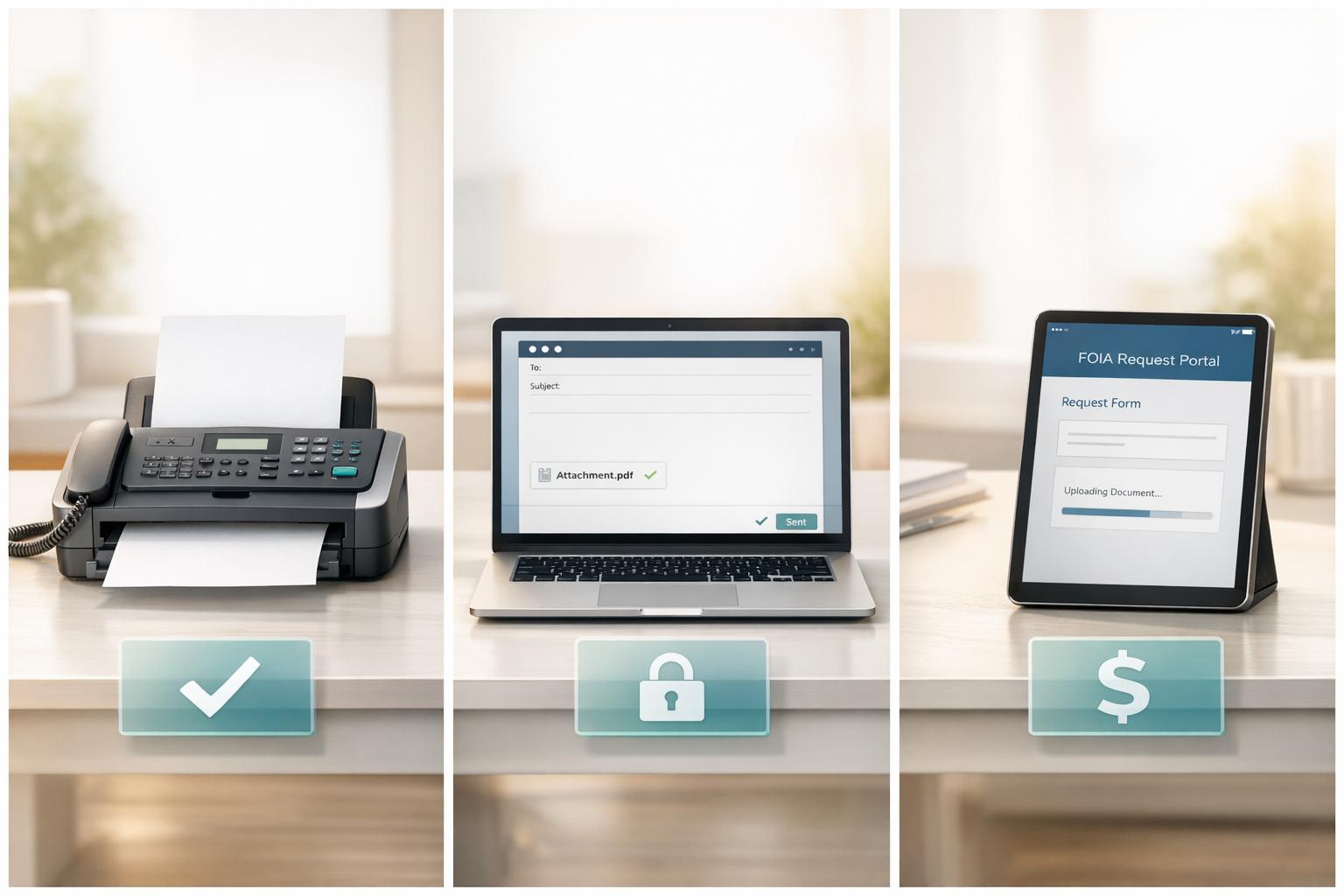
When submitting a FOIA request, you have three main options: fax, email, or a web portal. Each method has strengths and weaknesses, and the best choice depends on your priorities - proof of delivery, ease of use, security, and cost. Here's a quick breakdown:
- Fax: Offers timestamped proof of delivery and bypasses email spam filters. It's reliable for agencies with older systems but may involve busy lines or incorrect numbers. Services like OneFaxNow simplify the process with automatic retries and pay-per-fax vs. subscription pricing ($3.50 for 1–10 pages, $5.00 for 11–50 pages).
- Email: Free and easy to use but lacks immediate confirmation. Spam filters and attachment restrictions can cause delays.
- Portal: Provides structured forms and instant tracking numbers. Best for larger agencies but may require account creation and can have technical issues.
Quick Comparison
| Method | Proof of Delivery | Ease of Use | Cost | Best For |
|---|---|---|---|---|
| Fax | Timestamped receipt | Moderate (prep required) | $3.50–$5.00 | Legacy systems, urgent requests |
| Delayed (agency reply) | Very high | Free | Simple, non-sensitive requests | |
| Portal | Immediate tracking | Moderate (account needed) | Free | Large agencies, tracking needs |
Choose based on your needs: fax for proof and urgency, email for simplicity, or portals for tracking. Always check the agency's FOIA guidelines to ensure your request is processed efficiently.
FOIA Submission Methods: Fax, Email, and Portal Explained
The Main FOIA Submission Channels
Federal agencies primarily process FOIA requests through three electronic methods: web portals, email, and fax. While postal mail remains an option for requests requiring an original signature, electronic submissions are generally preferred. These methods allow agencies to efficiently route, log, and manage requests, reducing paperwork and minimizing delays across over 100 federal agencies [1].
Which Agencies Use Fax, Email, or Portal - and When
Each agency has its own preferred method for receiving FOIA requests. For example, large departments like the Department of Justice and the Department of Homeland Security utilize dedicated FOIA portals, accessible via FOIA.gov. These portals offer a centralized platform for submitting requests to any FOIA-covered agency. They are often the most efficient option, providing immediate tracking numbers and integrating directly into the agency's workflow [1].
Email remains a common choice for agencies that list a specific FOIA email address. This method is quick and familiar but comes with limitations - some agencies restrict email attachments for security reasons, which can complicate submissions that include supporting documents [4].
For smaller agencies, field offices, or locations still using older systems, learning how to fax a FOIA request continues to be a viable option. Fax submissions provide a timestamped transmission record, which can be particularly useful. As the Justice Department notes:
"Most federal agencies now accept FOIA requests electronically, including by web form, e-mail or fax." [1]
Pro Tip: Always refer to the specific agency's FOIA page for accurate submission details. Avoid relying on generic fax numbers from search results. Instead, use the contact information listed on the agency's official FOIA instructions or verified pages [4].
How OneFaxNow Fits Into FOIA Submissions
For agencies that still rely on fax, OneFaxNow simplifies the process by offering a modern solution. This service eliminates the need for a physical fax machine or account registration. Users can upload files (PDF, DOCX, etc.), enter the agency's fax number, and only pay if the transmission is successful. Failed delivery incurs no cost [2].
OneFaxNow's pricing is straightforward: $3.50 for 1–10 pages (Lite) and $5.00 for 11–50 pages (Standard). The service also includes up to three automatic retries if the agency's line is busy. This reliability is especially valuable when working under tight deadlines or needing a timestamped record as proof of submission [2].
sbb-itb-0df24da
Fax vs. Email vs. Portal for FOIA: A Direct Comparison
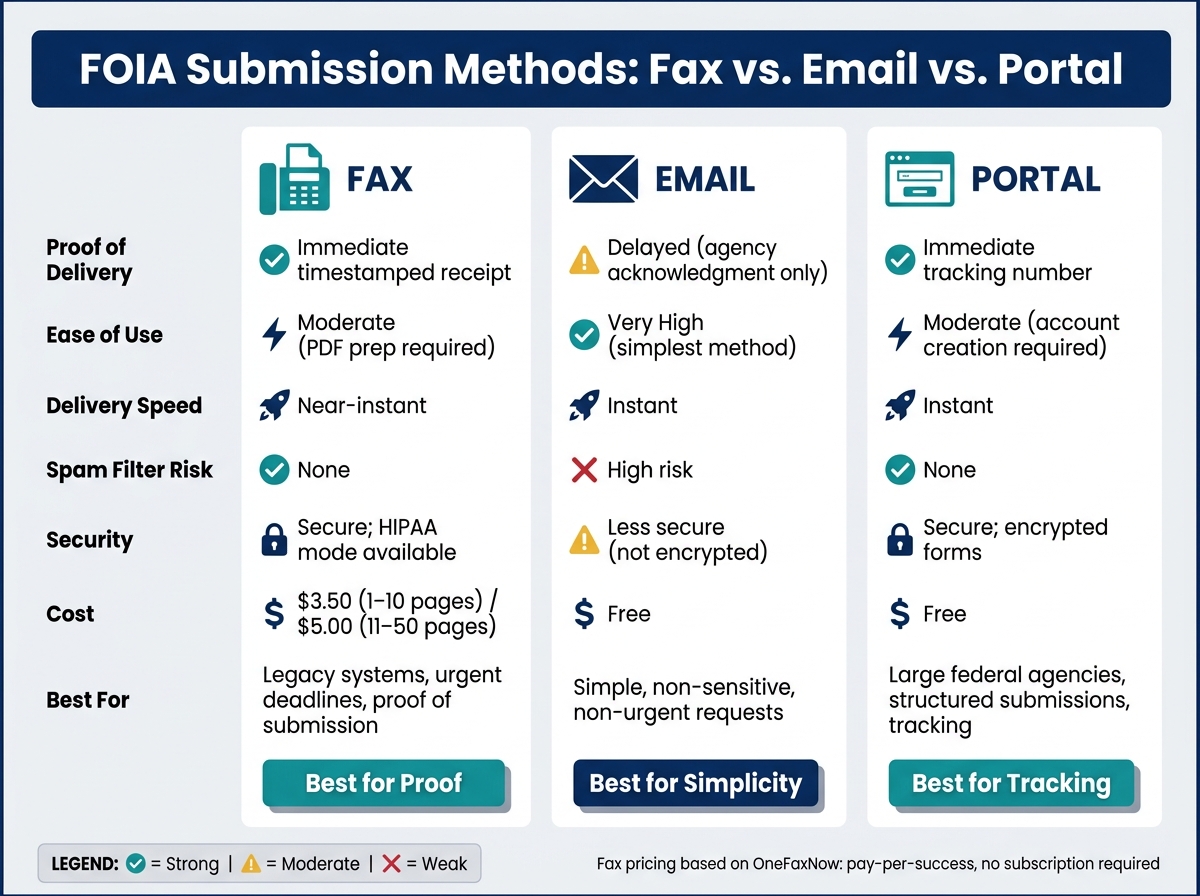
FOIA Submission Methods: Fax vs Email vs Portal Compared
This section breaks down the practical differences between fax, email, and portal methods for submitting FOIA requests. Here's a closer look at the pros, cons, and key features of each option to help you decide which works best for your situation.
FOIA by Fax: How It Works, Pros, and Cons
Submitting a FOIA request via fax involves either using an online fax service or a physical fax machine to send your document to the agency's FOIA fax number. Once sent, the agency receives a printed or digital copy, and you get a timestamped receipt as proof of submission.
Fax stands out for its immediate delivery confirmation, complete with a timestamp and page count. It bypasses email spam filters, making it a reliable choice for agencies with older intake systems. However, it’s not without challenges - busy lines, incorrect numbers, and poor scan quality can cause issues. Services like OneFaxNow help mitigate these problems with features like automatic retries, charging only for successfully delivered faxes [2].
| Feature | Detail |
|---|---|
| Proof of Delivery | Immediate receipt with timestamp and page count |
| Reliability | High - avoids spam filters and includes auto-retries |
| Common Issues | Busy lines, wrong numbers, poor scan quality |
| Cost (OneFaxNow) | $3.50 for 1–10 pages; $5.00 for 11–50 pages |
FOIA by Email: How It Works, Pros, and Cons
Email offers a straightforward and free way to submit FOIA requests. Simply draft your request, attach any required documents, and send it to the agency's designated FOIA email address.
The downside? Email delivery isn’t always guaranteed. Spam filters could block your request, and some agencies restrict attachments for security reasons. Unlike fax or portals, email lacks standardized delivery confirmation - you’ll often need to wait for a reply to know your request was received, which can delay time-sensitive matters.
| Feature | Detail |
|---|---|
| Proof of Delivery | No immediate confirmation; depends on agency acknowledgment |
| Reliability | Moderate - spam filters and attachment restrictions are common risks |
| Common Issues | Spam folders, file size limits, stripped attachments |
| Cost | Free |
FOIA via Portal: How It Works, Pros, and Cons
FOIA portals use structured web forms to guide your submission, ensuring all required fields are completed. Once submitted, you receive an immediate tracking number, making it easy to monitor your request’s progress without follow-ups.
While portals are highly reliable, they may require you to create an account, which can slow things down for first-time users. Additionally, technical glitches or formatting limitations can occasionally arise.
| Feature | Detail |
|---|---|
| Proof of Delivery | Immediate tracking number upon submission |
| Reliability | High - structured forms reduce errors |
| Common Issues | Account creation required; occasional technical issues; less flexibility in formatting |
| Cost | Free |
Side-by-Side Table: Fax vs. Email vs. Portal
| Criteria | Fax | Portal | |
|---|---|---|---|
| Proof of Submission | Immediate transmission receipt | Delayed (agency acknowledgment) | Immediate tracking number |
| Ease of Use | Moderate (may require PDF preparation) | Very high | Moderate (may require account) |
| Delivery Speed | Near-instant | Instant | Instant |
| Spam Filter Risk | None | High | None |
| Sensitive Records | Secure; HIPAA mode available | Less secure | Secure; encrypted forms |
| Best For | Legacy systems, deadlines, need for proof | Simple, non-urgent requests | Federal agencies, tracking needs |
Choosing the best method depends on the agency you’re dealing with. Larger federal departments often prefer FOIA portals for their structured format and tracking capabilities. On the other hand, smaller offices or those relying on older systems may handle fax submissions more efficiently. For urgent requests requiring same-day confirmation, fax can be a reliable choice - especially with services like OneFaxNow, which streamline the process. More on that in the next section.
How to Pick the Right FOIA Submission Method
When deciding how to submit your FOIA request, focus on four key factors: proof of delivery, data sensitivity, ease of setup, and cost. These considerations help ensure your request is delivered securely, efficiently, and at a predictable expense. Getting these details right can save you time and hassle down the road.
Proof of Submission and Delivery Confirmation
The clock for a FOIA response - 20 business days - doesn't start until your request reaches the correct FOIA office, not just the general inbox of the agency [5][6]. This distinction is crucial and often overlooked.
Different submission methods offer varying levels of proof:
- Fax: Provides a timestamped receipt. For instance, OneFaxNow sends a real-time status email with a job ID and tracking link.
- Portals: Offer a tracking number as confirmation.
- Email: Only shows a "sent" record until the agency acknowledges receipt.
"A delivery confirmation means the fax reached the destination fax system. It does not ensure the agency accepted the filing, processed the form, or approved the request." - 1Fax [4]
If you need to file an administrative appeal, that receipt or tracking number becomes essential. Keep it alongside any acknowledgment letter the agency sends back [1][3]. Choosing the method that provides the strongest proof of submission can make a big difference.
Sending Sensitive or Personal Information
Standard email isn't encrypted, making it unsuitable for requests that involve personal records, medical history, or Protected Health Information (PHI). Portals, managed by agencies, typically use encrypted connections, offering better security. Fax services like OneFaxNow, especially when using their HIPAA mode, provide stricter handling, audit logging, and a Business Associate Agreement (BAA) you can execute instantly through their dashboard.
For routine FOIA requests, any method works. But if your request involves sensitive data, it's better to use a secure portal or a HIPAA-enabled fax service rather than standard email. The sensitivity of your data should guide your choice.
Ease of Use and Setup
Some methods are easier to use than others:
- Portals: Require account creation, which adds an extra step for first-time users.
- Email: The simplest method but lacks structure.
- Fax via OneFaxNow: Offers a middle ground - no account needed. Just upload your document, enter the fax number, and you're done in about 60 seconds.
Keep in mind that submission requirements vary by agency. For example, starting January 22, 2026, USCIS will require all FOIA and Privacy Act requests to be submitted through their online portal. Always check the agency's latest rules before sending your request.
Cost Breakdown by Method
Different submission methods come with varying costs. Here's a quick comparison:
| Method | Cost per Submission | Notes |
|---|---|---|
| Free | No formal delivery proof | |
| Portal | Free | May require account creation |
| Fax (OneFaxNow) | $3.50 (1–10 pages) / $5.00 (11–50 pages) | Pay only if delivery is successful [2] |
| In-store fax (FedEx/UPS) | Higher per-page rates | No automatic retries or tracking |
OneFaxNow stands out with its success-only payment model. If all three automatic retries fail, you aren't charged [2].
Why OneFaxNow is a smart choice: With its pay-per-success model, automatic retries, and HIPAA-enabled options, OneFaxNow provides a transparent and reliable solution - especially when proper documentation is critical.
Practical Tips for Submitting a FOIA Request
A Simple Decision Framework
Start by visiting the agency's official FOIA page to confirm how they accept submissions. Check if the records you need are already public - this could save you the trouble of filing a request. Also, consider whether your documents contain sensitive information and weigh factors like proof of delivery, setup time, and cost.
"FOIA can be a lengthy and costly process, so a little preliminary research may save you time and money." - Office of Government Information Services (OGIS) [3]
Once you've done this groundwork, decide whether fax or an online method will work best for your specific request.
When Fax - and OneFaxNow - Is the Right Call
Faxing, especially through OneFaxNow, is a smart choice when the agency prefers it or doesn’t have an online portal. It's also handy if you want a timestamped record of delivery, which can be critical for tracking.
When faxing, include a cover page clearly marked "FOIA Request." Add your name, contact details, and the specific office within the agency to ensure it reaches the right place [2]. If you're using fillable PDFs, make sure to "flatten" them so all entries and signatures are preserved [4]. And most importantly, always use the agency's official contact information.
OneFaxNow makes this process straightforward. You don’t need an account, and their pricing is clear: flat $3.50–$5.00 pricing for one-time faxes. You’re only charged for successful deliveries. If the recipient’s fax line is busy, the service retries up to three times and provides real-time updates, including a job ID and tracking link. This creates a reliable paper trail for your records.
When Email or a Portal Is the Better Option
Sometimes, email or an online portal is a better fit, especially if the agency prefers it or if your request involves sensitive materials.
Email is quick, free, and easy to archive, making it a good option for straightforward, non-sensitive requests. However, keep in mind that email timestamps don’t provide formal proof of delivery, and attachments might get blocked [4].
For large federal agencies or when structured intake forms are available, online portals are often the way to go. These forms help ensure you include all necessary information, reducing the chances of rejection. Plus, portals typically provide a tracking number when you submit your request [1]. Always double-check the agency's current submission requirements, as they can change over time.
Conclusion: Picking the Best Way to Submit Your FOIA Request
When deciding how to submit your FOIA request, consider the agency's preferred method, how quickly you need a response, and whether proof of delivery is important. Each method has its strengths, depending on your priorities.
Email is a good choice for simple requests to large federal agencies, though it lacks reliable delivery confirmation. Online portals like FOIA.gov are excellent for major agencies, offering structured forms and automated tracking numbers. Faxing can be useful for local offices, older systems, or when you need timestamped proof of submission. Services like OneFaxNow provide the reliability of faxing with modern convenience - offering a pay-per-fax model, automatic retries, and no subscription fees. You only pay when your fax is successfully delivered.
Faxing remains a dependable option for requests where accountability matters, thanks to features like clear pricing, automatic retries, and verifiable delivery records.
"Most federal agencies now accept FOIA requests electronically, including by web form, e-mail or fax." - U.S. Department of Justice [1]
Before submitting, always check the agency's FOIA guidelines to confirm their accepted methods and ensure you have the correct contact details.
Submit your FOIA fax via OneFaxNow - No Account Required
If your FOIA request involves sensitive information, consider our HIPAA-compliant faxing options for added security.
FAQs
Which FOIA submission method starts the 20-day clock fastest?
Submitting a FOIA request by fax can sometimes speed up the 20-day response clock. Certain agencies, particularly those relying on older systems or favoring fax for record-keeping, may still accept or even prioritize faxed requests. One advantage of fax is that it provides a physical, timestamped confirmation, which can help kickstart the process more efficiently.
How can I prove the agency received my FOIA request?
When sending a FOIA request, the best way to confirm the agency received it is by securing delivery confirmation. Using a fax service like OneFaxNow is a practical option, as it provides tracking links and confirmation receipts, giving you solid proof of delivery. To make things smoother, include a detailed cover page with your contact information and the specifics of your request. While some agencies might acknowledge receipt through email or mail, a fax receipt often serves as the clearest and most immediate proof.
What’s safest for sending sensitive info in a FOIA request?
When submitting sensitive information as part of a FOIA request, the most secure option is using a secure electronic fax service. Look for features like delivery confirmation, automatic retries, and optional HIPAA compliance for added protection. Faxing ensures a direct transmission and provides proof of delivery, which helps bolster security. Before proceeding, confirm that the agency accepts faxes and select a service with encryption and compliance features to minimize risks such as transmission errors or incomplete documents.