Faxing DMV Vision and Medical Forms from Your Doctor’s Office: A Practical Guide
Clear steps for clinics to fax DMV vision and medical forms, including correct fax numbers, HIPAA-safe options, and proof of delivery.
Faxing DMV Vision and Medical Forms from Your Doctor’s Office: A Practical Guide
Faxing DMV medical and vision forms directly from your doctor’s office is often required to ensure timely and accurate submission. These forms confirm a driver’s medical fitness and must be completed and signed by a licensed provider. Missing deadlines or submitting incomplete forms can lead to serious consequences, like license suspension. Faxing remains a fast and reliable method, but it’s important to use the correct DMV fax number, ensure all sections are filled out, and verify the provider’s credentials.
For clinics without a fax machine, online fax services like OneFaxNow provide an easy solution. With no subscription needed, clinics can send forms in minutes for $3.50 (1–10 pages) or $5.00 (11–50 pages). For sensitive medical information, the optional HIPAA Mode ensures secure transmission for an additional $3.00–$5.00, offering encryption and compliance features.
Key Tips:
- Confirm the correct DMV fax number and submission rules.
- Ensure all patient and provider sections are complete, signed, and dated.
- Use a HIPAA-compliant service for forms containing medical details.
- Keep a copy of the fax confirmation as proof of submission.
Faxing DMV forms doesn’t have to be complicated. Following these steps can help you avoid delays and keep your license status in good standing.
DMV Vision and Medical Forms: What You Need to Know
DMV medical and vision forms are used to confirm a driver’s ability to safely operate a vehicle. These forms may be required for various reasons, such as license renewals, reports from law enforcement, concerns raised by healthcare providers, or specific medical conditions like seizures or vision impairments. Below, we break down the most common forms and their purposes.
Common DMV Forms and Their Purposes
The form you’ll need depends on your medical condition and the rules in your state. For instance, New York uses several specialized forms for different scenarios:
| Form | Purpose |
|---|---|
| MV-619 | Certifies vision acuity for license renewals. |
| MV-80 / MV-80U.1 | Provides a physician’s statement for conditions that cause loss of consciousness or body control. |
| MV-80L | Reports low vision for drivers with acuity between 20/40 and 20/70 or those using telescopic lenses. |
| DS-6 | Allows a physician to report a patient they believe is unfit to drive safely. |
In Washington, D.C., the DMV uses a combined Medical/Eye Report form. Drivers aged 70 and older must also provide a physician’s certification during license renewal. According to the DC DMV:
"If you have a medical condition that may impair your ability to safely operate a motor vehicle, even temporarily, you must provide DC DMV a Medical/Eye Report form that has been completed by your licensed medical practitioner." [3]
Who Fills Out Which Sections
DMV forms clearly outline the roles of patients and healthcare providers. Patients are responsible for filling out personal information like their name, date of birth, driver’s license number, and contact details. Providers, on the other hand, complete the clinical sections, which include exam findings, diagnoses, their professional assessment of the patient’s driving fitness, and their signature along with their license number.
The type of provider who can complete a form depends on the form itself. For example:
- Vision forms like New York’s MV-619 can be completed by a variety of professionals, including physicians (MDs), physician assistants, optometrists, opticians, and registered nurses.
- More complex medical forms, such as the MV-80U.1 for conditions involving loss of consciousness, typically require completion by a licensed physician (MD or DO) [2][4].
One common mistake that leads to form rejection is using a provider with the wrong credentials. Clinics should confirm the required credentials before scheduling appointments to avoid delays.
How DMVs Accept These Forms
DMVs offer several submission options, including fax, mail, in-person drop-off, and electronic registries. However, not all forms can be submitted through every method. For certain forms - especially those involving clinical certifications - DMVs often require that the provider’s office submits the form directly, rather than the patient.
For instance, New York’s Medical Review Unit accepts medical documentation by fax at 518-402-2991 [4]. It’s important to note that DMVs may have different fax numbers for various departments, so always check the official DMV website to ensure you’re using the correct one. Clinics using online fax services like OneFaxNow should double-check submission details to ensure timely processing.
sbb-itb-0df24da
When Faxing Makes the Most Sense
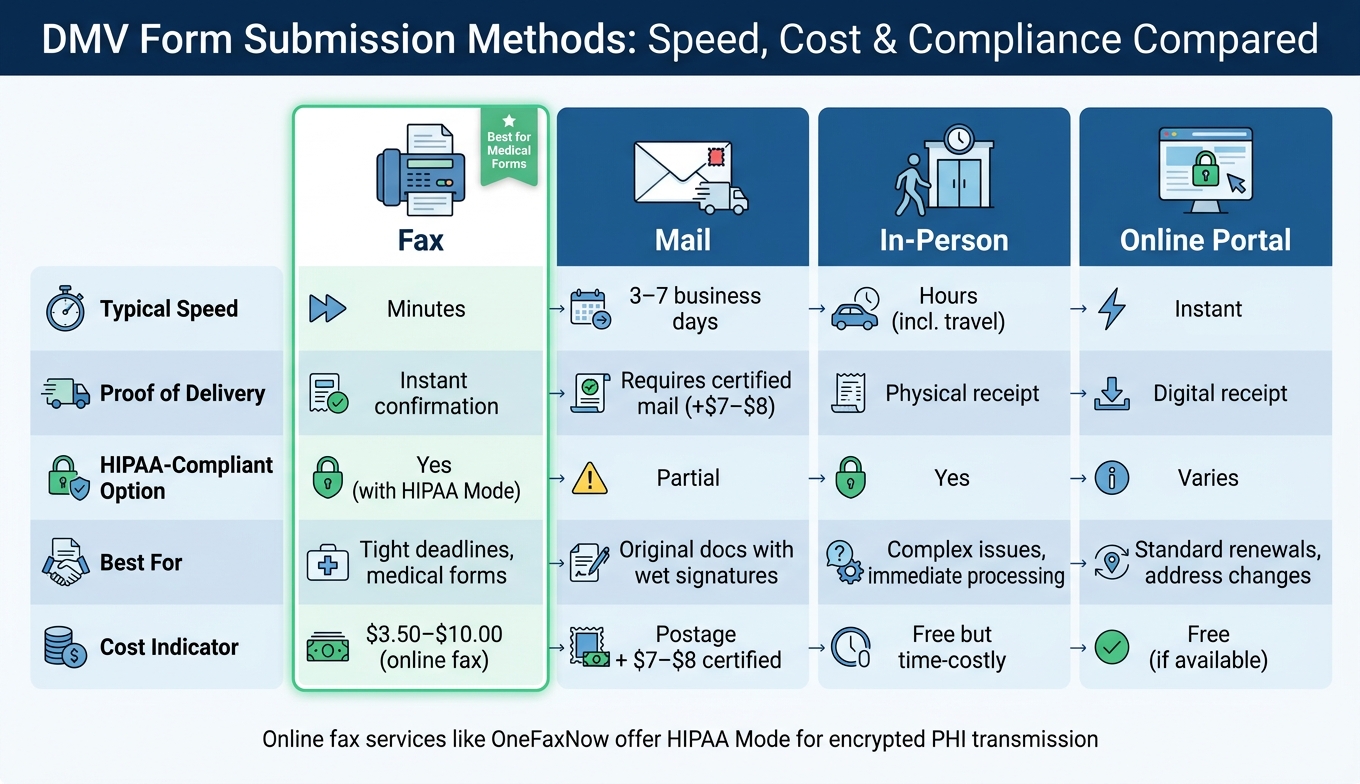
DMV Form Submission Methods: Speed, Cost & Compliance Compared
Clinics that fax medical records for DMV submissions can benefit from the speed and reliability of faxing, especially in time-sensitive situations. Clear communication with patients and understanding the pros and cons of faxing are key when working with a clinic.
Why Faxing DMV Forms Works Well
One of the biggest perks of faxing is how fast it is. Unlike mailing forms, which can take days to arrive, faxing gets your documents where they need to be almost instantly. This is especially helpful in situations where timing is critical - like in Washington, D.C., where there's a 30-day deadline to report a seizure to the DMV [3].
Another benefit? Faxing provides immediate proof that your document was sent. Many online fax services offer real-time updates and email confirmations once your fax goes through. Compare this to certified mail, which costs an extra $7–$8 and still takes a few days to deliver [5].
Faxing also ensures your form gets to the right place. For example, sending directly to a Medical Review Unit means the document is less likely to end up lost in a general mailroom [1]. While faxing has clear advantages, it’s not without its challenges.
Here’s a quick comparison of submission methods:
| Submission Method | Typical Speed | Proof of Delivery | Best For |
|---|---|---|---|
| Fax | Minutes | Instant confirmation | Tight deadlines, medical forms |
| 3–7 business days | Requires certified mail | Original documents with wet signatures | |
| In-Person | Hours (including travel) | Physical receipt | Complex issues, immediate processing |
| Online Portal | Instant | Digital receipt | Standard renewals, address changes |
But before hitting "send", it’s important to watch out for common faxing mistakes.
Drawbacks of Faxing to Be Aware Of
Faxing isn’t foolproof. One common issue is sending forms to the wrong fax number. DMVs often have different fax numbers for various departments, so a misplaced document might never reach the right desk.
Another problem is poor scan quality. Blurry or improperly scanned forms could lead to rejection. Always ensure the document is scanned clearly and is easy to read. And even if your fax is successfully received, it doesn’t guarantee immediate action - DMV staff still need to manually process and file the document [1].
How to Coordinate with Your Doctor's Office
Being prepared and asking the right questions at the clinic can help you avoid delays or rejections.
What to Do Before Your Appointment
Start by checking your state DMV's official website to confirm whether fax submissions are allowed for your specific form. Not all forms can be faxed, and some states now require online submissions. Once you’ve verified this, locate the correct fax number for the department handling your case, such as the Medical Review Unit or Driver Control.
Before heading to your clinic, make sure you’ve filled out all the patient sections on your form. This includes your full legal name, driver’s license or ID number, date of birth, and contact information. To avoid any processing hiccups, prepare a cover sheet that lists your license number and any case or reference number tied to your file.
| Requirement | Action to Take Before Appointment |
|---|---|
| Form Selection | Download and print the specific DMV form for your state (e.g., NY MV-619 or DC Medical/Eye Report) [2][3]. |
| Data Accuracy | Clearly write your driver’s license number and case number on every page. |
| Fax Destination | Call the DMV to confirm the correct fax number for the Medical Review Unit. |
| Clinic Policy | Contact your clinic to ask about fees and how long it typically takes to complete DMV paperwork. |
Make sure that an authorized medical professional - such as a physician, physician assistant, ophthalmologist, optometrist, or registered nurse - is available to sign the form [2].
Once you’ve completed these steps, you’ll be ready to discuss the details with your provider.
Questions to Ask Your Provider or Clinic
When you contact the clinic, ask if there’s a fee for completing DMV paperwork and how long it usually takes. Some clinics process these forms on the same day, while others may need 48–72 hours. Also, confirm whether the clinic will send the fax for you or if you’ll need to handle this yourself.
Before the fax is sent, request a copy of the signed form for your records, along with the fax confirmation receipt. These documents can serve as proof of submission in case any issues arise. Double-check that the provider has signed and dated all required sections - missing signatures are a common reason for DMV rejections.
Taking these steps will help ensure the process goes smoothly when it’s time to send the fax.
Using an Online Fax Service at the Clinic
Some clinics, especially smaller ones, may not have a reliable fax machine or any faxing capabilities. In these cases, an online fax service can be a practical solution. For instance, OneFaxNow allows clinics to upload scanned forms (PDF, JPG, or Word), input the DMV fax number, and send the document in about 60 seconds - no account or subscription required.
Here’s how the pricing works:
- Lite Plan: $3.50 for 1–10 pages
- Standard Plan: $5.00 for 11–50 pages
If the DMV’s fax line is busy, OneFaxNow retries up to three times, and payment is only processed once the fax is successfully delivered. For forms that include sensitive information like diagnoses or exam results, the optional HIPAA Mode add-on (+$3.00 for Lite or +$5.00 for Standard) ensures encrypted transmission, audit logging, and instant Business Associate Agreement generation, all without a long-term commitment.
Online fax services eliminate the hassle of maintaining hardware or managing paper supplies. Clinics can simply upload scans or photos and monitor delivery in real time, making this a viable option even for offices that only handle a few DMV-related faxes each year. This approach ensures DMV forms are sent securely and efficiently without unnecessary complications.
HIPAA-Compliant Faxing of DMV Forms
DMV vision and medical forms often contain sensitive health information - things like visual acuity scores, diagnoses, treatment details, and physician assessments. Since faxing these documents involves Protected Health Information (PHI), clinics must follow strict safeguards from the moment the fax is prepared until its delivery is confirmed. Below are the key rules clinics need to follow to send a HIPAA-compliant fax containing PHI.
HIPAA Rules That Apply to Faxing Medical Forms
When faxing DMV forms with PHI, three HIPAA rules are especially relevant.
- Minimum Necessary Rule: Only send the specific information the DMV requires. For example, if the request is for a vision evaluation, send the vision report, not the patient’s entire medical record.
- Verification: Double-check the recipient’s fax number before sending. A misdirected fax containing sensitive data like a diagnosis or test result can result in a reportable HIPAA breach.
- Audit Trail: Keep a log of who sent the fax, when it was sent, and the recipient’s fax number. This creates a defensible record in case of any compliance review.
While HIPAA considers encryption "addressable", using encrypted services is a practical necessity. AES 256-bit encryption ensures that faxes are protected from interception. Unlike traditional fax machines, which can leave printed pages sitting in open trays, digital fax services deliver documents securely to inboxes.
What to Include on a HIPAA-Compliant Fax Cover Sheet
A proper fax cover sheet is essential for HIPAA compliance. It should include:
- The clinic's name, phone number, and fax number
- The recipient's name, department (e.g., Medical Review Unit), and fax number
- The patient’s full name and either their driver’s license number or case number
- The total number of pages (including the cover sheet)
- A confidentiality notice specifying that the fax contains PHI meant only for the named recipient, with instructions to destroy it if received in error
To reduce risk, avoid including clinical details on the cover sheet. This way, even if the fax is misdirected, sensitive information remains protected.
How OneFaxNow's HIPAA Mode Helps Clinics Stay Compliant
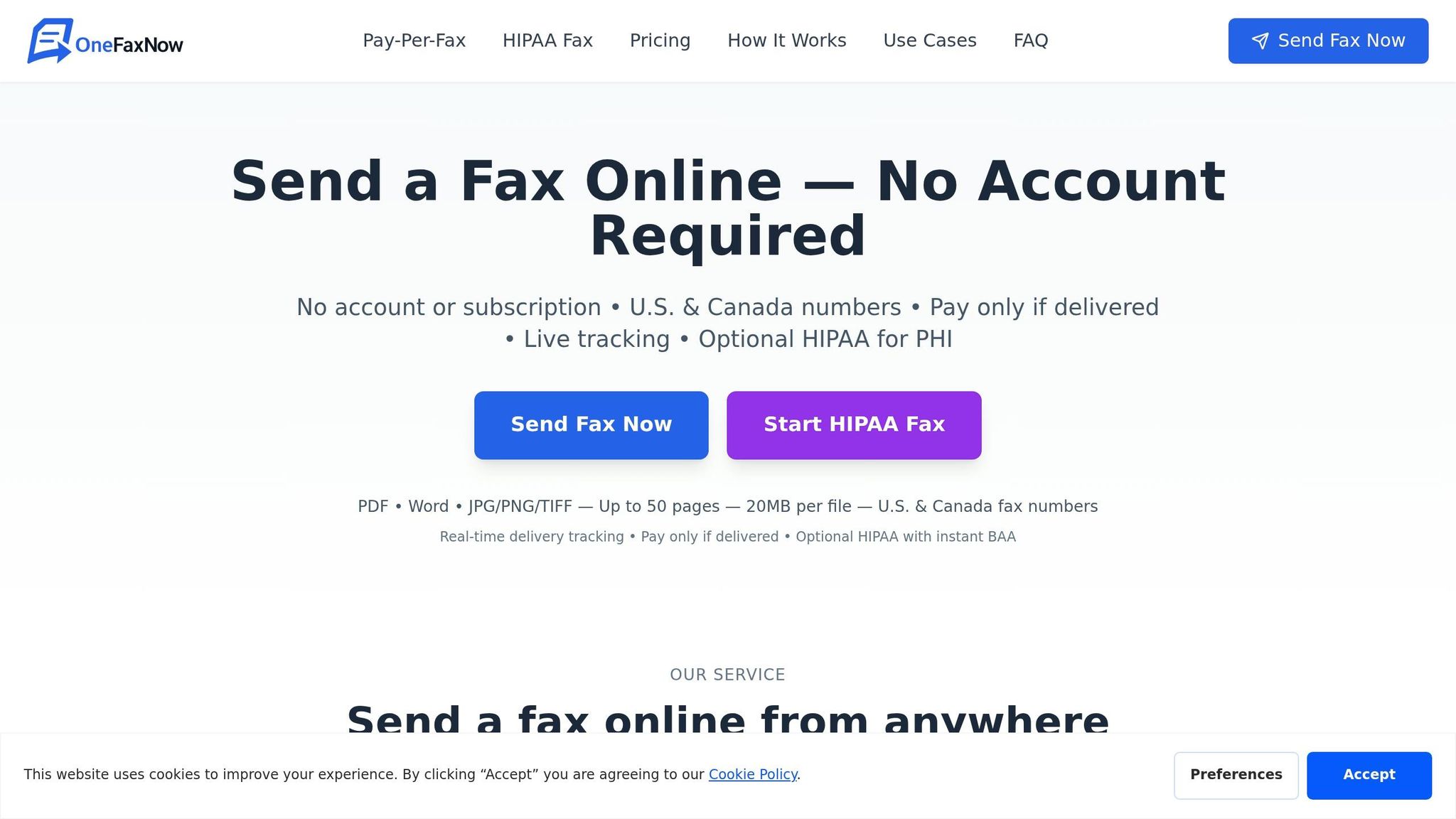
OneFaxNow’s HIPAA Mode simplifies compliance by integrating encrypted delivery, stricter data handling protocols, and an instant Business Associate Agreement (BAA) - a legal document that defines how third-party services handle PHI. These features make faxing DMV forms both secure and straightforward.
The HIPAA Audit Dashboard is another key tool. It tracks every transmission, including details like the sender, recipient number, date, time, and delivery status. Clinics can export this data in CSV or PDF formats for record-keeping. Additionally, PHI files are automatically deleted from the system once the fax is successfully delivered, reducing long-term risk.
| Feature | Standard Mode | HIPAA Mode |
|---|---|---|
| Encryption | Standard SSL | AES 256-bit |
| BAA | Not included | Instant BAA at checkout |
| Audit Logs | Basic tracking | HIPAA Audit Dashboard (CSV/PDF export) |
| PHI File Deletion | Standard retention | Automatic deletion after delivery |
| Cost (1–10 pages) | $3.50 | $6.50 |
| Cost (11–50 pages) | $5.00 | $10.00 |
| Best For | Address changes, proof of insurance | DMV forms with medical evaluations/PHI |
How to Fax DMV Forms Using OneFaxNow: Step by Step
Getting the Form Ready to Send
Before sending, double-check that your form is fully completed. Make sure all required fields are filled out, the provider's signature is included, and the form is dated. Missing any of these details could delay processing at the DMV.
Next, scan the form into a PDF (this format works best) or another supported file type like DOCX, JPG, PNG, or TIF. Keep individual files under 20 MB, and ensure the total packet - including the cover sheet - doesn’t exceed 50 pages. If you’re working with multiple files, arrange them in the correct order before uploading, as OneFaxNow combines them into a single transmission.
Sending the Fax Through OneFaxNow
Once your files are ready, you’re all set to send the fax. The good news? You don’t need to create an account. Simply visit onefaxnow.com, upload your files, and enter the fax number for the DMV’s Medical Review Unit (not the general DMV line). The system will automatically format U.S. fax numbers as you type them in.
If your form contains Protected Health Information (PHI) - like a vision evaluation score, diagnosis, or clinical assessment - select the HIPAA Mode option before checking out. This ensures the fax is sent with encryption and generates an instant Business Associate Agreement (BAA) for compliance. HIPAA Mode costs $6.50 for 1–10 pages and $10.00 for 11–50 pages, while standard faxes are priced at $3.50 and $5.00 for the same ranges. Payment is securely processed through Stripe after delivery is confirmed, making it a quick and reliable solution for handling DMV-related documents.
Tracking Delivery and Keeping Records
After sending your fax, you can track its progress in real time. OneFaxNow provides a Fax Status page that updates you on the transmission’s progress. Once the fax is delivered, you’ll get an email confirmation with a link to the status page. Be sure to save both the email and the link as proof of submission.
If the DMV line is busy, the system will automatically retry up to three times. For faxes sent in HIPAA Mode, an audit dashboard logs detailed information, including the sender, recipient number, date, time, and delivery status. You can export this log as a CSV or PDF immediately after confirmation and file it with the patient’s records. Additionally, any PHI-related files are deleted from the system once the fax is delivered, though the audit log remains available for future reference.
Conclusion: A Faster Way to Submit DMV Forms from Your Clinic
Submitting DMV forms accurately starts with a few key steps: confirm the DMV accepts fax submissions, use the correct fax number (like the Medical Review Unit), and double-check that the provider signs and dates all necessary fields before sending. When providers fax the form directly after an exam instead of handing it off to the patient, it minimizes errors, reduces delays, and establishes a clear record of the submission process. Using an online fax solution can make this process even smoother. Many clinics compare online fax services to find the best fit for their workflow.
OneFaxNow offers a hassle-free way to fax without needing a dedicated fax line, subscription, hardware, or account. Pricing is straightforward: $3.50 for 1–10 pages or $5.00 for 11–50 pages. Plus, the system retries up to three times if the DMV line is busy, and payment is only processed after successful delivery. [1] These features help clinics avoid common issues that slow down form submissions.
For sensitive forms containing PHI, you can enable HIPAA Mode for added security. This option costs $6.50 for 1–10 pages or $10.00 for 11–50 pages and includes encrypted faxing, an instant BAA, and automatic PHI deletion. [1]
Always double-check the DMV’s most recent instructions and fax number before sending. Simplify your clinic’s DMV form process today.
FAQs
Does my DMV require the doctor’s office to fax the form?
Some DMVs may insist that forms are faxed directly from your doctor’s office, but this can differ depending on the state or licensing board. It's crucial to review the specific instructions provided by your DMV or licensing board to determine if the form must be submitted by your provider or if alternative submission methods are acceptable. Before sending, double-check that the form is fully completed and easy to read.
What should I include on the fax cover sheet for DMV forms?
When faxing DMV forms, make sure to include a cover sheet. The cover sheet should have your contact information, the recipient's fax number, and a clear description of the documents you're sending. Be specific about the type of form (like a medical or vision evaluation), include your name, and add any relevant case or reference numbers. To prevent delays, check with your DMV to see if they need additional details, such as your driver’s license number or an appointment reference.
What should I do if the DMV says they didn’t receive my fax?
To start, check the delivery tracking from your fax service to ensure the fax went through successfully. Double-check that you used the correct DMV fax number for the specific form you were submitting. If the fax didn't go through or encountered errors, try sending it again. You can also reach out to the DMV directly to confirm they received it. If faxing continues to be problematic, consider other submission options like mailing the form or using the DMV's online portal.