Referrals by Fax: How Clinics Can Send Specialist Referrals Without a Fax Machine
Small clinics can ditch fax machines and send secure, HIPAA-compliant referral packets using pay-per-fax services, reusable templates and delivery tracking.
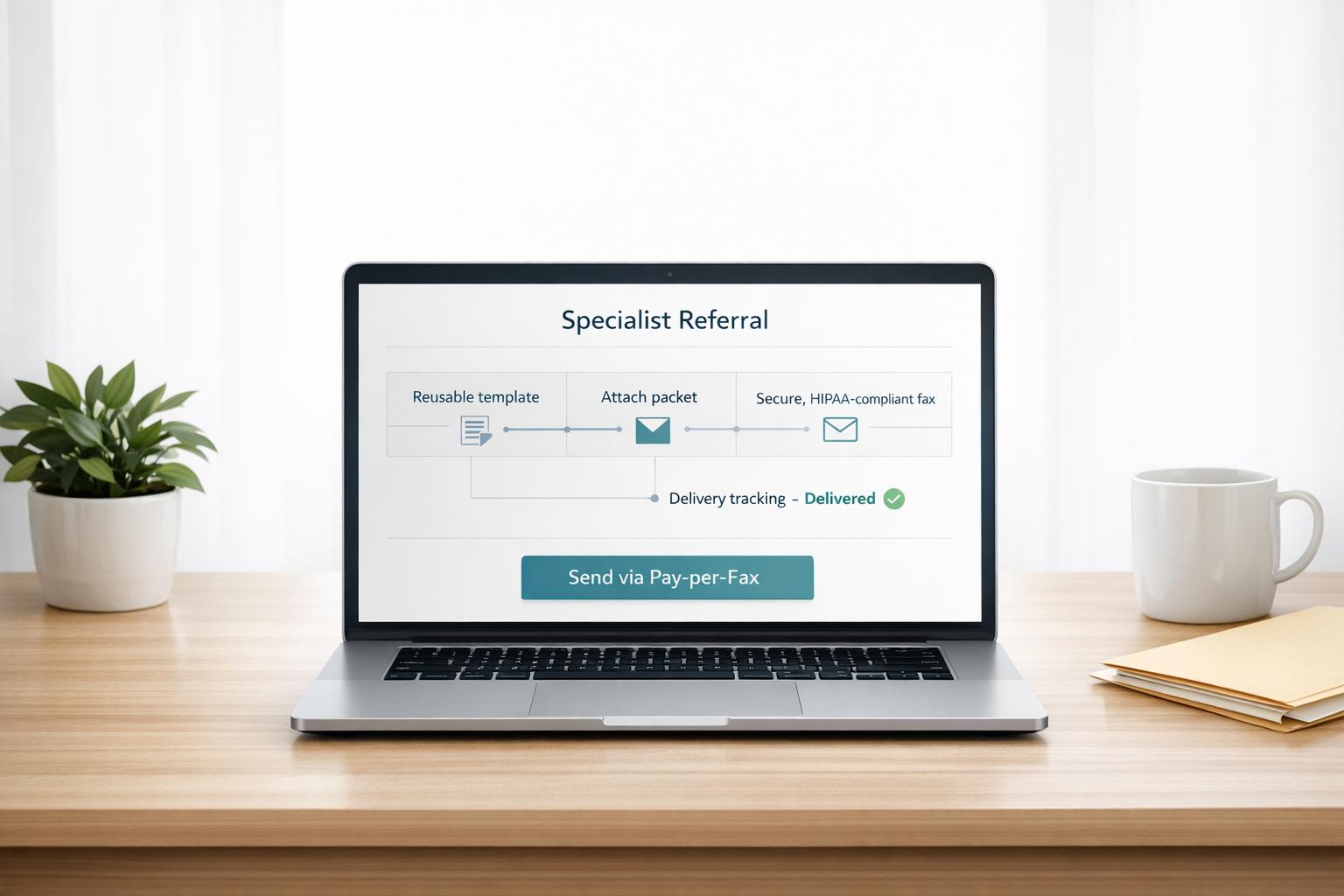
Referrals by Fax: How Clinics Can Send Specialist Referrals Without a Fax Machine
Fax machines are outdated, but clinics still need to send referrals. Here’s how you can do it without one:
- Use pay-per-fax services: Upload documents, enter the recipient’s fax number, and send. No subscription required.
- Ensure HIPAA compliance: Enable secure transmission modes, execute a Business Associate Agreement (BAA), and protect patient data.
- Track delivery in real time: Get instant updates and retry failed transmissions automatically.
- Prepare complete referral packets: Include a referral form, last visit note, and lab/imaging results for clarity and efficiency.
- Avoid common mistakes: Double-check fax numbers, ensure document legibility, and include direct contact information.
Pay-per-fax services like OneFaxNow make referrals secure, efficient, and affordable. You pay only for successful transmissions, with no need for a bulky fax machine or costly subscriptions.
What Goes in a Referral Packet
A complete referral packet should include three essential elements: a referral form, your last visit note, and any relevant lab or imaging results. Leaving out any of these can slow down the evaluation process.
Specialists rely on well-organized packets that provide clear clinical context right away [7]. Unfortunately, research shows many specialists are dissatisfied with the quality of referral letters they receive [7]. By sticking to a simple checklist, you can ensure your referrals consistently meet expectations. Here's a breakdown of what each component should include.
Referral Form
Start with a detailed referral form that provides key patient information and the purpose of the referral. This form should list the patient's full name, date of birth, sex at birth (for treatment considerations), insurance details, and a unique identifier like their medical record number [6]. Most importantly, state the reason for the referral clearly - whether it's for evaluation, management recommendations, or a second opinion [5][6].
"A standardized template gives medical professionals a structured format when presenting patient information. The consistency provided by a template reduces the risk of missing important details, helping specialists quickly understand the patient's condition." – Heidi Health [5]
Ensure your form features your practice's letterhead, including the clinic's name, contact details, and the date of the referral [5]. Also, indicate the urgency level - routine, soon, or urgent - so the specialist can prioritize appropriately [6][8]. A clear and concise referral form minimizes the chances of errors or delays during transmission.
Last Visit Note
The last visit note offers the specialist a narrative of the patient's condition leading up to the referral. Use a printed or digital format to avoid any legibility issues [7]. Combining a formal narrative with bullet points can make the information easier to digest [5].
If you're still relying on handwritten notes, consider using AI-powered medical scribes to transcribe patient history and reformat it into a professional referral document [5]. For physical documents, mobile scanning apps can help you create clear, readable files before uploading or faxing [2].
Labs and Imaging Results
Include any relevant lab and imaging results, along with a summary of the findings [5]. This ensures the specialist has all the necessary information to understand the patient's medical history and tests before the evaluation [9].
"Clarity, legibility and overall format are also important features of a good referral letter." – RPJC Ramanayake, Department of Family Medicine, Faculty of Medicine, University of Kelaniya [7]
sbb-itb-0df24da
Common Referral Fax Mistakes and How to Fix Them
Even the best-prepared referral packet can fail to reach its destination if common faxing mistakes occur. Studies reveal that 65% of patient referrals fall through without proper tracking, which can lead to serious consequences, including preventable deaths [4]. These errors not only disrupt patient care but also create inefficiencies in your pay-per-fax workflow. The good news? Most of these issues are simple to avoid with a bit of extra attention during the faxing process.
Missing or Wrong Phone Numbers
One of the most frequent issues is forgetting to include a direct callback number or listing an incorrect one. Specialists need a clear, direct way to contact you - whether for clarifications or to schedule the patient. Unfortunately, many referral forms either leave this field blank or provide a general clinic number that often leads to voicemail. Double-check that your cover page includes a direct extension or the referral coordinator's contact information before sending [1]. Some modern online fax platforms can even validate recipient fax numbers and check form fields in real-time, helping catch these errors before the fax is sent [2].
Illegible Scanned Notes
Handwritten notes can be a major headache for specialists, especially when they’re difficult to decipher. Poorly scanned documents are often to blame. To ensure clarity, scan text documents at 300 DPI and image-heavy pages at 600 DPI. Always clean the scanner bed beforehand and use Grayscale or Text mode for the best results. If the notes are faint, adjust the contrast and brightness to improve readability before sending [11][12][13].
"Low-resolution faxes travel faster but are harder to read and can result in a fuzzy or blurred image." – eFax [10]
Wrong Fax Number
Accidentally sending a referral packet to the wrong fax number not only delays patient care but also risks exposing sensitive PHI, violating HIPAA fax requirements. To avoid this, always verify the specialist’s fax number directly from their official website or intake instructions instead of relying on outdated contact lists [3]. Some departments may require faxes to be sent to specific sub-numbers rather than a general office line, so double-check any agency-specific guidelines [3]. Using a fax service with features like real-time tracking and automatic retries can help quickly identify and resolve fax number errors [2].
How to Build a Reusable Cover Page Template
Including a complete referral packet with a cover page ensures specialists receive all the necessary information quickly and accurately. A standardized cover page can save time on repeated referrals while minimizing the chances of leaving out critical details. Creating a reusable Word or PDF template is a simple way to streamline this process. It also helps avoid common errors, like missing contact information or misfiled patient data.
To start, design a header that includes your clinic's and the specialist's contact details. This should feature your clinic's name, address, phone number, and fax number, followed by the specialist's name, department, facility, and destination fax number [5][15]. Next, add a section for patient identifiers - this should include the patient’s full name, date of birth, and a unique identifier to ensure accurate filing [15][16].
A clinical context block is also essential. Use this space to outline the reason for the referral, its urgency (e.g., Routine, Urgent, or 2-Week Wait), and any relevant ICD-10 diagnostic codes. This information helps the specialist's team prioritize referrals effectively [15][16].
Include a documentation summary section that lists all attached files, such as "Last Visit Note, CBC Lab Results, Chest X-Ray Report", along with the total page count (including the cover page) [1][15][16]. This ensures the recipient can confirm they’ve received the full packet. Finally, add a HIPAA confidentiality disclaimer at the bottom. This protects patient information and provides instructions for unintended recipients to destroy the document. Under HIPAA's Minimum Necessary Standard, include only the essential details required for the specialist to address the patient’s needs [14].
Once your template is complete, save it as a DOCX or PDF file. When sending a referral, simply fill in the patient-specific details (name, DOB, reason for referral), and upload the completed cover page along with your clinical documents to a digital fax service like OneFaxNow. With OneFaxNow, you can send up to 50 pages in a single transmission [2]. If you prefer, OneFaxNow also offers an optional feature to generate cover pages automatically [1]. Using this template alongside OneFaxNow can make referral transmissions even more efficient.
How to Send a Referral with OneFaxNow
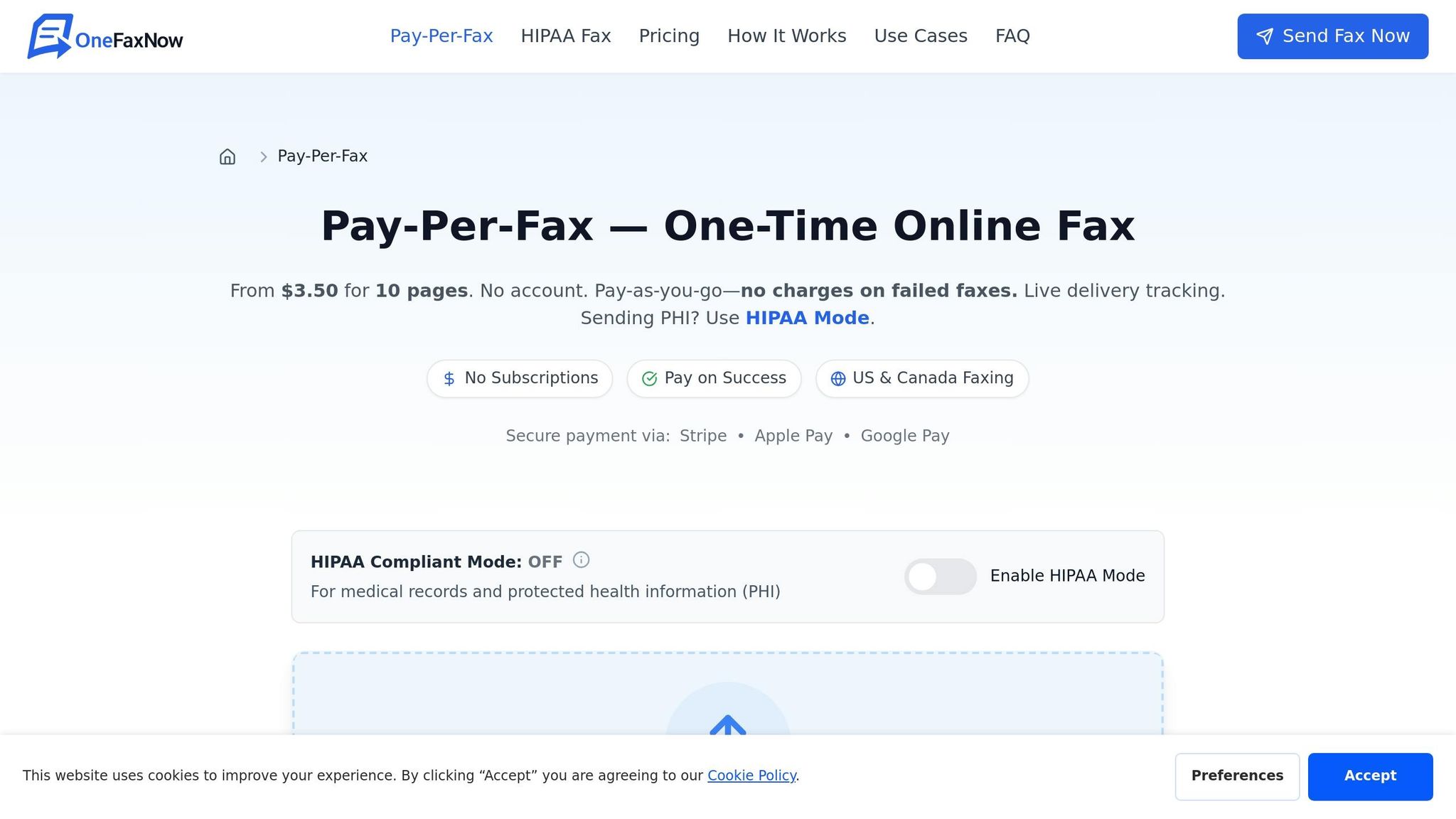
OneFaxNow is a straightforward solution for clinics that need to send referrals quickly without the hassle of maintaining a fax line or committing to a monthly subscription. It supports faxes up to 50 pages and accepts a variety of file types, including PDF, DOCX, JPG, PNG, TIFF, and TXT. Best of all, there's no need to create an account - just upload your files, send them, and pay only if the fax is successfully delivered.
Upload Your Referral Documents
To get started, either drag and drop your referral files or browse to upload them. If you're on a smartphone, you can scan documents directly using OneFaxNow's apps for Android and iOS. The platform allows you to upload up to 15 files in HIPAA mode or 10 files in standard mode, and you can mix file types. For example, you might combine a PDF referral form, a DOCX visit note, and a TIFF imaging result in one fax. The system quickly validates your files and calculates the total page count.
Important: If your referral includes Protected Health Information (PHI), make sure to enable HIPAA mode before uploading your documents. Keep in mind that refreshing the page will erase any uploaded files to maintain security.
Once your files are uploaded, it's time to secure your transmission and enter the recipient's details.
Turn On HIPAA Mode and Enter Recipient Details
Switch on HIPAA mode to ensure your fax complies with PHI regulations. This mode includes instant BAA execution, secure transmission, and automatic file deletion after delivery. Next, carefully input the recipient's fax number, double-checking it against your referral form to avoid sending sensitive information to the wrong person.
Keep in mind that using HIPAA mode adds a small fee: $3.00 for faxes with 1–10 pages and $5.00 for faxes with 11–50 pages, in addition to the base cost.
Track Delivery and Access Audit Records
After setting up your documents and enabling HIPAA mode, OneFaxNow takes care of the rest. Once you've made your payment via Stripe, you'll receive real-time tracking updates and email notifications. If delivery stalls, the system automatically retries at 3, 6, and 12 minutes. Most referrals are delivered in 1–3 minutes, and if all retries fail, you won’t be charged.
For added peace of mind, the HIPAA audit dashboard lets you export detailed logs in CSV or PDF formats. These records are invaluable when a specialist’s office asks, “Did you send it?” or if you need documentation for insurance claims and appeals.
OneFaxNow vs Other Fax Services
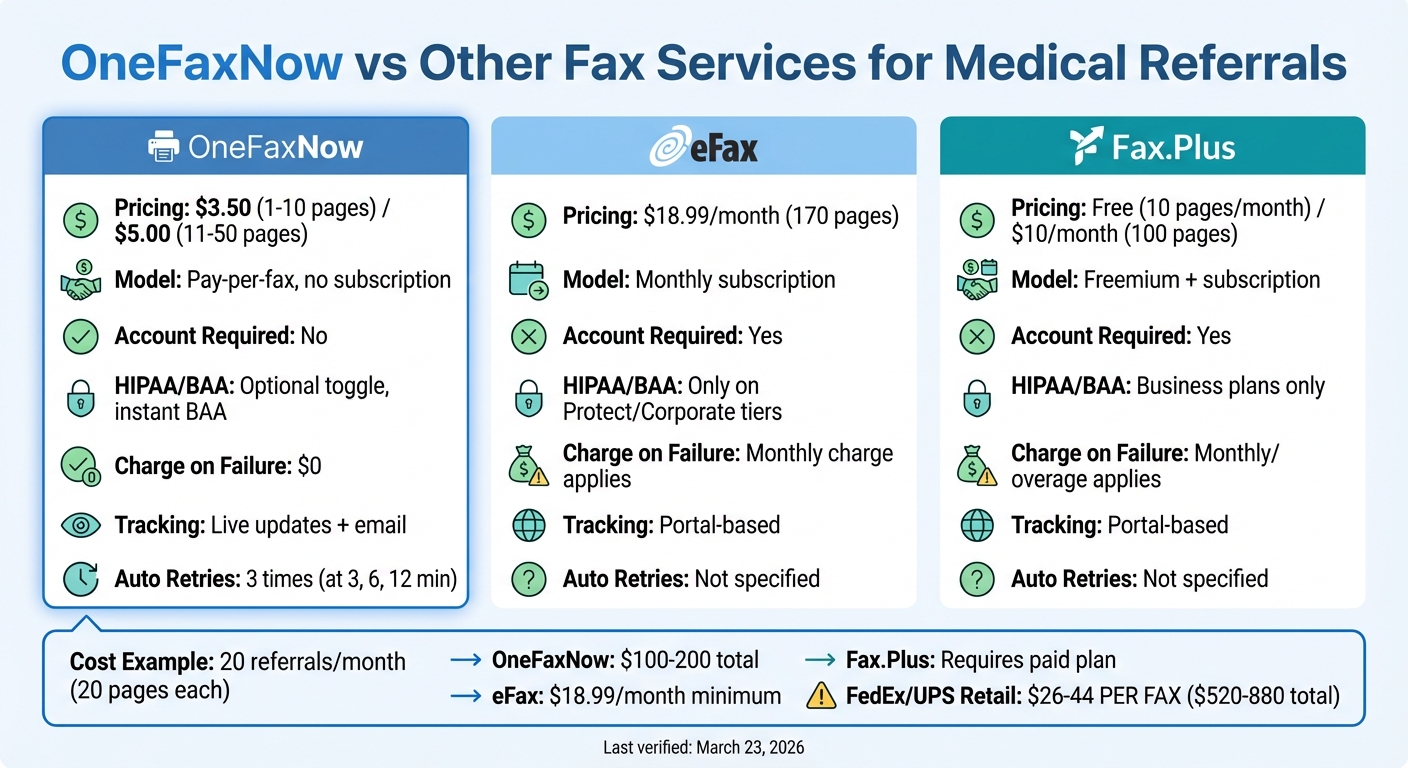
OneFaxNow vs Other Fax Services: Cost and Features Comparison
Clinics often face a tough decision when choosing a faxing method for specialist referrals. Options like pay-per-fax, subscription services, or retail faxing all come with their own pros and cons. Below, you'll find how OneFaxNow stacks up against popular alternatives in terms of cost, compliance, and ease of use.
OneFaxNow vs eFax
eFax operates on a subscription model, starting at $18.99 per month for 170 pages, and requires users to create an account. In contrast, OneFaxNow uses a pay-per-fax pricing model: $3.50 for 1–10 pages or $5.00 for 11–50 pages, with no monthly fees or account setup.
| Feature | OneFaxNow | eFax |
|---|---|---|
| Pricing Model | Pay-per-fax, no subscription | Monthly subscription (starting at $18.99/month) |
| Account Required | No | Yes |
| HIPAA & BAA | Optional per-fax toggle; instant BAA at checkout | Available only on Protect/Corporate tiers (not on standard Plus/Pro) |
| Charge on Failure | $0 (only charges for successful faxes) | Monthly charge applies regardless of usage |
| Delivery Tracking | Live updates + email notifications | Portal-based tracking |
| Retries (Automatic) | 3 retries at 3, 6, and 12 minutes | Not specified |
| File Support | PDF, DOCX, JPG, PNG, TIFF, TXT (up to 50 pages) | PDF, DOCX, and other common formats |
For clinics that send occasional referrals - such as 5 to 10 per month - OneFaxNow's pay-per-fax structure is far more cost-effective. Its instant HIPAA compliance option also ensures secure handling of sensitive information without requiring a subscription upgrade. On the other hand, eFax might be a better fit for clinics needing a dedicated inbound fax number or international faxing, though its HIPAA compliance is limited to higher-priced plans. (Last verified: March 23, 2026)
You might also consider how it compares to a HelloFax or Dropbox Fax alternative if you're looking for a no-account solution. Next, let's see how OneFaxNow compares to Fax.Plus in terms of flexibility and compliance.
OneFaxNow vs Fax.Plus
Fax.Plus offers a mix of free and paid plans, but free accounts are capped at 10 pages per month and require sign-up. Paid plans start at about $10 per month for 100 pages. OneFaxNow, on the other hand, imposes no monthly charges or page caps (beyond a 50-page-per-fax limit).
| Feature | OneFaxNow | Fax.Plus |
|---|---|---|
| Pricing Model | Pay-per-fax | Freemium + subscription tiers |
| Account Required | No | Yes |
| HIPAA & BAA | Optional per-fax toggle; instant BAA | Available on Business plans only |
| Charge on Failure | $0 (authorize-then-capture model) | Monthly charge or per-page overage applies |
| Delivery Tracking | Live updates + email confirmation | Portal-based tracking |
| Retries (Automatic) | 3 retries included | Not specified |
| File Support | PDF, DOCX, JPG, PNG, TIFF, TXT (up to 50 pages) | PDF, DOCX, and other common formats |
OneFaxNow's ability to toggle HIPAA compliance on a per-fax basis and execute a BAA instantly makes it a strong choice for one-off referrals containing Protected Health Information. Fax.Plus may appeal to clinics with very light faxing needs thanks to its free tier, but accessing HIPAA compliance features requires upgrading to a paid Business plan. (Last verified: March 23, 2026)
Now, let’s look at how OneFaxNow compares to retail faxing options like FedEx and UPS.
OneFaxNow vs FedEx/UPS Fax Services
Retail faxing at locations like FedEx and UPS is charged per page, with costs for a 20-page referral packet ranging from $26 to $44. OneFaxNow offers a flat fee of $5.00 for 11–50 pages in standard mode or $10.00 with HIPAA compliance.
| Feature | OneFaxNow | FedEx / UPS Retail Fax |
|---|---|---|
| Cost for 20 Pages | $5.00 (standard) / $10.00 (HIPAA) | $26–$44 |
| Delivery Tracking | Live updates + email notifications | Physical receipt only |
| HIPAA Compliance | Optional; instant BAA + audit logs | Not HIPAA-compliant; documents handled at public counters |
| Retries (Automatic) | 3 retries at 3, 6, and 12 minutes | Manual retry by customer |
| Convenience | Available 24/7 from any device | Requires travel; limited store hours |
| Charge on Failure | $0 (only charges for successful faxes) | Charged per page regardless of success |
OneFaxNow eliminates the high costs and security risks associated with retail faxing. Unlike retail services, which expose documents at public counters and lack audit trails, OneFaxNow ensures secure handling of Protected Health Information. Additionally, its online tracking and automatic retries save clinics the hassle of traveling back to a store if a fax fails. (Last verified: March 23, 2026)
Why Choose OneFaxNow for Referrals: With pay-per-fax pricing, instant HIPAA compliance options, and live tracking, OneFaxNow is designed for clinics that fax occasionally. It addresses common challenges like misdirected pages, high costs, and compliance concerns, making it an efficient solution for streamlining referral workflows.
Why OneFaxNow Works for Referrals
Small clinics often face specific hurdles when managing referrals: they occur infrequently, often include Protected Health Information (PHI), and demand proof of delivery when specialists follow up to confirm receipt. OneFaxNow tackles all these challenges head-on, fitting seamlessly into the efficient workflows mentioned earlier.
With a pay-per-fax model, clinics only pay for what they use. For example, a solo family practice sending 20 referrals a month might spend $5.00 to $10.00 per transmission for an 11–50 page packet, all while maintaining HIPAA compliance. This is a stark contrast to subscription-based services that charge $18.99 monthly, regardless of usage. For clinics with unpredictable referral volumes, the cost savings can be substantial.
OneFaxNow's HIPAA Mode makes compliance effortless. With a simple toggle, clinics can activate end-to-end encryption and instantly generate a fully executed Business Associate Agreement (BAA). The Audit Dashboard then takes over, logging every detail: upload timestamps, transmission status, recipient confirmations, and proof of delivery. So, when a cardiologist’s office calls asking, "Did you send the ECG results?", staff can retrieve the exact send time and delivery confirmation in seconds - no more hunting through paper trails or questioning whether the fax went through.
Real-time tracking eliminates the uncertainty that comes with traditional faxing. A live status page shows whether the referral packet is queued, transmitting, or delivered. Plus, built-in automatic retries ensure every effort is made to complete the transmission. And the best part? The success-only charge model means clinics pay nothing if the fax fails to go through after all retry attempts.
For recurring referrals - like sending cardiology consults with a standard cover page, last visit note, and EKG - OneFaxNow simplifies the process further. Staff can upload up to 10 files (PDF, DOCX, JPG, PNG, TIFF) in one transmission, assemble the packet, and send a compliant fax in under 60 seconds - all from any web browser. Tracking delivery is just as quick and easy, making the entire process efficient and stress-free.
Conclusion
Small clinics no longer need to rely on bulky fax machines or expensive subscriptions to send specialist referrals. With modern pay-per-fax services like OneFaxNow, solo practitioners and small practices can send referral packets - complete with prior authorization forms, visit notes, and lab results - in under 60 seconds, right from a web browser.
The pay-per-use model is budget-friendly for clinics with low faxing needs. For example, a clinic sending around 20 referrals a month might spend just $5.00 to $10.00 per transmission for a packet ranging from 11 to 50 pages, all while maintaining HIPAA compliance.
OneFaxNow’s HIPAA Mode ensures secure transmissions with end-to-end encryption, instant Business Associate Agreement (BAA) generation, and access to audit logs. These features make it easy to answer questions like "Was it sent?" without the hassle of paper trails or uncertainty.
Additional tools like real-time tracking and automatic retries take the frustration out of traditional faxing. Clinics can confirm delivery within minutes, and charges only apply to successful transmissions. Features such as reusable cover-page templates and the ability to upload up to 10 files per fax make recurring referrals even more efficient.
By addressing common faxing headaches - like missing phone numbers, illegible scans, and incorrect fax numbers - while providing delivery proof through the Audit Dashboard, OneFaxNow transforms referral faxing into a fast, secure, and affordable process. It’s a perfect solution for small practices ready to retire their fax machines without sacrificing security or reliability.
Want to streamline your referral workflow? Send a Fax Online - No Account Required. Explore more about HIPAA-compliant faxing.
FAQs
Do I need HIPAA mode for every referral fax?
HIPAA mode isn’t mandatory for every referral fax, but it’s a smart choice when dealing with protected health information (PHI). Activating HIPAA mode provides an added layer of security, helping to protect sensitive patient data and stay aligned with HIPAA regulations.
What should I do if the specialist says they didn’t get the fax?
If the fax wasn’t received, start by checking the delivery status using your fax service’s real-time tracking and confirmation tools. Double-check the fax number, ensure the file format is correct, and review the transmission logs for any errors. Many fax services automatically retry failed attempts and only bill for successful transmissions. If the problem continues, verify that the recipient’s fax number is accurate and confirm their fax machine is working before attempting to resend.
How can I make scanned referral notes more readable?
To make scanned referral notes easier to read, stick to the most relevant findings and skip repetitive details. Simplify your process by using tools like macros or dotphrases to keep your notes concise and clear. Also, pay attention to font styles and sizes in your EHR system - this small adjustment can go a long way in improving legibility and minimizing errors.