How to Fax Doctor’s Notes, Work Excuse Forms, and School Forms Without a Fax Machine
Send doctor's notes, work excuses, and school forms securely without a fax machine using pay-per-fax; scan, enable HIPAA mode, and track delivery.
How to Fax Doctor’s Notes, Work Excuse Forms, and School Forms Without a Fax Machine
Need to send a doctor's note, work excuse, or school form quickly but don't have a fax machine? Here's the solution: use an online fax service like OneFaxNow. It lets you send documents securely from your phone or computer without any bulky equipment or subscriptions.
- Cost: Pay-per-fax pricing starts at $3.50 for up to 10 pages.
- Process: Upload your file, enter the recipient’s fax number, and send.
- Security: Enable HIPAA mode for sensitive medical information.
- Convenience: No account required; send faxes 24/7.
Online faxing is faster, cheaper, and more secure than in-store services or buying a fax machine. Whether it’s a return-to-work note or a school health form, you can handle it all from home in minutes.
Learn how to prepare your document and send it successfully below.
How to Prepare Your Doctor's Note or Form Before Faxing
Before sending a doctor's note or school form via fax, it's crucial to ensure the document is complete and easy to read. Missing details or poor image quality are two of the most common reasons forms get rejected.
Include All Necessary Information
To avoid delays or rejections, double-check that your document contains all the required details. A proper doctor's note or school form should include:
- Patient's full name
- Provider's name and credentials
- Professional signature
- Date of the document
- Date of the medical visit
- Any specific instructions, such as "cleared to return on [date]" or "no heavy lifting over 10 pounds"
Additionally, many schools and employers require the provider's contact information and official letterhead to confirm the document's authenticity. If you're using a template provided by the school or employer, ensure every field is completed. Even something as small as a missing date or signature could result in delays, requiring you to redo and resend the form.
"HIPAA requires that healthcare organizations preface faxes containing PHI with a cover sheet notifying the recipient of the sensitivity of the information contained therein." – eFax [3]
Ensure the Document is Clear and Legible
Even a perfectly filled-out form can be rejected if it's hard to read. Common issues include shadows from poor lighting, cropped edges that cut off important details, wrinkled paper that distorts text, or low-resolution images that make small print unreadable.
To prevent these problems, lay the document flat on a clean surface and make sure all four corners are visible when scanning or photographing. Using a mobile scanning app can help by automatically detecting edges, removing backgrounds, and improving contrast. Save the file in a supported format like PDF, DOCX, JPG, PNG, or TIFF, keeping it under 20MB and no more than 50 pages [1].
If you’re taking a photo, use bright, even lighting to avoid shadows, and hold your phone directly above the document to prevent distortion. A fax with blurry or shadowy sections may be rejected, forcing you to start over and potentially delaying important communications.
Up next, you'll learn how to scan or photograph your document for the best results when faxing.
sbb-itb-0df24da
When You Need to Fax Medical and School Forms
faxing medical records and school documents might not happen often, but when it does, it’s usually urgent. Many employers, schools, and insurance companies still rely on faxing because it provides a secure, timestamped paper trail that email often cannot match. This tried-and-true method ensures privacy and compliance in situations where digital options may fall short.
Here are some common scenarios where faxing remains essential for medical and educational purposes.
Return-to-Work Notes and Gym Excuse Forms
If you’ve been out of work due to illness or injury, many employers require a doctor’s note before you’re allowed to return. These notes are often faxed to HR departments to ensure secure handling of sensitive health information and to maintain compliance with workplace policies.
Similarly, gyms or fitness centers may ask for clearance forms before you resume working out after a medical procedure or join an intensive program. Faxing these forms ensures they are delivered securely and on time. In some cases, workplaces also require faxed documents for Workers’ Compensation claims, such as First Reports of Injury, where speed and accuracy are critical.
School Health Forms and Daycare Medical Clearances
Schools and daycare centers also rely heavily on faxing for securely handling student health records. Parents are often asked to fax documents such as immunization records, allergy action plans, medication authorization forms, and physical exam clearances when enrolling their children. These institutions prefer faxing to protect sensitive student information under FERPA and HIPAA regulations, avoiding the risks associated with email.
Other school-related documents frequently sent by fax include IEP/504 plans for students with special needs and transfer requests that include medical histories. For example, faxing a 20-page packet at retail locations like FedEx or UPS can cost between $26 and $44, while online fax services typically charge around $5 for the same task [2].
These examples highlight why having a reliable online fax service, like OneFaxNow, can make all the difference when secure and timely delivery matters most. Up next, learn how to prepare your documents for faxing with OneFaxNow by scanning or photographing them properly.
How to Scan or Photograph Your Document for Clear Faxing
A blurry or incomplete doctor's note can lead to unnecessary delays in getting back to work or school. That's why having a clean, readable digital copy is so important. The good news? You don’t need fancy equipment - your smartphone can create a fax-ready file in just a few steps.
Use a Scanner or Mobile Scanning App
If you have a traditional scanner, it’s the simplest option. But if not, your smartphone has you covered. iPhone users can rely on the "Scan Documents" feature in the Notes app, while Android users can use Google Drive's "+" icon to scan and convert documents into PDFs.
For even more functionality, apps like Adobe Scan and Microsoft Lens are excellent choices. These apps come with features like edge detection, perspective correction, and the ability to merge multiple pages into one file. They support various formats, including PDF, JPG, PNG, and TIFF, all of which are compatible with OneFaxNow. Just keep in mind the file size limit of 20MB and ensure your document doesn’t exceed 50 pages.
Get the Lighting and Framing Right
Start by placing your document on a flat surface that contrasts with the paper. Use natural light or evenly distributed artificial light to avoid shadows. If you’re using your phone’s flash, test it beforehand to prevent glare.
Position your camera directly above the document to avoid any distortion. Make sure all four corners of the page are visible in the frame. Most scanning apps will automatically detect the edges, but if a corner gets missed, you can manually adjust the crop to include the entire page. Aim for a resolution of 300 DPI or higher - modern smartphones can easily meet this standard. If your app has a "Black and White" or "Docs" filter, use it to enhance text clarity and improve contrast, which helps ensure the fax is clear on the other end.
Before finalizing, review the scan to confirm that every detail is sharp and nothing is cut off. If anything looks unclear, rescan the document. Once you have a crisp, complete digital copy, you’re all set to fax it through OneFaxNow.
When to Use Standard Fax vs HIPAA-Compliant Fax Mode
Once your document is ready to send, the next step is choosing the right fax mode. This decision hinges on the type of information in your document. Not all forms - like a simple school note or a doctor's clearance - need the same level of security. The deciding factor? Whether your document contains Protected Health Information (PHI). PHI includes medical details that fall under federal privacy laws, and using the proper fax mode helps safeguard your privacy and ensures compliance.
Use Standard Faxing for Non-Sensitive Forms
For simple forms without any medical specifics, standard faxing works just fine. Examples include:
- A return-to-work note that just says "cleared to return on 3/20/2026."
- Gym excuse slips confirming a visit date without mentioning injuries.
- School absence notes verifying a doctor's visit, but without medical details.
These types of documents typically don’t include sensitive information like diagnosis codes, medications, or treatment plans. If your document contains any of those details, however, it’s time to switch to HIPAA mode.
Use HIPAA Faxing When Protected Health Information Is Included
HIPAA faxing is essential when your document contains sensitive medical information. This includes:
- Diagnosis codes (like ICD-10).
- Prescription details or lab results.
- immunization records, treatment plans, or insurance claims.
- School health forms listing allergies, chronic conditions, or specialist referrals.
- Daycare medical clearances with vaccination history or recent illness details.
OneFaxNow’s HIPAA add-on offers advanced features to protect sensitive data. It includes TLS/AES encryption, audit logs to monitor document access, and secure file deletion immediately after delivery. Plus, you can execute and download a Business Associate Agreement (BAA) instantly from your dashboard - no delays or email back-and-forths. For more details, check out HIPAA faxing here.
The HIPAA add-on is available at $3.00 for documents up to 10 pages and $5.00 for 11–50 pages. This pay-as-you-go pricing is ideal for those who need occasional secure faxing without a subscription.
If you’re unsure whether your document contains PHI, look for any mention of medical conditions, treatments, or test results. When in doubt, it’s always safer to use HIPAA mode. Choosing the correct mode ensures your information is sent securely and stays in compliance with privacy regulations.
How to Send a Fax Using OneFaxNow (Step-by-Step)
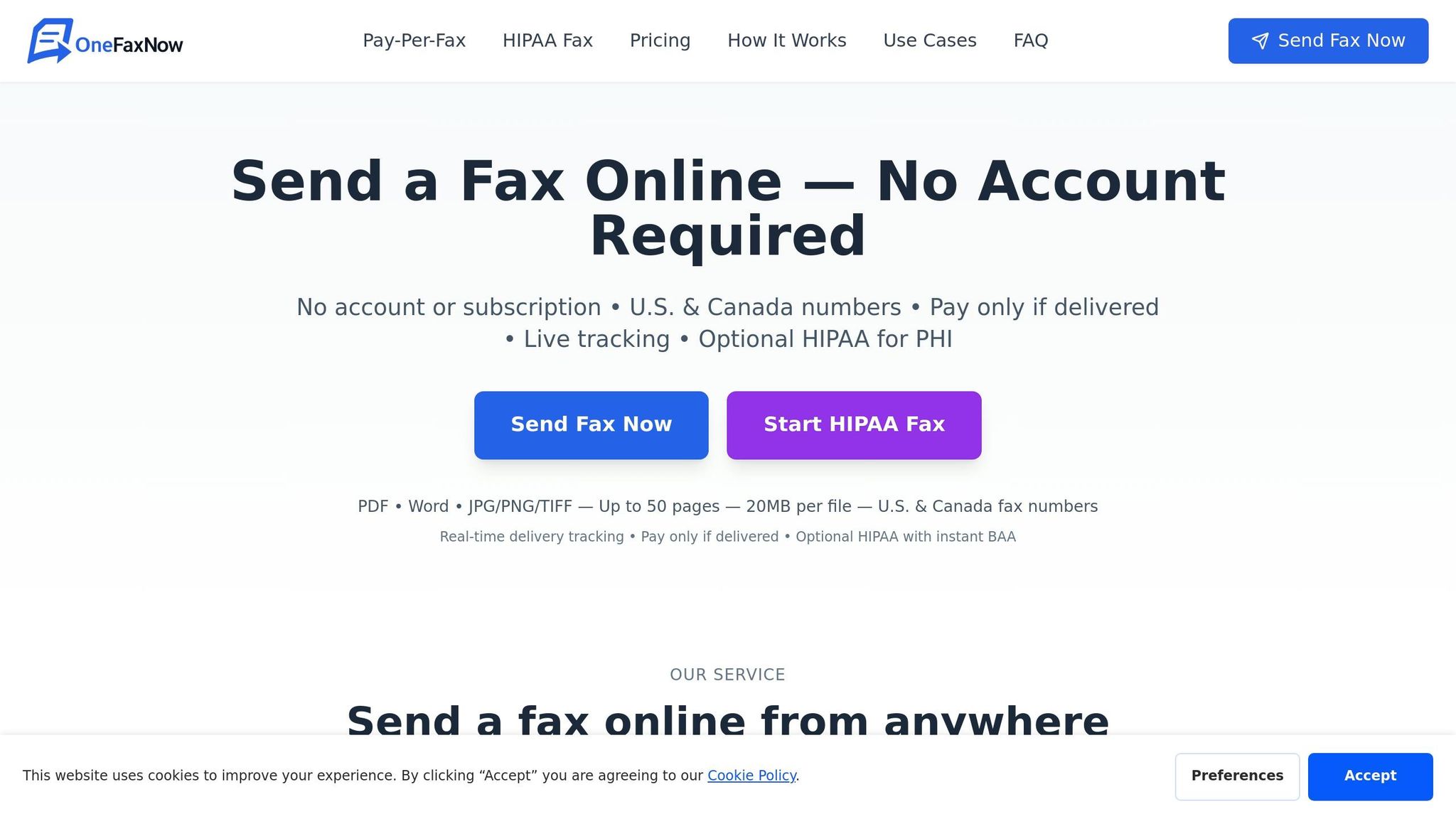
If you need to send important documents like doctor's notes or school health forms but don’t have access to a fax machine, OneFaxNow’s pay-per-fax service has you covered. With no need for account creation, you can securely upload your document, fill in the recipient’s details, and pay - all in a few easy steps.
Upload Your Document
Head over to onefaxnow.com/pay-per-fax. You can either drag and drop your file into the upload area or click to browse files from your device. Keep in mind that supported file types and limits apply, and you can upload up to 10 files in a single session. This is especially handy if your documents are split into multiple files, like a school form and immunization records.
If you’re on a mobile device, you can upload files directly from your camera roll. Once uploaded, the platform will validate the file and calculate the page count within 2–5 seconds. After confirmation, you’ll move on to entering the recipient’s fax details.
Enter the Fax Number and Add a Cover Page
Input the recipient’s 10-digit fax number for the U.S. or Canada in the format (XXX) XXX-XXXX. Double-check the number to avoid any delivery issues. You’ll also need to provide your email address so you can receive updates on the fax’s status.
Adding a cover page is optional but can be useful, especially for medical forms. To include one, click "Add Cover Page" and type a brief message, such as "Return-to-work note attached." You can also include sender details or a confidentiality notice if using the HIPAA mode. Before proceeding, take a moment to review the document preview to ensure everything is clear and legible.
Pay and Track Your Fax
Next, review the online fax pricing: $3.50 for 1–10 pages or $5.00 for 11–50 pages. If your document contains Protected Health Information (PHI), you can enable HIPAA mode for an additional $3.00 (Lite) or $5.00 (Standard). Payments are processed securely through Stripe, with options to pay via credit card, Apple Pay, or Google Pay.
Once payment is complete, you’ll get an email confirmation that includes a unique job ID and a tracking link. This link lets you monitor the fax’s progress in real time, showing statuses like Queued, Sending, or Delivered. If the recipient’s line is busy, OneFaxNow will automatically retry up to three times at intervals of 3, 6, and 12 minutes. If all attempts fail, you won’t be charged, and you’ll receive an email explaining the issue.
OneFaxNow vs Other Online Fax Services
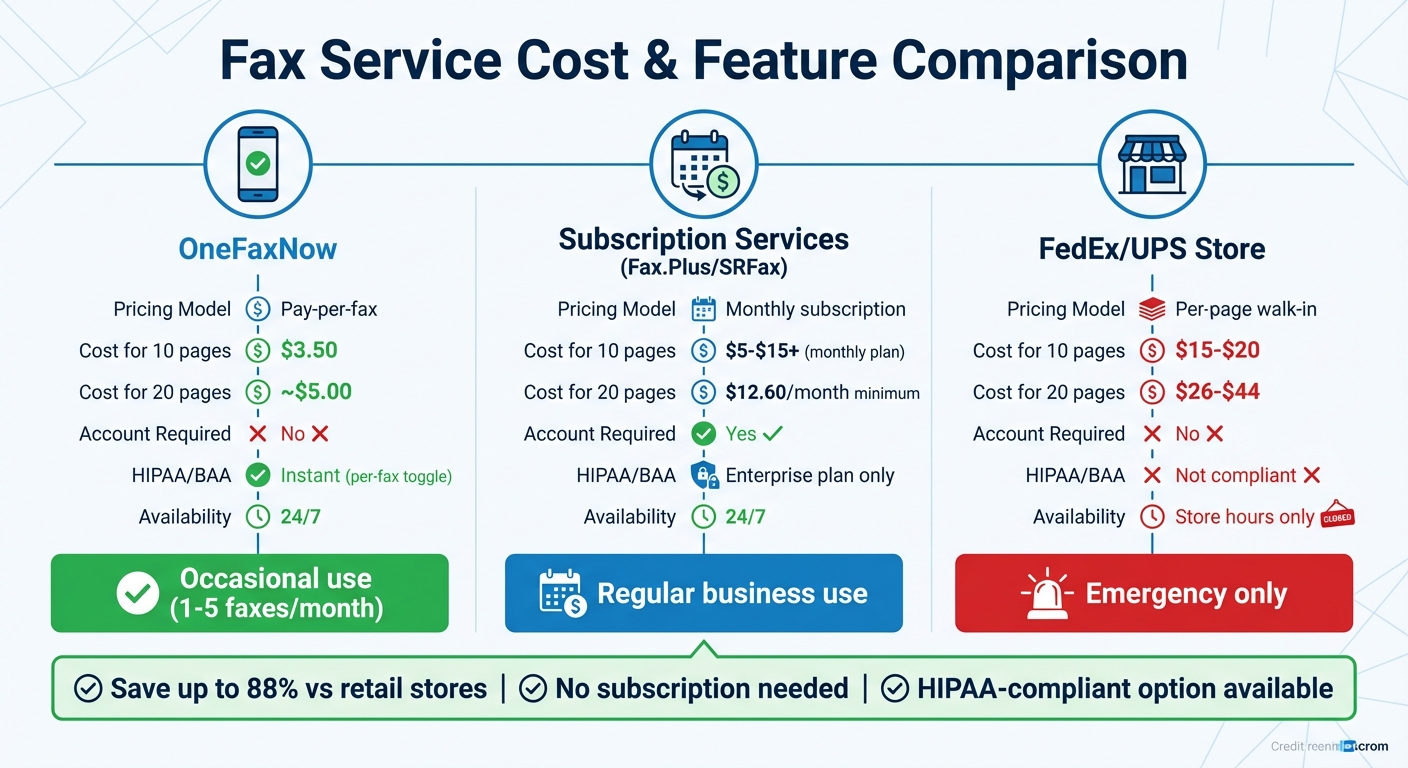
OneFaxNow vs FedEx/UPS and Other Online Fax Services Cost Comparison
Faxing a doctor's note or school form? It’s important to weigh your options based on cost, security, and convenience. Here’s how OneFaxNow compares to other services when it comes to meeting document preparation standards and security requirements.
OneFaxNow vs Fax.Plus
Fax.Plus operates on a subscription model, meaning you pay monthly or annually - regardless of how many faxes you send. In contrast, OneFaxNow uses a pay-per-fax model: $3.50 for 1–10 pages or $5.00 for 11–50 pages, with no account setup required.
HIPAA compliance is another area where OneFaxNow stands out. It offers a per-fax HIPAA mode with an instant Business Associate Agreement (BAA) generated right after sending. Fax.Plus, on the other hand, requires users to upgrade to its Enterprise-tier subscription for BAA access.
| Feature | OneFaxNow | Fax.Plus |
|---|---|---|
| Pricing Model | Pay-per-fax | Monthly/Annual Subscription |
| Account Required | No | Yes |
| Cost for 1 Fax (10 pages) | $3.50 | ~$5–$15+ (plan price) |
| HIPAA/BAA | Per-fax toggle; instant BAA | Enterprise plan only |
| Payment Options | Credit card, Apple Pay, Google Pay | Credit card |
| Best For | One-time or occasional use | International or team use |
With its pay-per-fax pricing and flexible HIPAA mode, OneFaxNow is a smart choice for secure, occasional faxing. It’s particularly useful for one-off tasks like sending medical or school forms.
OneFaxNow vs SRFax
SRFax is designed for healthcare professionals who send multiple faxes every month and need a dedicated fax number. Their Healthcare plans start at $12.60 per month, covering up to 200 pages, with additional pages costing $0.08 each.
OneFaxNow, on the other hand, is perfect for one-time senders. There’s no subscription, no monthly billing, and no need for a dedicated number. For example, if you’re a parent faxing a gym excuse or medical clearance, you’ll pay just $3.50 to $5.00 total - far less than committing to a monthly plan.
| Feature | OneFaxNow | SRFax |
|---|---|---|
| Pricing Model | Pay-per-fax | Monthly Subscription |
| Account Required | No | Yes |
| Cost for 1 Fax (10 pages) | $3.50 | $12.60/mo (Healthcare plan) |
| HIPAA/BAA | Instant, automated | Available on Healthcare plans |
| Overage Fees | None (flat rate up to 50 pages) | $0.08 per page |
| Best For | Occasional medical forms | Ongoing healthcare use |
If you only fax occasionally, OneFaxNow’s straightforward, no-commitment pricing is a clear winner. It offers a simple, cost-effective way to handle sensitive documents without a subscription.
OneFaxNow vs FedEx and UPS Fax Services
Using FedEx or UPS for faxing might seem convenient, but it’s both expensive and time-consuming. These services charge $1.50 to $2.00+ per page, meaning a 20-page fax could cost anywhere from $26 to $44. In comparison, OneFaxNow charges about $5.00 for the same document.
Privacy is another concern with in-store faxing. Documents are often handled by staff or left in public trays, while OneFaxNow encrypts all transmissions and deletes files immediately after delivery. Plus, OneFaxNow operates 24/7 from your phone or computer, eliminating the need to visit a store during business hours or wait in line.
| Feature | OneFaxNow | FedEx / UPS Fax Services |
|---|---|---|
| Setup | No account required | Walk-in service |
| Availability | 24/7 from any location | Limited to store business hours |
| Cost (20 Pages) | ~$5.00 | $26–$44 |
| Privacy | Encrypted; files deleted after delivery | Public counters; staff handling |
| HIPAA Compliance | Optional HIPAA mode with instant BAA | Not HIPAA-compliant |
| Convenience | Upload from mobile or desktop | Requires travel and physical document |
| Success Guarantee | Payment captured only on successful delivery | Pay upfront; no retry/refund policy |
With lower costs, better privacy, and 24/7 availability, OneFaxNow is a more efficient and secure option for faxing important documents.
Why Choose OneFaxNow for Doctor's Notes and School Forms:
If you’re sending 1–5 faxes a month, OneFaxNow offers a cost-effective alternative to subscriptions or pricey in-store services. With fees ranging from $3.50 to $17.50 for occasional use, it’s an excellent solution for handling sensitive documents. For added security, enabling HIPAA mode provides an instant BAA - something in-store services don’t offer.
Ready to get started?
• Send a Fax Online - No Account Required
• Learn about HIPAA Faxing
How to Confirm Your Fax Was Delivered
With OneFaxNow, you get real-time tracking from the moment you send your fax. A dedicated tracking page allows you to follow the process step by step, from upload to delivery. Most faxes are completed within 1 to 3 minutes.
Once your fax is successfully delivered, you'll receive an automated email confirmation. If the recipient's line is busy, OneFaxNow automatically retries at intervals of 3, 6, and 12 minutes. A live countdown timer keeps you updated on when the next attempt will occur.
OneFaxNow follows a success-only payment policy. Your card is pre-authorized via Stripe, but you're only charged if the fax is successfully delivered. If all three retry attempts fail, the pre-authorization is canceled, and you pay $0.
In the rare case of a failed fax, you'll receive an email explaining what went wrong. For HIPAA-mode faxes, the HIPAA Audit Dashboard provides access to delivery logs, receipts, and compliance documentation - even after the document has been deleted. This makes it simple to provide proof of delivery for employers, schools, or healthcare providers.
There's no need for an account or subscription to track your fax. With secure tracking and delivery confirmation, OneFaxNow continues to be a reliable choice for sending your important documents.
Why OneFaxNow Is the Best Choice for Faxing Doctor's Notes and School Forms
OneFaxNow makes sending medical and school forms quick and hassle-free. You can start faxing right away - no need to create an account, sign up for a trial, or commit to a subscription—a key advantage when comparing online fax vs traditional fax methods. This is perfect for parents who need to send a daycare clearance form or a return-to-work note in just minutes. It's all about speed and simplicity, ensuring you can handle these tasks without delays.
The pay-per-fax model keeps things straightforward and affordable. Since most doctor's notes and school forms are only 1–3 pages, you'll typically pay $3.50 per fax. Plus, if the fax doesn't go through after all automatic retries, you’ll pay $0 - no hidden fees, no recurring charges. Everything is upfront and transparent. And when it comes to security, OneFaxNow has you covered with built-in features to protect sensitive information and meet HIPAA requirements for medical records.
For documents containing Protected Health Information, like a diagnosis or treatment details, you can enable HIPAA mode. This gives you an instant Business Associate Agreement (BAA) and strong encryption for secure transmission. Unlike other services that require lengthy approval processes, OneFaxNow makes compliance quick and easy - just select the option, and you're ready to go.
You can upload a variety of file types - PDFs, DOCX, JPG, PNG, or TIFF - and track your fax in real time. With features like automatic retries and email updates, you’ll always know when your school or employer receives the document.
Ready to send your fax? Try OneFaxNow's pay-per-fax service. Need extra security for health information? Activate HIPAA-compliant faxing for instant legal compliance with a BAA.
FAQs
Will my employer or school accept an online faxed doctor’s note?
Yes, most employers and schools accept online faxed doctor’s notes, especially when sent through HIPAA-compliant services. This method is trusted because it ensures secure handling, provides instant confirmation, and guarantees reliable delivery. Services like OneFaxNow prioritize the safe transmission of your information while meeting professional requirements.
How do I know if I should use HIPAA mode for my document?
If your document includes sensitive medical details - like diagnosis information or personal health data (PHI) - you should enable HIPAA mode. This setting ensures privacy and compliance with healthcare regulations when handling such information. It's particularly critical for documents sent to medical providers, insurance companies, or any other entities dealing with PHI. For documents that don't contain sensitive information, the standard Pay-Per-Fax mode usually works just fine.
What should I do if my fax says failed or never gets delivered?
If your fax doesn’t go through or fails to deliver, start by checking the delivery status page for real-time updates. Many services, such as OneFaxNow, automatically retry sending if the line is busy and will notify you once the fax is successfully delivered.
If the problem continues, double-check the recipient’s fax number for accuracy and ensure your internet connection is stable before attempting to resend. You can also try troubleshooting by verifying the file format is supported or confirming that the recipient’s fax machine is functioning properly. For additional assistance, reach out to customer support or consult the service’s troubleshooting guide.