Faxing HR Incident Reports and Workplace Injury Forms: What Employers Should Know
Secure faxing is essential for HR incident and workplace injury forms to prevent breaches and legal exposure.
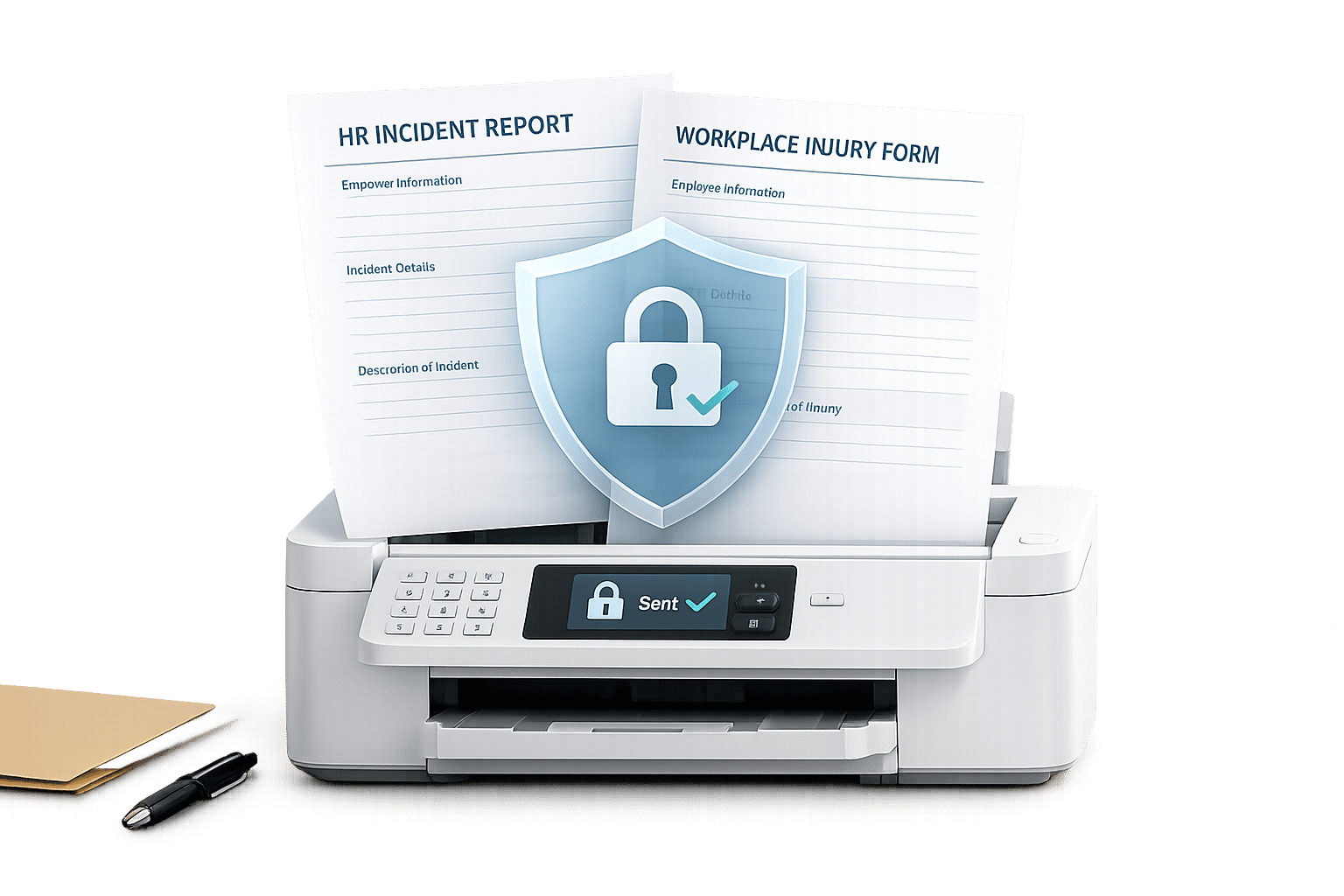
Faxing HR Incident Reports and Workplace Injury Forms: What Employers Should Know
Faxing remains critical for HR and workplace safety teams, especially in the U.S., where many workers' compensation carriers, TPAs, and state agencies still require or prefer it. Here's what you need to know:
- Why Faxing Is Still Used: It provides timestamped confirmation, crucial for meeting reporting deadlines (24 hours to 10 days) and resolving disputes. It's also widely used in healthcare for sharing treatment summaries and work status updates.
- When PHI Is Involved: Incident reports with medical details (e.g., diagnoses or treatment notes) qualify as Protected Health Information (PHI) under HIPAA. These require secure faxing methods with encryption and compliance measures.
- Key Report Components: Standard fields include employer/employee details, incident description, injury specifics, and supporting documents like OSHA forms, medical summaries, or witness statements.
- Compliance Tips: Use private, secure fax methods. Avoid shared machines or retail fax counters. Always redact sensitive details, verify recipient details, and use a confidentiality notice.
- Fax Options: Choose between shared machines (low security), subscription services (good for frequent use), or pay-per-fax tools (ideal for occasional needs). Services like OneFaxNow offer on-demand HIPAA compliance for sensitive reports.
Pro Tip: Always classify documents before faxing. If PHI is included, ensure compliance with HIPAA and other privacy laws. Secure processes reduce legal risks and protect employee data.
What Goes Into an HR Incident or Workplace Injury Report
Standard Fields in Incident and Injury Reports
Workplace incident reports typically follow a consistent structure, whether you're using OSHA's official Form 301 or an internal company template. If your company has more than 10 employees in most industries, OSHA mandates that you complete Form 301 within 7 calendar days of becoming aware of a recordable injury or illness. This ensures key details are documented promptly.
The form must include essential employer and employee details, such as the legal business name, FEIN, employee name, job title, department, and hire date. It also requires the exact date, time, and location of the incident, along with a clear, factual narrative of what occurred. This narrative is critical, as both adjusters and OSHA inspectors rely on it heavily to determine causation and whether the incident is recordable.
The injury description section should specify the affected body part, the type of injury (e.g., "acute muscle strain" or "2 cm laceration, left index finger"), and how it happened (e.g., slipping on a wet floor or contact with a sharp object). Avoid vague descriptions like "hurt back while working", which can lead to delays and additional inquiries. A well-documented example might be:
"At 9:15 a.m. on 03/10/2026, the employee was lifting a 45-lb box in Aisle 7, reported sharp pain in the lower right back upon turning."
After completing the narrative and injury details, supporting documents are often attached to bolster the report.
Supporting Documents Commonly Sent with Faxes
Incident reports sent via fax are rarely sent alone. The accompanying documents depend on the recipient and the report’s purpose. These attachments ensure compliance with regulations and streamline claims processing, especially when protected health information (PHI) is involved. For example, if law enforcement was involved, a police report may be required for insurance purposes.
| Document | Primary Recipient | Purpose |
|---|---|---|
| OSHA 301 (or equivalent) | OSHA, internal records | Ensures compliance with recordkeeping rules |
| State First Report of Injury | Workers' comp carrier / TPA | Initiates the claim process |
| Initial medical visit summary | Carrier / TPA | Confirms diagnosis and treatment received |
| Work status / return-to-work form | HR, carrier | Manages modified duties and wage replacement |
| Witness statements | Carrier / TPA | Verifies facts and aids compensability review |
| Police report | Carrier, HR | Required for incidents involving law enforcement |
How to Tell PHI Apart from Sensitive Employment Records
When reviewing report contents, it’s important to distinguish between regular employment records and those containing PHI. PHI includes health information generated by a healthcare provider or health plan. For instance, an internal HR note like "employee slipped on wet tile and reported right ankle pain" is a sensitive employment record, not PHI. However, if you add a clinic's visit summary, MRI results, or a doctor’s work restriction note, PHI is now part of the file.
Any document with clinical details - such as diagnoses, lab results, medication lists, or provider notes - qualifies as PHI. On the other hand, HR-managed records like work restriction summaries, payroll data, attendance logs, and general incident descriptions without clinical specifics are considered confidential employment records, subject to HR policies and state laws.
This distinction is crucial when deciding how to fax documents while adhering to legal and HIPAA standards. Always apply the minimum necessary standard: share only the medical details the recipient needs to perform their role, and keep non-essential information in internal files.
sbb-itb-0df24da
Privacy and Compliance When Faxing HR Reports
Legal Requirements for Faxing Sensitive HR Documents
The rules for faxing HR documents depend on the type of information being sent. If a document includes individually identifiable health information - such as diagnoses, treatment plans, or test results - and is handled by a covered entity or business associate, it falls under HIPAA regulations. Examples of covered entities include employer-sponsored health plans, workers' compensation TPAs, and occupational health providers. However, HR records without clinical details, like an injury description, are not governed by HIPAA but are still subject to other regulations, such as the ADA, FMLA, OSHA recordkeeping rules (29 CFR Part 1904), and state privacy laws.
For sensitive cases, such as those involving sexual assault, HIV status, mental illness, or reproductive health conditions, OSHA requires that the employee's name be excluded from the OSHA 300 log. Instead, the name should be kept on a separate confidential list. When faxing these records, this redaction must be applied consistently across all pages. Similarly, the ADA mandates that medical information be stored in separate, confidential files, not mixed with general personnel records. Your faxing process should mirror this organizational structure.
If documents contain PHI, they must comply with HIPAA fax requirements, OSHA, and state privacy laws, and a signed Business Associate Agreement (BAA) is required. [1][3]
With these legal obligations in mind, secure faxing practices are essential to safeguard sensitive information.
Best Practices for Sending Faxes Securely
To meet legal standards and protect sensitive data, follow these secure faxing practices:
- Verify the recipient. Double-check the fax number using a trusted source, such as official letterhead, a secure portal, or a direct phone call. Avoid relying on saved numbers from memory. For frequent recipients like TPAs, maintain an updated and vetted contact list, reviewing it periodically.
- Use a detailed cover sheet. Include a confidentiality notice stating that the fax is intended for the named recipient only, and instruct unintended recipients to notify you immediately and destroy the document. Avoid listing sensitive details, such as diagnosis codes or injury descriptions, on the cover sheet itself.
- Send only what’s necessary. For example, when working with a TPA on a workers' comp claim, they typically need the First Report of Injury and the initial medical summary - not the entire investigation file. Log the transmission details, including the date, time, recipient, and confirmation status. Many online fax services automate this process.
"If you'd hesitate to email the form unencrypted, use HIPAA Mode." - OneFaxNow [1]
- Avoid shared machines. Do not use shared breakroom fax machines or retail fax centers for sensitive documents. These locations lack proper security, and documents could be left unattended or handled by unauthorized staff. Instead, opt for a private online fax service with features like user authentication, encrypted transmission, and automatic delivery confirmation. Services like OneFaxNow are designed to reduce risks and help HR teams stay compliant when handling sensitive reports.
What to Do When a Fax Is Sent to the Wrong Recipient
Even with careful protocols, mistakes can happen. Here’s how to act quickly if a fax is sent to the wrong recipient:
- Contact the recipient immediately. Ask them to delete the document without viewing or copying it. Follow up in writing to confirm that the document has been deleted or returned.
- Notify internal stakeholders. Inform your compliance officer, HR leadership, and legal counsel right away. Assess the situation by asking key questions: What information was disclosed? Does it include PHI? How many employees are affected? Was the information viewed? These factors align with the HHS breach risk assessment framework under HIPAA. [4][5]
- Determine if it’s a reportable breach. If PHI was disclosed, you may need to report the breach. HIPAA requires affected individuals to be notified within 60 days, and HHS must also be informed. If the breach involves 500 or more individuals in a state, media notification is required. Misdirected faxes are a common cause of reportable breaches, according to the HHS Office for Civil Rights.
- Investigate and prevent future errors. Once the immediate issue is resolved, identify the root cause - whether it was an incorrect number, a transposed digit, or an outdated contact. Update your recipient list and consider requiring a second-person confirmation before sending PHI to minimize the chances of repeat mistakes.
Fax Options for HR and Safety Teams: A Side-by-Side Look
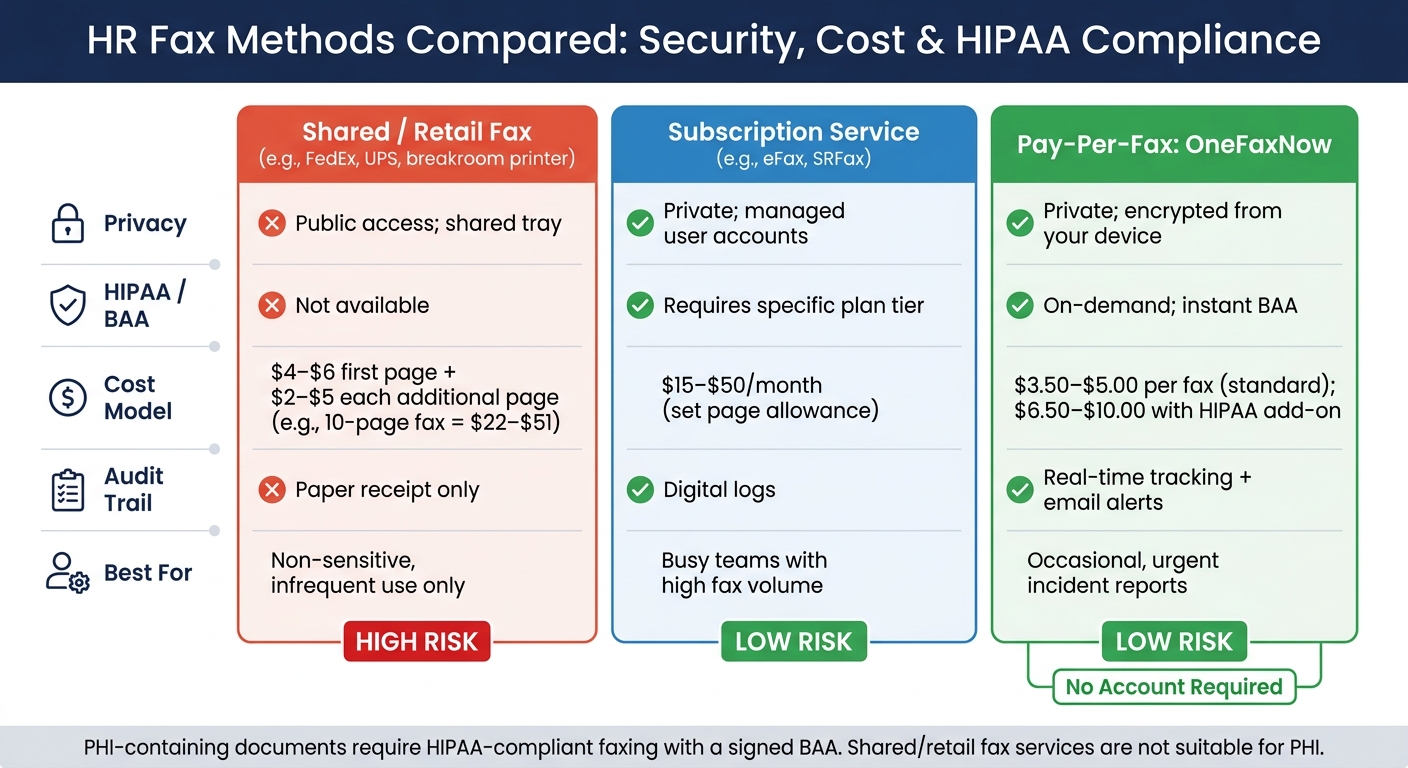
HR Fax Methods Compared: Security, Cost & HIPAA Compliance
Once your faxing workflow is secure, the next step is picking the right fax method. For HR and safety teams managing sensitive incident reports, the choice depends on how often you fax, the type of documents involved, and the level of privacy required.
Shared Office Machines and Retail Fax Services
Using breakroom multifunction printers or retail fax counters (like FedEx or UPS) comes with risks. These setups often have public trays, no digital audit trails, and lack privacy. Documents can be seen by coworkers, customers, or store staff. Plus, they don’t offer a Business Associate Agreement (BAA), which makes them unsuitable for any fax containing protected health information (PHI) [6].
Costs at retail fax counters range from $4.00–$6.00 for the first page and $2.00–$5.00 for each additional page. Even if the fax fails, you’re charged the full amount. For example, a 10-page First Report of Injury fax could cost anywhere from $22 to $51 [6]. These options should only be considered for low-risk, non-sensitive documents when no other method is available and the faxing area is tightly controlled.
Subscription-Based Online Fax Services
Online fax services like eFax and SRFax offer HIPAA-compliant plans for a monthly fee, typically between $15 and $50 [7]. These subscriptions come with a set page allowance, better user management, and centralized handling of faxes. For organizations with multiple locations or high faxing volumes - like those frequently sending injury reports to workers' comp carriers - this option can lower per-fax costs. Additionally, these services provide detailed digital audit logs, which are helpful for compliance.
However, if your faxing needs are seasonal or minimal, you might end up paying for unused pages. Also, setting up these accounts and provisioning IT can delay sending urgent faxes. For occasional faxing, a pay-per-fax option might be a better fit.
Pay-Per-Fax Tools for On-Demand HR Faxing
If your organization only sends incident reports a few times a year, pay-per-fax services can save you from committing to a monthly subscription. OneFaxNow, for instance, charges $3.50 for up to 10 pages (Lite) or $5.00 for 11–50 pages (Standard). Adding HIPAA compliance increases these totals to $6.50 and $10.00, respectively [2]. There’s no account setup required, and you only pay after a successful delivery, with up to three retries included.
This model works well for smaller organizations, like a 150-employee professional services firm that sends injury forms to an insurer two or three times annually. Instead of maintaining a subscription or using a retail counter, HR staff can securely upload a document, enable HIPAA-compliant faxing if needed, and receive delivery confirmation via email - all within a minute [2].
Here’s a quick comparison of these fax options:
| Feature | Shared/Retail Fax | Subscription Service | Pay-Per-Fax (OneFaxNow) |
|---|---|---|---|
| Privacy | Public access; shared tray | Private; managed user accounts | Private; encrypted from your device |
| HIPAA / BAA | Not available | Requires a specific plan tier | On-demand; instant BAA |
| Cost Model | $4–$6 for the first page [6] | $15–$50/month [7] | $3.50–$10.00 per fax [2] |
| Audit Trail | Paper receipt only | Digital logs | Real-time tracking and email alerts |
| Best for | Non-sensitive, infrequent use | Busy teams with high volume | Occasional, urgent incident reports |
Why Choose OneFaxNow for HR Faxing? OneFaxNow offers a secure, flexible solution for infrequent and urgent faxing needs. With pay-per-fax pricing, no account setup, and on-demand HIPAA compliance - including instant BAA generation - it’s an efficient and secure way to handle time-sensitive HR incident reports and workplace injury forms.
How to Fax HR Incident Reports Safely: A Step-by-Step Guide
Preparing Your Documents Before Sending
When faxing HR incident reports, it's critical to ensure compliance and protect sensitive data. Start by confirming the recipient's current contact details. Include only the information required under HIPAA's minimum necessary standard - this means excluding any unrelated records. For incident reports, make sure to redact sensitive details like Social Security numbers, unrelated performance notes, or other employees' information. Use a proper redaction tool instead of a marker to ensure the data is effectively concealed.
Double-check the document for accuracy before sending and verify the fax number using a trusted source, such as the carrier's portal, an official letter, or a regulatory website. Misdialing is a common cause of misdirected faxes, and the Department of Health and Human Services (HHS) Office for Civil Rights (OCR) identifies "sending a fax to the wrong number" as a frequent HIPAA violation.
Prepare a cover sheet that includes key details: sender and recipient names, department or organization, date, total page count, and a confidentiality notice. For documents containing Protected Health Information (PHI), clearly mark the cover sheet with: "CONFIDENTIAL – CONTAINS PROTECTED HEALTH INFORMATION (PHI)." Avoid including clinical details on the cover sheet - use employee IDs or claim numbers instead.
Once your documents are ready, it's time to select the right fax method to ensure privacy and compliance.
Picking the Right Fax Method Based on Privacy Needs
The appropriate faxing method depends on whether the documents include PHI and how often you send such reports.
For reports containing medical records, like treatment records or physician notes, choose a fax solution with encryption, access controls, audit logging, and a signed Business Associate Agreement (BAA). Avoid shared office machines or retail fax counters, as they typically lack these safeguards. Services like OneFaxNow offer HIPAA-compliant faxing on demand. Their HIPAA add-on is available for an extra $3.00 for a Lite fax (1–10 pages, $6.50 total) or an additional $5.00 for a Standard fax (11–50 pages, $10.00 total). A BAA can be executed immediately through their dashboard.
For incident reports without medical details - like near-miss safety reports or harassment complaints - privacy risks are lower. However, these documents still contain sensitive data. A private, access-restricted online fax solution is a better choice than using a shared office machine or retail counter.
This approach ensures secure, compliant transmission of sensitive HR documents, aligning with OneFaxNow's pay-per-fax model designed for privacy and ease of use.
Recordkeeping and Retention After Faxing
After sending your fax, proper recordkeeping is essential for compliance. Save the delivery confirmation immediately, either as a PDF or a printed copy, for dispute resolution and compliance purposes.
Follow OSHA guidelines for retaining injury records, which typically require keeping them for five years. Some states, like California, may have additional requirements, such as retaining records for at least five years from the injury date or the last benefit payment, whichever is later.
For documents containing PHI, review your fax provider’s retention policy. OneFaxNow’s HIPAA mode, for example, automatically deletes PHI files after transmission while keeping audit logs and receipts for your records. This ensures proof of transmission without retaining sensitive content. Internally, restrict access to fax archives to HR and safety personnel with a documented business need. Use identifiers like claim numbers or employee IDs instead of full names or diagnoses in your logs to further protect privacy.
Conclusion: Sending HR Incident Reports by Fax the Right Way
Using secure and compliant faxing methods for HR incident reports not only minimizes legal risks but also simplifies tasks like police and insurance reporting. Faxing remains a crucial tool since workers' compensation carriers, TPAs, and regulatory agencies still depend on it. The focus shouldn't be on replacing faxing but on improving how it's managed.
Start by classifying documents before sending. If a report includes medical diagnoses, treatment details, or provider information linked to an identifiable employee, it qualifies as PHI and must be sent using a HIPAA-compliant method. When unsure, always err on the side of caution and apply stricter standards. For sensitive HR records that don't meet the PHI threshold - such as witness accounts, near-miss reports, or basic injury details - maintain strong confidentiality practices, even if a BAA isn't required.
Pay close attention to how and where faxes are sent. Shared office machines and retail fax counters are the least secure options. Uncollected pages, uncontrolled access, and the absence of audit trails make these methods risky. A misdirected fax containing PHI could result in a reportable HIPAA breach, leading to risk assessments, mitigation steps, and possibly notifying affected individuals and the HHS Office for Civil Rights. To avoid these pitfalls, consider using a secure fax solution like OneFaxNow, which offers HIPAA-compliant transmissions, instant BAA execution, and real-time audit logs. These features make handling errors less likely and easier to document if they occur.
Serious workplace incidents often require police reports and insurance claims in addition to HR documentation. Streamlining your fax workflow across these tasks - using the same secure tool for incident reports, insurance forms, and PHI-related documents - can reduce training time and minimize errors.
Once secure document classification and transmission are in place, review the entire faxing process. Double-check recipient numbers, use secure online fax portals, limit archive access to HR and safety staff, and ensure retention practices comply with OSHA's five-year recordkeeping requirement. Small adjustments in these areas can greatly reduce both legal and reputational risks. Send a Fax Online - No Account Required
FAQs
Is an incident report always considered PHI under HIPAA?
An incident report falls under PHI (Protected Health Information) according to HIPAA only if it contains protected health information like medical details or identifiable health data. When such information is included, ensuring compliance with HIPAA regulations becomes necessary.
What should I redact before faxing an injury report?
Before sending an injury report via fax, make sure to remove any sensitive health details. This includes medical diagnoses, treatment information, medication details, medical record numbers, or anything else classified as protected health information (PHI). If such information is present, activate HIPAA mode to ensure secure handling and compliance with privacy regulations.
What should I do if I accidentally fax a report to the wrong number?
If you accidentally fax a report to the wrong number, it’s crucial to act quickly and follow your organization’s incident response procedures. Start by investigating what happened and identifying the scope of the issue. If necessary, notify your compliance officer to ensure the situation is handled appropriately. Document the incident in detail, including the steps taken to address it. Lastly, take action to retrieve the misdirected data or reduce any potential risks tied to the error. Addressing possible data privacy concerns should be a top priority throughout the process.